1
2
[01]
[12]
[01]
[12]
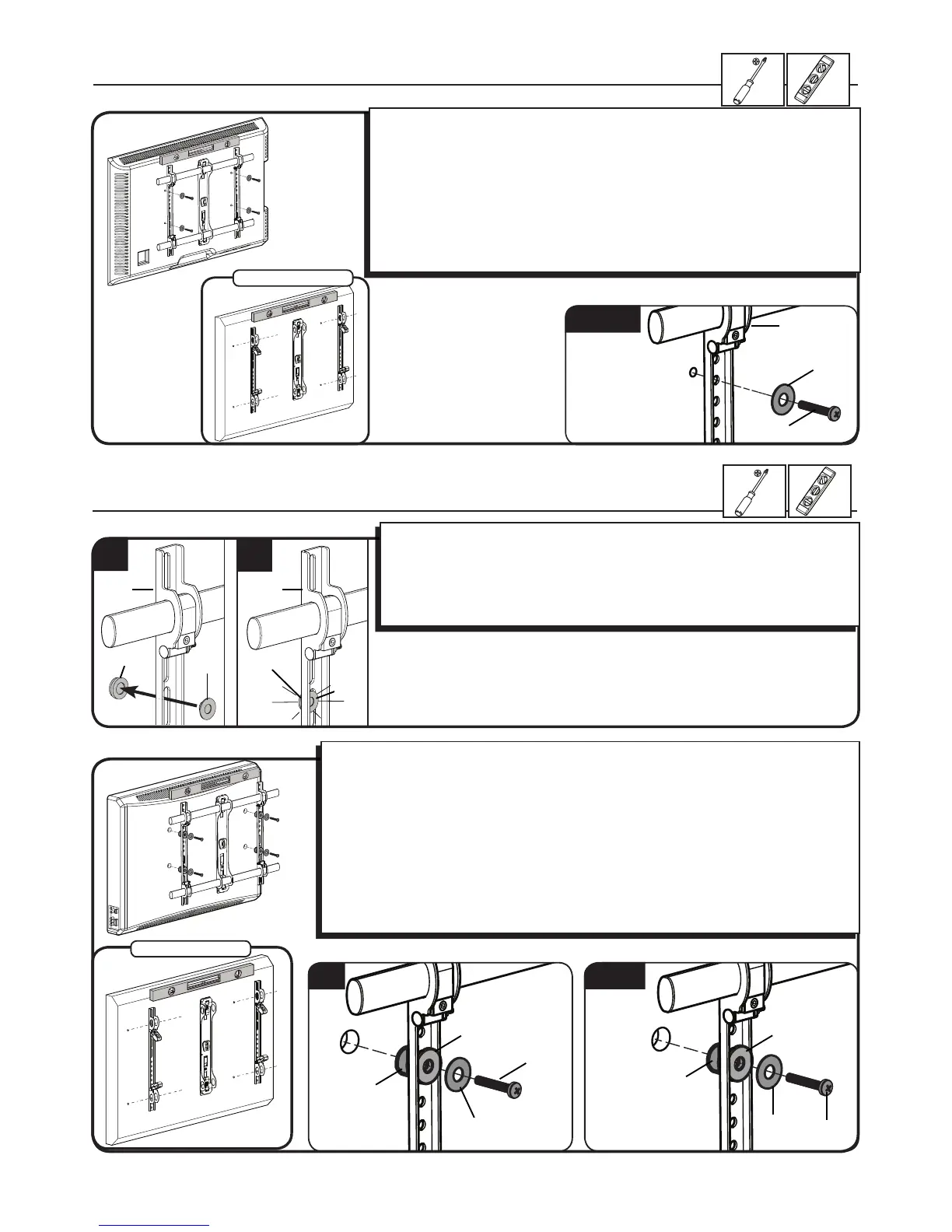
1. Push the shoulder washer [12] through the appropriate openings of the brackets
[01].
2. Snap shoulder washer [12] into the spacer you selected in step 1-2.
If your TV has a curved or obstructed back, or if you need more room to accomodate
cables, recesses, or protrusions, use either the 14mm, or 24mm spacer [10 or 11].
M4/M6/M8
1-2 Attach brackets to a TV with a flat back
[04, 06, 08]
[14, 15]
In step 1, If you selected the:
M4 x 12mm screw [04] use the M4 washer [14].
M6 x14mm screw [06] use the M6/M8 washer [15].
M8 x16mm diameter screw [08] use the M6/M8 washer [15].
Conrm that the brackets are level on the back of the TV.
For 400 x 400mm hole spacing: Resecure the locking carriages (c) and insert the
support tubes.
If you require additional space for cables, recesses, or protrusions, choose one of the
congurations below.
1-2 Attach brackets to a TV with an irregular back
In step 1, If you selected the:
M4 x 30mm screw [05] use the M4 washer [14] and spacer [10].
M6 x 40mm screw [07], use the M6/M8 washer [15] and spacer [11].
M8 x 45mm screw [09], use the M6/M8 washer [15] and spacer [11].
Conrm that the brackets are level on the back of the TV.
For 400 x 400mm hole spacing: Resecure the locking carriages (c) and insert the support
tubes.
Standard congurations are shown. For special applications, or if you are uncertain about your
hardware selection, contact Customer Service.
M4
M6/M8
[10]
[11]
[12]
[12]
[14]
[05]
[07, 09]
400 x 400mm
400 x 400mm
[01]
[10, 11]
[10, 11]
[15]


 To Next Page