7
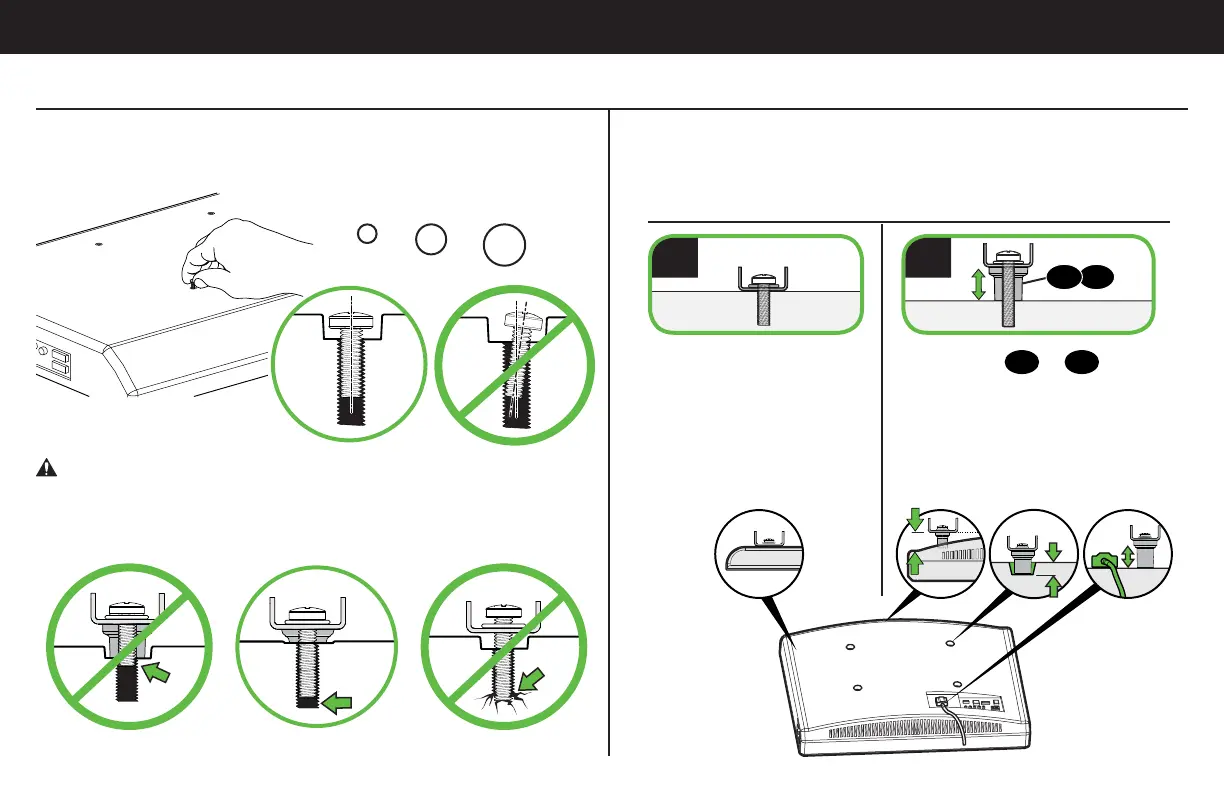
1-1 Select TV Screws
Hand thread screws into the threaded inserts on the back of your TV
to determine which screw diameter (M4, M6, or M8) to use.
1-2 Select TV Spacers
CAUTION: Verify adequate thread engagment of the screw
and spacer combination on your TV.
Too short will not hold the TV and too long will damage the TV.
M4 M6 M8
Too Short Correct Too Long
Do not use spacers if
your TV has a flat back
AND you want your TV
closer to the wall.
Use spacers
12
or 13
to
accommodate:
● Round/irregular back TVs
● TVs with inset mounting holes
● Extra space needed for cables
Spacers and screws are supplied to install your TV bracket.
Determine your preference for spacer configuration when
attaching your TV bracket.
Round Back CablesInset HolesFlat Back
a
b
STEP 1 Attach Brackets to TV
1312


 To Next Page