7
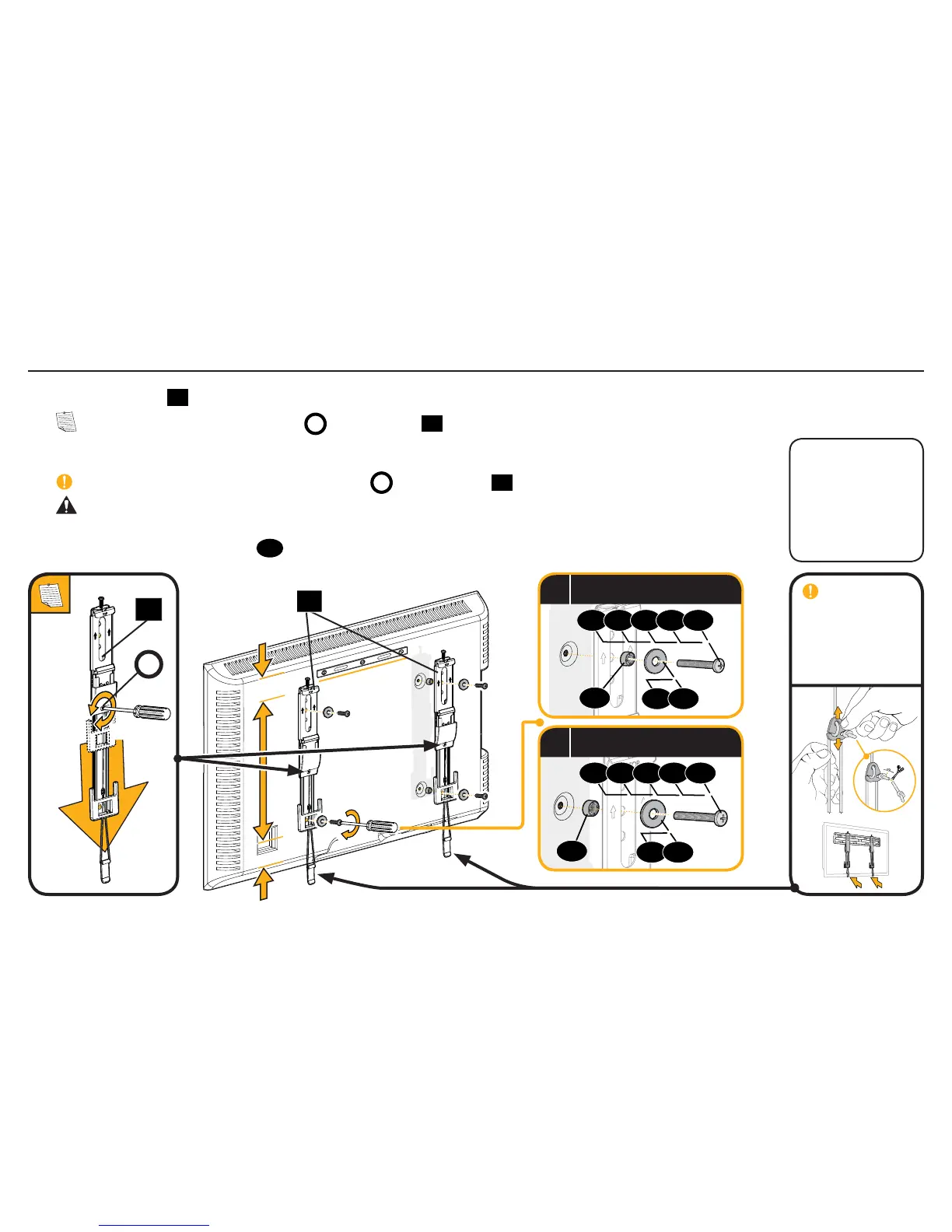
IMPORTANT:
For ease of access,
straps should
be level with the
bottom of the TV.
1.3 Attach TV Brackets
Center the TV brackets
01
over your TV hole pattern as shown. Be sure to use the same holes and that the brackets are level.
NOTE: Loosen the adjustment screws
A
on TV brackets
01
to extend the mounting holes over your TV hole pattern.
Install using the spacer, TV screw and washer combination you selected for your TV.
IMPORTANT: Tighten the adjustment screws
A
on TV brackets
01
when finished.
CAUTION: Avoid potential personal injuries and property damage! DO NOT use a
power screwdriver for this step. Tighten screws only until TV Bracket is secured in place.
DO NOT overtighten M4 screws
02
.
01
Loosen
Tighten
A
Standard
configurations are
shown. For special
applications, or if
you are uncertain
about your hardware
selection, contact
Customer Service at
1-800-359-5520
.
01
09
a
Spacer, screw and washer
07 08
02 03 04 05 06
09
b
Spacer, screw and washer
07 08
02 03 04 05 06


 To Next Page