REMOTE CONTROL
Controls
1.
2.
3.
4.
5.
6.
7.
8.
9.
12
—9
—8
—7
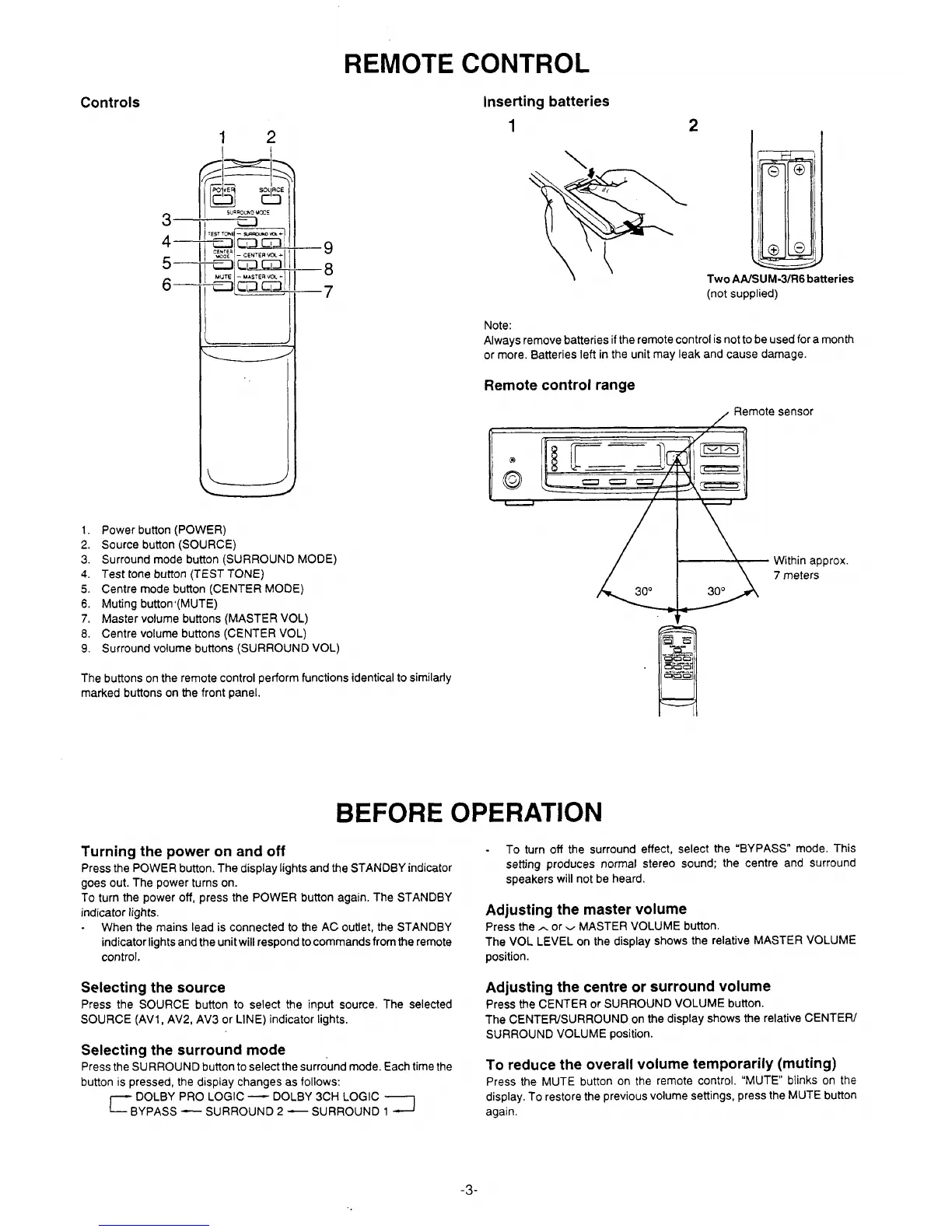
Power button (POWER)
Source button (SOURCE)
Surround mode button (SURROUND MODE)
Test tone button (TEST TONE)
Centre mode button (CENTER MODE)
Muting button ‘(MUTE)
Master volume buttons (MASTER VOL)
Centre volume buttons (CENTER VOL)
Surround volume buttons (SURROUND VOL)
The buttons on the remote control perform functions identical to similarly
marked buttons on the front panel.
Inserting batteries
1
2
/4.,
‘*
\(
\
\
Two AAISUM-31R6 batteries
(not supplied)
Note:
Always remove batteries if the remote control is not to be used for a month
or more. Batteries left in the unit may leak and cause damage.
Remote control range
Remote sensor
1. 3
L-B
Within approx.
7 meters
30°
30°
BEFORE OPERATION
Turning the power on and off
To turn off the surround effect, select the ‘BYPASS” mode. This
Press the POWER button. The display lights and the STANDBY indicator
setting produces normal stereo sound; the centre and surround
goes out. The power turns on.
speakers will not be heard.
To turn the power off, press the POWER button again. The STANDBY
indicator lights.
Adjusting the master volume
-
When the mains lead is connected to the AC outlet, the STANDBY
Press the ~ or ~ MASTER VOLUME button.
indicator lights and the unit will respond to commands from the remote
The VOL LEVEL on the display shows the relative MASTER VOLUME
control.
position.
Selecting the source
Press the SOURCE button to select the input source, The selected
SOURCE (AV1, AV2, AV3 or LINE) indicator lights.
Selecting the surround mode
Press the SURROUND button to select the surround mode. Each time the
button is pressed, the display changes as follows:
r
DOLBY PRO LOGIC — DOLBY 3CH LOGIC
BYPASS —
SURROUND 2
3
— SURROUND 1
Adjusting the centre or surround volume
Press the CENTER or SURROUND VOLUME button.
The CENTEWSURROUND on the display shows the relative CENTER/
SURROUND VOLUME position.
To reduce the overall volume temporarily (muting)
Press the MUTE button on the remote control. “MUTE blinks on the
display. To restore the previous volume settings, press the MUTE button
again.
-3-


 To Next Page