ADDITIONAL EXAMPLES
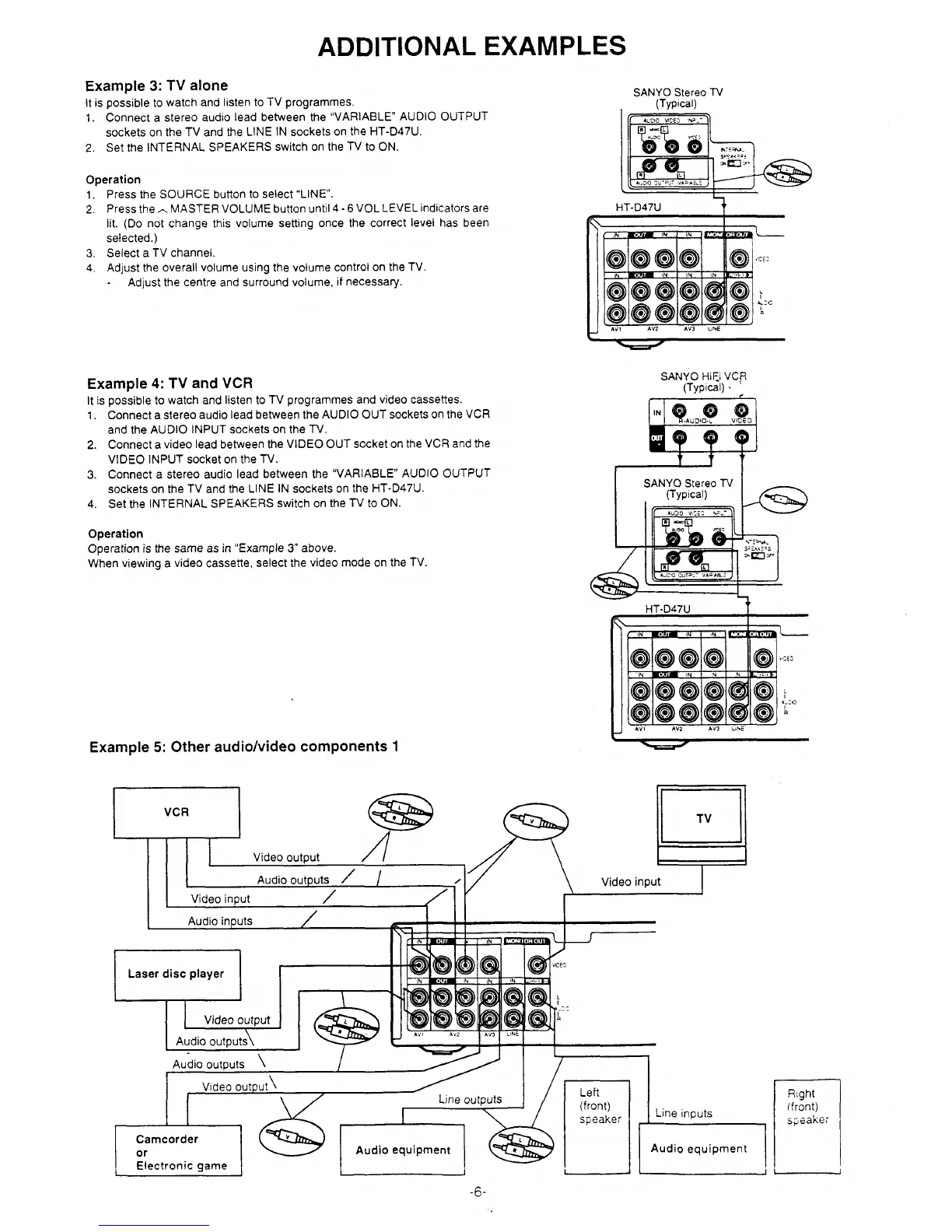
Example 3: TV alone
It
IS possible to watch and listen to TV programmed.
SANYO Stereo TV
(Typ!cal)
1. Connect a stereo audio lead between the “VARIABLE AUDIO OUTPUT
sockets on the TV and the LINE IN sockets on the HT-D47U.
2. Set the INTERNAL SPEAKERS switch on the TV to ON.
1.
2.
3.
4.
Operation
Press the SOURCE button to select “LINE.
Press the * MASTER VOLUME button until 4-6 VOL LEVEL indicators are
lit. (Do not change this volume setting once the correct level has been
selected.)
Select a TV channel.
Adjust the overall volume using the volume control on the TV.
Adjust the centre and surround volume, if necessaty.
Example 4: TV and VCR
It
is possible to watch and listen to TV programmed and video cassettes.
1. Connect a stereo audio lead between the AUDIO OUT sockets on the VCR
and the AUDIO INPUT sockets on the TV.
2. Connect a video lead between the VIDEO OUT socket on the VCR and the
VIDEO INPUT socket on the TV.
3. Connect a stereo audio lead between the “VARIABLE” AUDIO OUTPUT
sockets on the TV and the LINE IN sockets on the HT-D47U.
4. Set the INTERNAL SPEAKERS switch on the TV to ON.
Operation
Operation is the same as in “Example 3“ above.
When viewing a video cassette, select the video mode on the TV.
Example 5: Other audio/video components 1
Fle
(==$
HT-D47U
i
!
‘L
,,:::
?
y:c
Q
AV! AV2 AV3 .NE
SANYO Him VC~
(TypIcd) . ;
HT-D47U
t
(
{NWU19 )N
I ‘N 1~-
,,:ic
I
y
R
AV! AV2 Av3 .%6
TV


 To Next Page