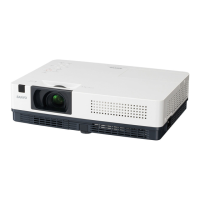
This document describes the EIKI LC-XBL20 and LC-XBL25 Multimedia Projectors, designed for portability, durability, and ease of use. These projectors utilize built-in multimedia features, a palette of 16.77 million colors, and matrix liquid crystal display (LCD) technology.
Function Description
The EIKI LC-XBL20 and LC-XBL25 are multimedia projectors capable of displaying images from various sources, including computers and video equipment. They feature a multi-scan system that automatically conforms to almost all computer output signals, supporting resolutions up to UXGA. The projectors also include a LAN network function for remote operation and management.
Important Technical Specifications
- Projector Type: Multi-media Projector
- Dimensions (W x H x D): 13.13" x 3.35" x 9.72" (333.5mm x 85.2mm x 247.0mm) (Not including protrusions)
- Net Weight: 5.5 lbs (2.5 kg)
- Foot Adjustment: 0° to 10°
- LCD Panel System: 0.55" TFT Active Matrix type, 3 panels
- Panel Resolution: 1,024 x 768 dots
- Number of Pixels: 2,359,296 (1,024 x 768 x 3 panels)
- Color System: PAL, SECAM, NTSC, NTSC4.43, PAL-M, and PAL-N
- High Definition TV Signal: 480i, 480p, 575i, 575p, 720p, 1035i, and 1080i
- Scanning Frequency: H-sync. 15 kHz–100 kHz, V-sync. 50–100 Hz
- Projection Image Size (Diagonal): Adjustable from 40" to 300"
- Throw Distance: 4.3'–38.7' (1.30m – 11.80m)
- Projection Lens: F 2.0~2.15 lens with f 18.38 mm – 22.06 mm with manual zoom and focus
- Projection Lamp: 220 W
- Video Input Jack: RCA Type x 1
- Audio Input Jack: Mini Jack (stereo) x 1
- Computer In 1/ S-video In / Component Input Terminal: Mini D-sub 15 pin x 1
- Computer In 2 / Monitor Out Terminal: Mini D-sub 15 pin x 1
- Control port: D-sub 9 pin x 1
- Audio Output Jack: Mini Jack (stereo) x 1 (variable)
- LAN Connection Terminal: 100 Base-TX (100Mbps)/10 Base-T (10Mbps), RJ45
- Internal Audio Amp: 1.0 W RMS
- Built-in Speaker: 1 speaker, ø1.1" (28mm)
- Operating Temperature: 41°F–95°F (5 °C–35 °C)
- Storage Temperature: 14°F–140°F (-10°C–60 °C)
- Remote Control Battery: AAA or LR03 1.5V ALKALINE TYPE x 2
- Remote Control Operating Range: 16.4' (5 m)/±30°
- Remote Control Dimensions: 2.0" (W) x 0.7" (H) x 4.3" (D) (52 mm x 18 mm x 110 mm)
- Remote Control Net Weight: 2.37 oz (67 g) (including batteries)
Usage Features
- Compact Design: The projector's compact size and light weight make it easy to carry and install in various locations.
- Simple Computer System Setting: The multi-scan system quickly conforms to most computer output signals up to UXGA resolution.
- Useful Functions for Presentations:
- Digital Zoom: Allows focusing on crucial information during a presentation.
- Blackboard Function: Green blackboards can be used as a projection screen.
- Lamp Control: Brightness of the projection lamp can be selected to suit different environments.
- Quick Termination: The AC power cord can be unplugged immediately after turning off the projector, without waiting for the cooling fan to stop.
- Logo Function: Customize the screen logo by capturing an image for the starting-up display or between presentations.
- Multilanguage Menu Display: The operation menu is available in 18 languages, including English, German, French, Italian, Spanish, Portuguese, Dutch, Swedish, Finnish, Polish, Hungarian, Romanian, Russian, Chinese, Korean, Japanese, Thai, and Turkish.
- Security Function:
- Key Lock: Locks operation on the top control or remote control.
- PIN Code Lock: Prevents unauthorized use of the projector.
- LAN Network Function: Operate and manage the projector via a wired LAN network (100-Base-TX/10-Base-T).
- Auto Setup Function: Enables input search, auto keystone correction, and auto PC adjustment with a single button press.
- Colorboard Function: Provides close color images on colored walls by selecting a similar color from four preset options, mimicking projection on a white screen.
- Switchable Interface Terminal: A versatile terminal can be used for computer input or monitor output.
- Power Management: Reduces power consumption and extends lamp life.
- Closed Caption: Displays the audio portion of a TV program as text on the screen (primarily for the U.S.).
- Adjustable Foot: Allows adjusting the projection angle up to 10.0 degrees. Keystone distortion can be corrected via the menu.
- Remote Control Operation: Provides quick access to frequently used operations without navigating the On-Screen Menu, including input source selection, freeze, no show, P-timer, image mode, screen size, volume, and lamp mode.
- On-Screen Menu: A hierarchical menu structure for adjusting and setting various projector configurations.
- Input Source Selection: Direct selection of computer (RGB), video, S-video, component video, and RGB (Scart) input sources.
- Computer System Selection: Automatically tunes to various computer types (VGA, SVGA, XGA, SXGA, WXGA, UXGA) and allows manual selection or storage of custom settings.
- Image Mode Selection: Choose from Dynamic, Standard, Real, Blackboard (Green), Colorboard, and four user-preset image modes.
- Image Adjustment: Adjust Contrast, Brightness, Color, Tint, Color temp., White balance (Red/Green/Blue), Sharpness, Gamma, Noise reduction, and Progressive settings.
- Screen Size Adjustment: Customize image size with options like Normal, True, Wide, Full, Custom, and Digital zoom +/-.
- Sound Adjustment: Adjust volume and mute the sound.
- Setting Menu: Configure various projector operations, including language, menu position, auto setup, keystone, background, display, logo, ceiling, rear projection, terminal settings, power management, on start, standby mode, closed caption, lamp control, remote control code, security, fan control, lamp counter, filter counter, warning log, and factory default reset.
Maintenance Features
- Lamp Replacement: The projector indicates when the lamp needs replacement (LAMP REPLACE indicator lights yellow). Instructions are provided for safe replacement.
- Filter Cleaning: The projector warns when filters need cleaning (Filter warning icon). Instructions are provided for removing and cleaning the front and back air filters.
- Resetting Filter Counter: After cleaning or replacing filters, the filter counter must be reset.
- Cleaning Projection Lens: Gently wipe with a non-abrasive camera lens cleaner or use a lens cleaning paper/air blower.
- Cleaning Projector Cabinet: Gently wipe with a soft dry cleaning cloth; for heavy soil, use a small amount of mild detergent.
- Attaching Lens Cap: Instructions for securing the lens cap to protect the projection lens when not in use or during transport.
- Warning Log: Records anomalous operations and warning messages to aid in diagnosing faults.

 Need help?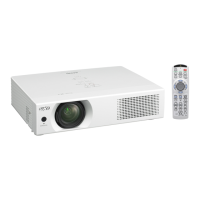




 To Next Page
 General