EasyManua.ls Logo

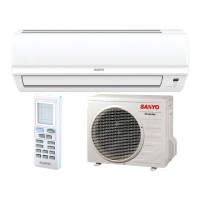
Sanyo SAP-KRV96EHDS - User Manual

Sanyo SAP-KRV96EHDS
77 pages
Print Icon
To Next Page IconTo Next Page
Loading...
TECHNICAL & SERVICE MANUAL
SAP-KRV96EHDS + SAP-CRV96EHDS
SAP-KRV126EHDS + SAP-CRV126EHDS
DC INVERTER SPLIT SYSTEM AIR CONDITIONER
Indoor Model No.
SAP-KRV96EHDS
SAP-KRV126EHDS
Indoor Unit
Product Code No.
1 852 340 69
1 852 340 70
FILE NO.
Destination: Europe
Outdoor Model No.
SAP-CRV96EHDS
SAP-CRV126EHDS
Product Code No.
1 852 340 73
1 852 340 74
Outdoor Unit
SAP-KRV96EHDS
SAP-KRV126EHDS
SAP-CRV96EHDS
SAP-CRV126EHDS
REFERENCE NO. SM700708
RoHS
WARNING
This product does not contain any hazardous substances prohibited by the RoHS Directive.
These air conditioners employ new refrigerant R410A.
Pay special attention when servicing the unit.
• You are requested to use RoHS compliant parts for maintenance or repair.
• You are requested to use lead-free solder.
A
IR
C
O
N
DITIONER

Table of Contents

Other manuals for Sanyo SAP-KRV96EHDS

Questions and Answers

  • J
    Jessica TaylorAug 19, 2025
    What to do if self-diagnostics function fails to operate on my Sanyo Air Conditioner?
    • R
      Regina HillAug 19, 2025
      If the self-diagnostics function isn't working, start by checking the indoor unit and the power voltage. See if the fuse is blown and replace it if needed. If everything appears normal, consider replacing the circuit board or the controller.
  • P
    Phillip VegaAug 21, 2025
    Why does the fan not stop when my Sanyo SAP-KRV96EHDS outdoor unit stops?
    • S
      Shane CaseAug 21, 2025
      If the fan continues to run after the outdoor unit has stopped, this is likely due to trouble with the outdoor unit controller. The suggested solution is to replace the controller.
  • K
    Kimberly MurrayAug 25, 2025
    Why does the fan not stop when my Sanyo SAP-KRV96EHDS Air Conditioner unit stops?
    • J
      jroweAug 25, 2025
      If the fan continues to run after the unit has stopped, this is likely due to trouble with the indoor unit controller. The suggested solution is to replace the controller.
  • E
    Erin RobinsonAug 26, 2025
    What causes electromagnetic interference in my Sanyo SAP-KRV96EHDS Air Conditioner?
    • L
      Lisa RobertsAug 27, 2025
      Electromagnetic interference can cause noise or distortion in television pictures, or static in radio sound. To resolve this, select a separate power source for the air conditioner.
  • R
    rmurphyAug 28, 2025
    What to do if the motor rotates briefly then stops when the outdoor unit of my Sanyo Air Conditioner operates?
    • S
      Sandra GarciaAug 28, 2025
      If the motor rotates for a few seconds and then stops when the outdoor unit is operating, it indicates a problem with the feedback of motor rotation speed to the outdoor unit controller. Replace the outdoor unit controller, and if necessary, replace the DC motor.
  • J
    jennifer25Aug 30, 2025
    What to do if the motor rotates briefly then stops when the indoor unit of my Sanyo SAP-KRV96EHDS Air Conditioner operates?
    • K
      Kristin HughesAug 30, 2025
      If the motor rotates for a few seconds and then stops when the indoor unit is operating, it indicates a problem with the feedback of motor rotation speed to the indoor unit controller. Replace the indoor unit controller, and if necessary, replace the DC motor.
  • E
    Edward OconnellSep 1, 2025
    Why does the fan motor not rotate when my Sanyo SAP-KRV96EHDS outdoor unit is operating?
    • T
      thomas99Sep 1, 2025
      If the fan motor does not rotate when the outdoor unit is running, it could be due to abnormal measured values. Replace the controller.
  • L
    Lisa TapiaSep 3, 2025
    Why does the fan motor not rotate when my Sanyo Air Conditioner unit is operating?
    • J
      Jared TurnerSep 3, 2025
      If the fan motor does not rotate when the unit is running, it could be due to abnormal measured values. Replace the controller.
  • J
    Jonathan DavisSep 5, 2025
    What causes noise malfunction in my Sanyo Air Conditioner?
    • K
      Kathryn FergusonSep 6, 2025
      A noise malfunction can cause the unit to stop suddenly and indicator lamps to flicker. To address this, insulate for noise or increase the distance from the noise source.
  • V
    vanessacortezSep 7, 2025
    What to do if fan motor rotation speed does not change during outdoor unit operation of my Sanyo SAP-KRV96EHDS?
    • C
      Crystal CalhounSep 7, 2025
      If the fan motor rotation speed does not change during outdoor unit operation, replace the controller.

Summary

DC Inverter Split System Air Conditioner

Model Overview and Key Information

Lists indoor/outdoor models, RoHS compliance, and refrigerant type.

Important Safety and Operation Guidelines

Safe Installation and Trouble-Free Operation

Essential steps for proper setup and safe use, including reading the manual and observing codes.

Special Precautions and Warnings

Safety measures for wiring, transport, installation, servicing, and general use.

Operating Range Specifications

Cooling and Heating Temperature Limits

Defines operational temperature ranges for cooling and heating modes.

Specifications

Unit Specifications: Indoor & Outdoor

Detailed technical data for indoor and outdoor units, including performance and electrical ratings.

Major Component Specifications: Indoor Unit

Specifics on control PCB, fan, motors, and heat exchanger for indoor units.

Major Component Specifications: Outdoor Unit

Details on control PCB, compressor, fan, and heat exchanger for outdoor units.

Other Component Specifications

Sensor specifications with resistance-temperature graphs.

Dimensional Data

Indoor Unit Dimensions and Layout

Technical drawings showing the size and configuration of the indoor unit.

Outdoor Unit Dimensions and Layout

Technical drawings illustrating the size and configuration of the outdoor unit.

Refrigerant System

Flow Diagram and Tubing Insulation

Visual representation of refrigerant flow and insulation requirements for tubing.

Performance Data

Temperature Performance Charts

Graphs showing performance metrics at various temperature conditions.

Air Throw Distance Charts

Charts illustrating airflow distance based on flap angle and fan speed.

Electrical Data

Electrical Characteristics

Technical data on running current, power input, and voltage for unit operation.

Electric Wiring Diagrams

Schematics detailing electrical connections for the indoor unit.

Installation Instructions

Indoor Unit Installation Site Selection

Guidelines for choosing an optimal and safe location for the indoor unit.

Outdoor Unit Installation Site Selection

Recommendations for selecting a suitable location for the outdoor unit.

Wire Length and Diameter Recommendations

Guidance on selecting appropriate wire sizes and lengths for power supply.

Remote Control Unit Mounting Position

Advice on ideal placement for the remote control unit for optimal signal reception.

Air Conditioner Test Run Procedure

Step-by-step instructions for performing a test run of the air conditioner.

Grille Removal and Installation

Procedures for safely removing and reattaching the indoor unit's front grille.

Maintenance Procedures

Remote Control Address Setting

How to set or change the address for multi-unit systems.

Drain Hose and Grill Maintenance

Steps for removing and mounting the drain hose and removing the indoor unit grille.

Electrical Component Box Removal

Detailed steps for removing the electrical component box assembly.

P.C. Board and Panel Motor Removal

Procedures for removing the main circuit board and panel motor.

UV Antibacterial Filtration Unit Removal

Steps to remove the UV unit for maintenance or replacement.

UV Unit Mounting & Drain Pan Removal

Procedures for mounting the UV unit and removing the drain pan.

Fan Motor Removal and Mounting

Instructions for disassembling and reassembling the fan motor.

Fan Removal Procedure

Steps to safely remove the fan from the indoor unit assembly.

Outdoor Unit Connector Handling

Guide on how to disconnect and connect electrical connectors on the outdoor unit.

Functions and Operations

Key Operation Functions Overview

Explains emergency, auto, sensor dry, and PAM-a control modes.

Protective Functions Overview

Details on overload, freeze, and compressor temperature protection mechanisms.

Troubleshooting

Inspection and Repair Precautions

Essential safety steps and considerations before performing any inspection or repair.

Self-Diagnostics Method

Procedure to initiate and interpret the unit's self-diagnostic system.

Indoor and Outdoor Unit Checks

Steps to check for proper operation of indoor and outdoor units.

Serial Communication Error Identification

Guide to diagnose communication errors between indoor and outdoor units.

Indoor Fan Motor Troubleshooting

Diagnosing issues related to the indoor unit's DC fan motor.

Outdoor Fan Motor Troubleshooting

Diagnosing problems with the outdoor unit's DC fan motor.

Noise Malfunction and Electromagnetic Interference

Identifying and resolving issues caused by external noise and EMI.

Front Panel Operation Troubleshooting

Steps to check and fix issues with the front panel's operation.

Panel Motor Diagnosis

Procedure for checking the panel motor's coil resistance.

Checking Electrical Components

Insulation Resistance Measurement

Guide on how to measure insulation resistance of power cords and unit components.

Fuse Continuity Check

Steps to check the continuity of fuses on the PCB assembly using a multimeter.

Refrigerant R410 A: Servicing Precautions

R410 A Characteristics and Handling

Information on R410A composition, characteristics, and essential servicing precautions.

Servicing Checklist

Key checks and precautions to follow before performing service on R410A systems.

R410 A Tools and Tubing Installation

Recommended tools for R410A servicing and procedures for tubing installation.

Compressor Malfunction and Replacement Procedure

Steps for diagnosing compressor issues and replacing the unit.

Refrigerant Leak Detection and Repair

Procedures for finding, repairing, and recharging refrigerant leaks.

Additional Refrigerant Charging & System Retrofitting

Guidelines for charging additional refrigerant and retrofitting existing systems.

Air Conditioner Features

Product Information and Safety

Product Identification Details

Information needed for model, serial number, and purchase details.

Alert Symbols Explanation

Defines the meaning of warning and caution symbols in the manual.

Installation Location Guidelines

Recommendations for optimal and safe placement of the air conditioner.

Electrical Requirements and Safety

Wiring standards, grounding, and safety for electrical installation.

Parts Identification

Indoor and Outdoor Unit Parts

Diagrams labeling the main parts of the indoor and outdoor units.

Unit Display and Operation Buttons

Remote Control Unit Display Symbols

Using the Remote Control Unit

Remote Control Battery Installation

Guide on how to insert and replace batteries in the remote control.

Remote Control Mounting Position

Advice on where to install the wall mount for optimal signal reception.

Holding the Remote Control

Instructions for proper handling and aiming of the remote control unit.

Remote Control Operation

Automatic Operation Mode

How the unit automatically selects cooling or heating based on room temp.

Manual Operation Mode

Step-by-step guide for manual control of operation mode, temp, fan, and flap.

Fan Speed Adjustment

Setting fan speed manually or automatically.

Fan Only Mode

Operating the unit for air circulation without cooling or heating.

Night Setback Mode

Energy-saving feature for comfortable sleep, adjusting temp automatically.

Quiet Mode Operation

Reduces fan speed for quieter operation.

High Power Mode Operation

Boosts cooling/heating output for 30 minutes for rapid temperature change.

LED Clean Mode Operation

Activates UV anti-bacteria unit for air purification.

Special Remarks

Dry Operation Notes

Specifics on dry mode operation, including fan speed and temperature limits.

Heating Performance and Defrosting

Notes on heating efficiency at low temperatures and the defrosting system.

Cold Draft Prevention and Other Notes

Information on cold draft prevention, cooling operation limits, and power failure restart.

Setting the Timer

Setting the Present Time

Procedure to set the current time on the remote control display.

Setting the OFF Timer

Programming the unit to turn off at a specified time.

Setting the ON Timer

Programming the unit to turn on at a specified time.

Daily ON;OFF Repeat Timer

Setting recurring daily start and stop times.

Timer Functions

1-Hour OFF Timer

Function to automatically stop the unit one hour after activation.

Energy Saving Tips

Recommendations for efficient operation and energy conservation.

Airflow Direction Adjustment

Horizontal Airflow Adjustment

Manually directing airflow horizontally using vertical vanes.

Vertical Airflow Adjustment

Adjusting vertical airflow direction using the flap via remote.

Airflow Direction Settings

Explains sweep, manual flap positions, and auto flap functions.

Operation Without Remote Control

Front Panel Operation and Cleaning

How to operate the unit directly and clean the front panel.

Anti-Mold Filter Maintenance

Procedures for removing, replacing, and cleaning the anti-mold filter.

Indoor Unit Component Cleaning

Guidelines for cleaning the casing, grille, and internal components.

Troubleshooting Guide

Air Clean Filter Installation and Cleaning

How to install and maintain the air clean filter.

Common Operating Range Issues

Troubleshooting tips for issues related to operating range and performance.

Sanyo SAP-KRV96EHDS Specifications

General IconGeneral
Power Supply220-240V, 50Hz
RefrigerantR410A
TypeSplit
Capacity2.5kW
Cooling Capacity2.5kW
Heating Capacity2.8kW
Operating Temperature (Cooling)18°C to 43°C
Operating Temperature (Heating)-7°C to 24°C
Outdoor Unit Noise Level50 dB

Related product manuals