EasyManua.ls Logo

Sanyo VM-EX26P - Preparation

Sanyo VM-EX26P
24 pages
Print Icon
To Next Page IconTo Next Page
To Previous Page IconTo Previous Page
Loading...
CAMCORDER
PARTS
NAMES
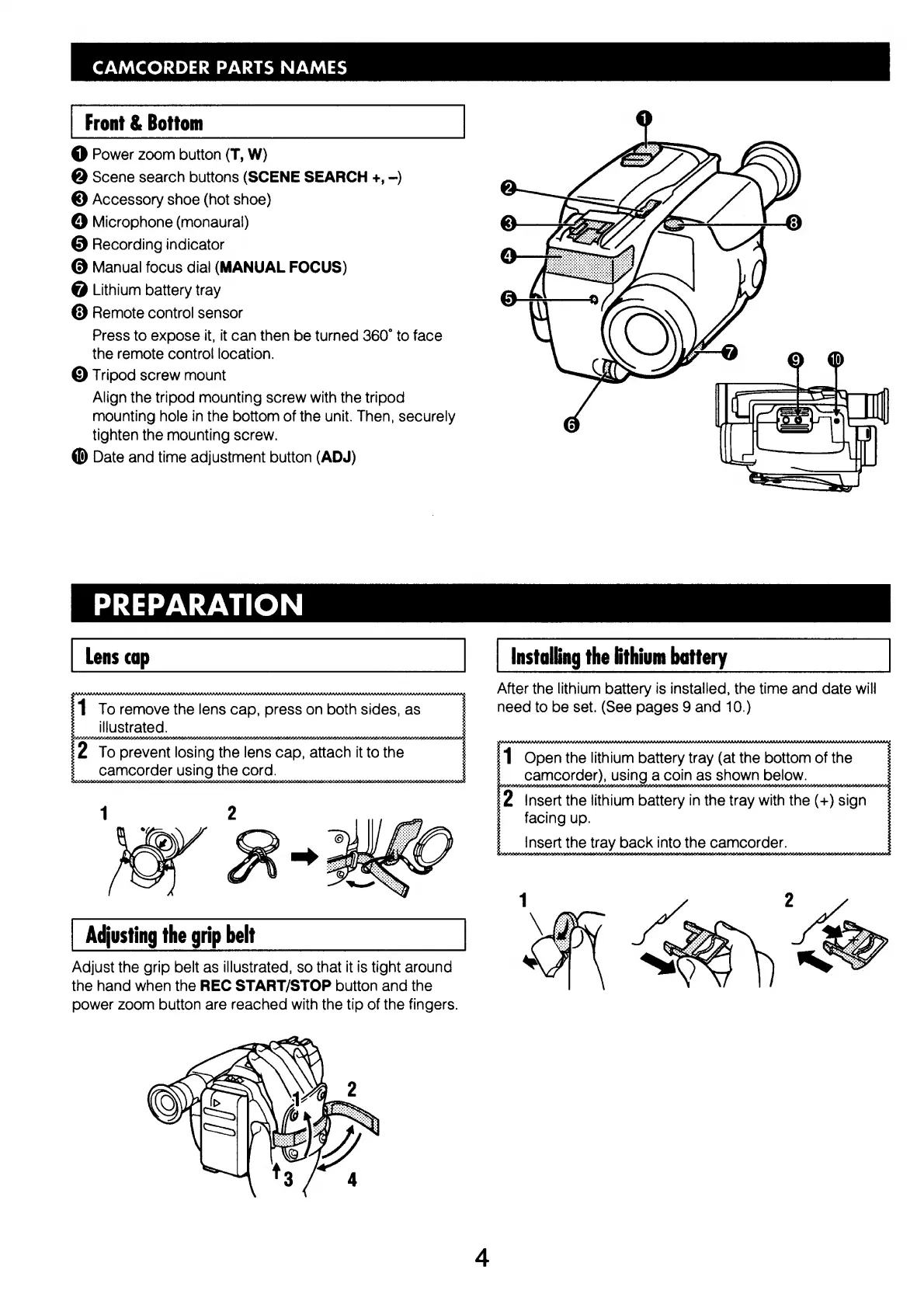
Front
&
Bottom
@
Power
zoom
button
(T,
W)
©
Scene
search
buttons
(SCENE
SEARCH
+,
-)
©
Accessory
shoe
(hot
shoe)
©
Microphone
(monaural)
®
Recording
indicator
©
Manual
focus
dial
(MANUAL
FOCUS)
@
Lithium
battery
tray
©
Remote
control
sensor
Press
to
expose
it,
it
can
then
be
turned
360°
to
face
the
remote
control
location.
©
Tripod
screw
mount
Align
the
tripod
mounting
screw
with
the
tripod
mounting
hole
in
the
bottom
of
the
unit.
Then,
securely
tighten
the
mounting
screw.
@
Date
and
time
adjustment
button
(ADJ)
PREPARATION
Installing
the
lithium
battery
possasssaosssosson
ssa
saannananavonanansansansansnnsanonnen
,
After
the
lithium
battery
is
installed,
the
time
and
date
will
1
To
remove
the
lens
cap,
press
on
both
sides,
as
|
need
to
be
set.
(See
pages
9
and
10.)
illustrated.
;
2
To
prevent
losing
the
lens
cap,
attach
it
to
the
:
1
Open
the
lithium
battery
tray
(at
the
bottom
of
the
1
camcorder),
using
a
coin
as
shown
below.
mand
2
Insert
the
lithium
battery
in
the
tray
with
the
(+)
sign
§
facing
up.
;
Insert
the
tray
back
into
the
camcorder.
Adjusting
the
grip
belt
Adjust
the
grip
belt
as
illustrated,
so
that
it
is
tight
around
the
hand
when
the
REC
START/STOP
button
and
the
power
zoom
button
are
reached
with
the
tip
of
the
fingers.

Related product manuals