EasyManua.ls Logo

Sanyo VM-EX26P - Recording Basic Steps; Eyesight Compensation Ring; Recording Review

Sanyo VM-EX26P
24 pages
Print Icon
To Next Page IconTo Next Page
To Previous Page IconTo Previous Page
Loading...
RECORDING
BASIC
STEPS
getet
CMER
N
E
Ea
EE
E
E
AE
E
E
PEE
EEIE
AA
EE
AEE
A
AA
R
E
E
a
a
a
a
a
aa
a
a
a
aaaeei
A
;
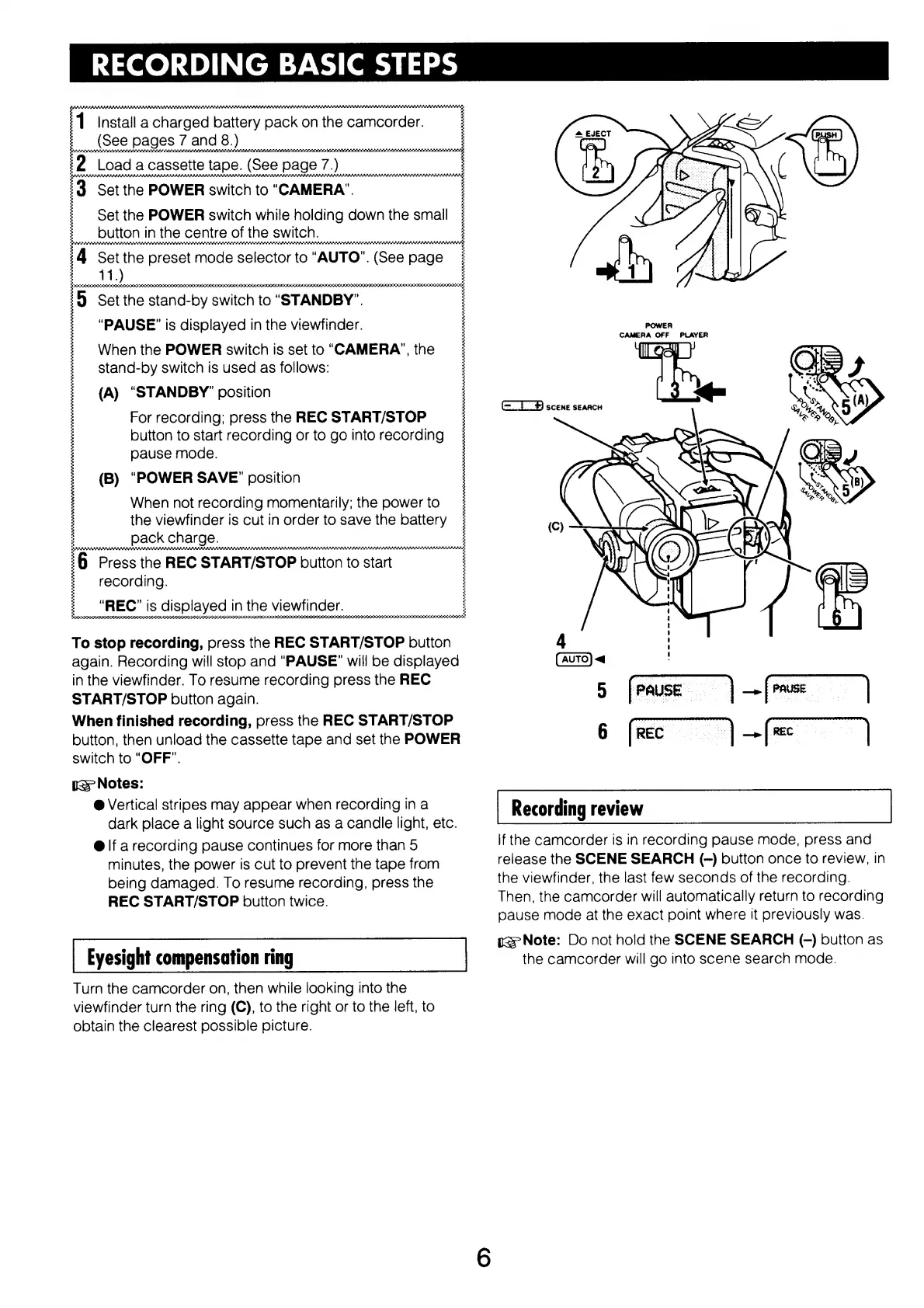
1
Install
a
charged
battery
pack
on
the
camcorder.
E
See
pages
7
and
8.)
mna
a
a
e
n
a
a
a
e
A
a
m
n
n
aa
m
aan
a
a
at
rrt
e
a
a
a
ana
meia
iaa
ea
aia
e
ae
esa
yl
:2
Load
a
cassette
tape.
(See
page
7.)
+
a
a
a
a
saia,
13
Set
the
POWER
switch
to
“CAMERA”.
Set
the
POWER
switch
while
holding
down
the
small:
__
button
in
the
centre
of
the
switch.
tat
EE
E
nE
ES
a
aea
EI
EEEE
E
e
e
a
b
saaan
4
Set
the
preset
mode
selector
to
“AUTO”.
(See
page:
Se
ee
ee
rE
p
re
i5
Set
the
stand-by
switch
to
“STANDBY”.
“PAUSE”
is
displayed
in
the
viewfinder.
:
When
the
POWER
switch
is
set
to
“CAMERA”,
the
stand-by
switch
is
used
as
follows:
(A)
“STANDBY”
position
;
i
For
recording;
press
the
REC
START/STOP
button
to
start
recording
or
to
go
into
recording
;
pause
mode.
;
COC
N
NIEM
MAE
IEE
SEE
E,
aS
Bie
Saen
ee
(B)
“POWER
SAVE”
position
When
not
recording
momentarily;
the
power
to;
the
viewfinder
is
cut
in
order
to
save
the
battery
;
:6
Press
the
REC
START/STOP
button
to
start
:
recording.
|.
REÇ”
is
displayed
in
the
viewfinder,
ononon
To
stop
recording,
press
the
REC
START/STOP
button
again.
Recording
will
stop
and
“PAUSE”
will
be
displayed
in
the
viewfinder.
To
resume
recording
press
the
REC
START/STOP
button
again.
When
finished
recording,
press
the
REC
START/STOP
button,
then
unload
the
cassette
tape
and
set
the
POWER
switch
to
“OFF”.
is
Notes:
@
Vertical
stripes
may
appear
when
recording
in
a
dark
place
a
light
source
such
as
a
candle
light,
etc.
@
if
a
recording
pause
continues
for
more
than
5
minutes,
the
power
is
cut
to
prevent
the
tape
from
being
damaged.
To
resume
recording,
press
the
REC
START/STOP
button
twice.
Eyesight
compensation
ring
Turn
the
camcorder
on,
then
while
looking
into
the
viewfinder
turn
the
ring
(C),
to
the
right
or
to
the
left,
to
obtain
the
clearest
possible
picture.
POWER
CAMERA
OFF
PLAYER
(=)
SCENE
SEARCH
Recording
review
if
the
camcorder
is
in
recording
pause
mode,
press
and
release
the
SCENE
SEARCH
(~)
button
once
to
review,
in
the
viewfinder,
the
last
few
seconds
of
the
recording.
Then,
the
camcorder
will
automatically
return
to
recording
pause
mode
at
the
exact
point
where
it
previously
was.
12
Note:
Do
not
hold
the
SCENE
SEARCH
(-)
button
as
the
camcorder
will
go
into
scene
search
mode.

Related product manuals