0% Level
100% Level
Fill the tank at Low Level
0% Level
100% L evel
1
2
3
Lower Calibration has done !
1
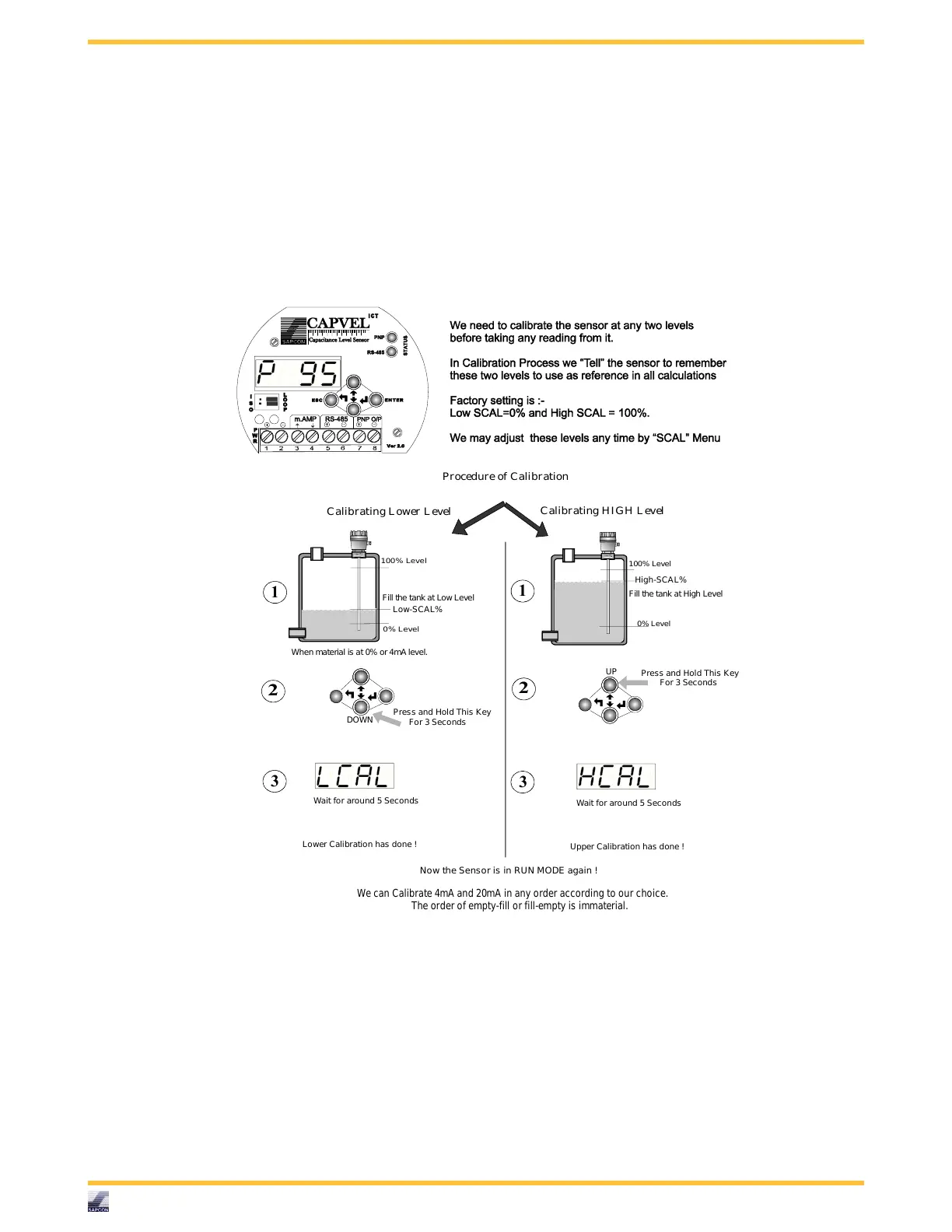
Calibrating L ower L evel
Procedure of Calibration
When material is at 0% or 4mA level.
Now the Senso r is in RUN MODE again !
We can Calibrate 4mA and 20mA in any order according to our choice.
The order of empty-fill or fill-empty is immaterial.
Calibrating H IGH L evel
Upper Calibration has done !
DOWN
2
Press and Hold This Key
UP
For 3 Seconds
Wait for around 5 Seconds
3
Wait for around 5 Seconds
Press and Hold This Key
For 3 Seconds
Fill the tank at High Level
High-SCAL%
Low-SCAL%



 To Next Page