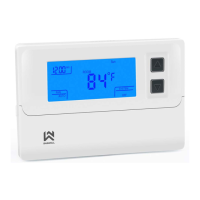
1. Select cooling cycle rate
The FA setting is used to produce shorter cooling cycles. The SL setting produces a longer cooling cycle. Both
settings produce very accurate temperature control and can be set to your personal preference. FA cycles the system
at a 0.5ºF (0.5ºC) differential, and SL cycles the system at 1.5ºF (1.5ºC).
2. Select heating cycle rate
The FA setting is used to produce shorter heating cycles. The SL setting produces a longer heating cycle. Both
settings produce very accurate temperature control and can be set to your personal preference. FA cycles the system
at a 0.5ºF (0.5ºC) differential, and SL cycles the system at 1.5ºF (1.5ºC).
3. Select display backlight
The display backlight improves display contrast in low lighting conditions. Select 1 for NO backlight display. Select 2
for the backlight to come on for approximately 30 seconds when any button of the thermostat is touched. Select 3 for
the backlight to remain on continuously.
4. Select filter replacement run time
The thermostat will display the Filter Alarm after a set time of operation. This is a reminder to change or clean your
air filter. This time can be set from 0 to 12 months in 1 month increments. Selection of 00 WILL CANCEL THIS
FEATURE. When Filter Alarm is displayed, you can clear it by pressing the ▲ and ▼ buttons. This resets the timer and
starts counting the days until the next filter change.



 To Next Page
 Loading...