4 INT-S SATEL
2.1 Address setting
An individual address (different from that in the other devices connected to the control panel
bus) must be set in the keypad.
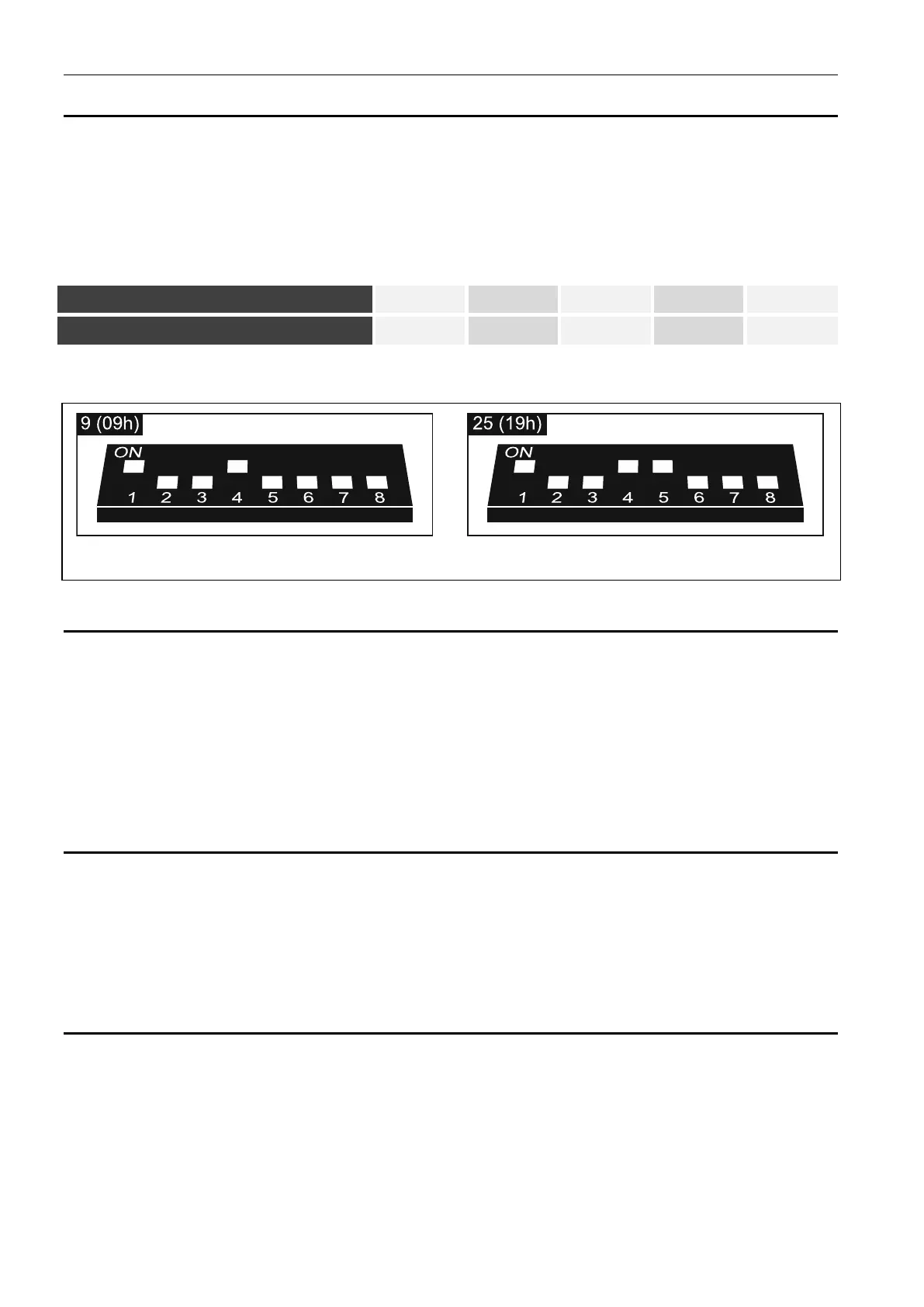
To set the address, use the DIP switches on the electronics board. The switches have
numbers assigned to them. The number for OFF position is 0. The numbers assigned to the
switches in ON position are presented in the table 1. The sum of these numbers is the
address set.
Table 1.
Fig. 3. Examples of partition keypad address setting.
2.2 Description of terminals
NO - relay output
12V - power input
DTA - data (expander communication bus)
CLK - clock (expander communication bus)
COM - common ground
IN - door status input (NC)
3. Configuring
The keypad settings you can configure using:
• DLOADX program: “Structure” window “Hardware” tab “Expansion modules”
branch [keypad name],
• LCD keypad: “Service mode” “Structure” “Hardware” “Expanders” “Settings”
[keypad name].
3.1 Description of parameters and options
Names of parameters and options from the DLOADX program are used in this manual.
Shown in square brackets at the description of a parameter or option is the name presented
on the display of the LCD keypad.
Name – individual name of the device (up to 16 characters).
Partition – partition operated by the keypad.


 To Next Page