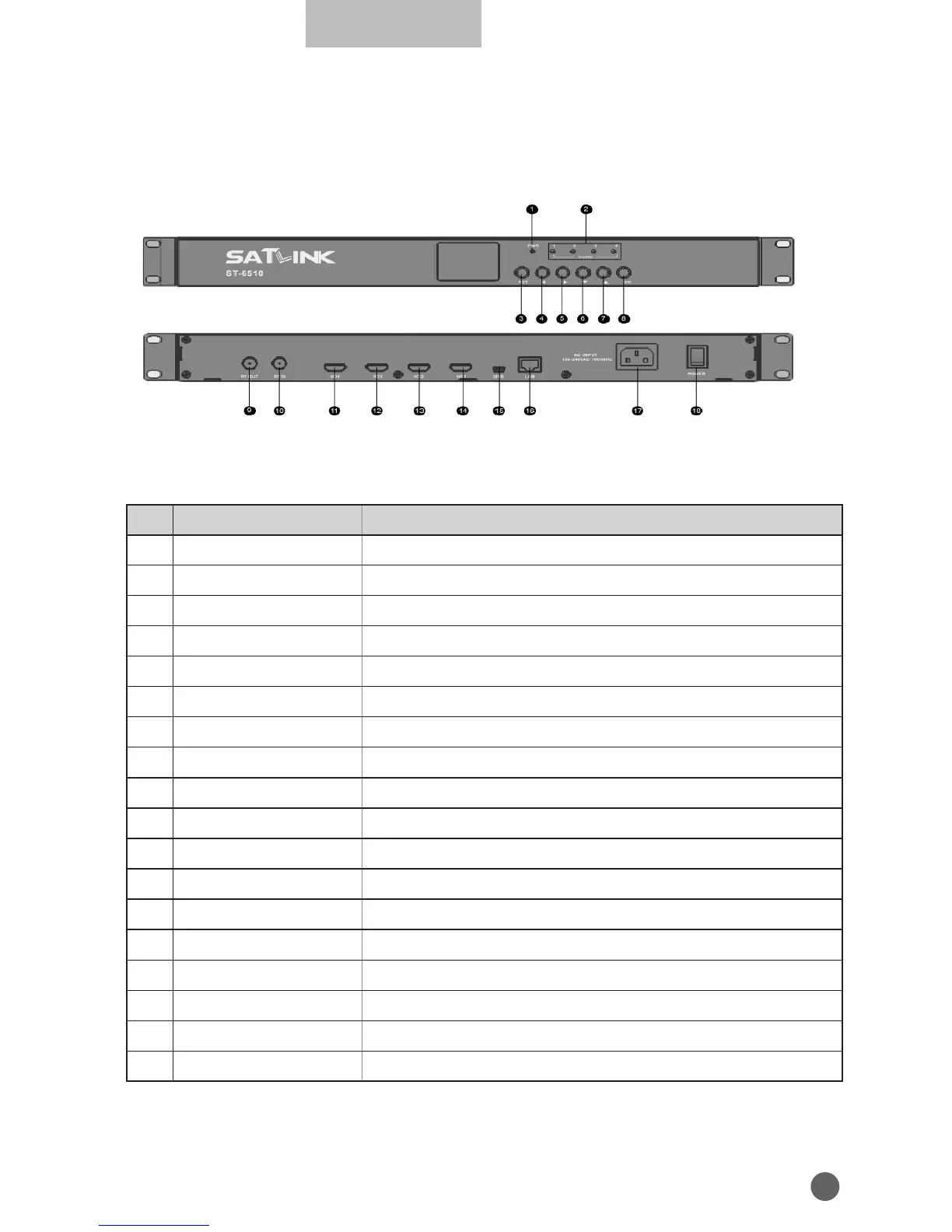
1.3 PRODUCT OVERVIEW & ILLUSTRATION
NO Description FUNCTION
1 PWR Power indicator light
2 Channel HD channel indicator light
3 RETURN Return to superior menu and save settings
4
A
Switch settings in menu or cursor left
5
B
Switch settings in menu or cursor right
6
Z
Change the frequency point or cursor down
7
Y
Change the frequency point or cursor up
8 OK Confirm the current operation
9 RF OUT RF output port
10 RF IN Terrestrial Digital signal input port
11 HD4 Channel 4 HD signal input port
12 HD3 Channel 3 HD signal input port
13 HD2 Channel 2 HD signal input port
14 HD1 Channel 1 HD signal input port
15 USB Connect to PC for upgrade
16 LAN Modify parameters by network
17 AC INPUT 100~240V alternating current input port
18 POWER Power switch


 To Next Page