27
www.cranecpe.com
Crane ChemPharma & Energy
Using the M-VUE Menus
Output Inversion
The Main Menu is accessed via the magnetic buttons H1 and H2 and is used to calibrate and program the sensor.
LEDs Inversion
The Main Menu is accessed via the magnetic buttons H1 and H2 and is used to calibrate and program the sensor.
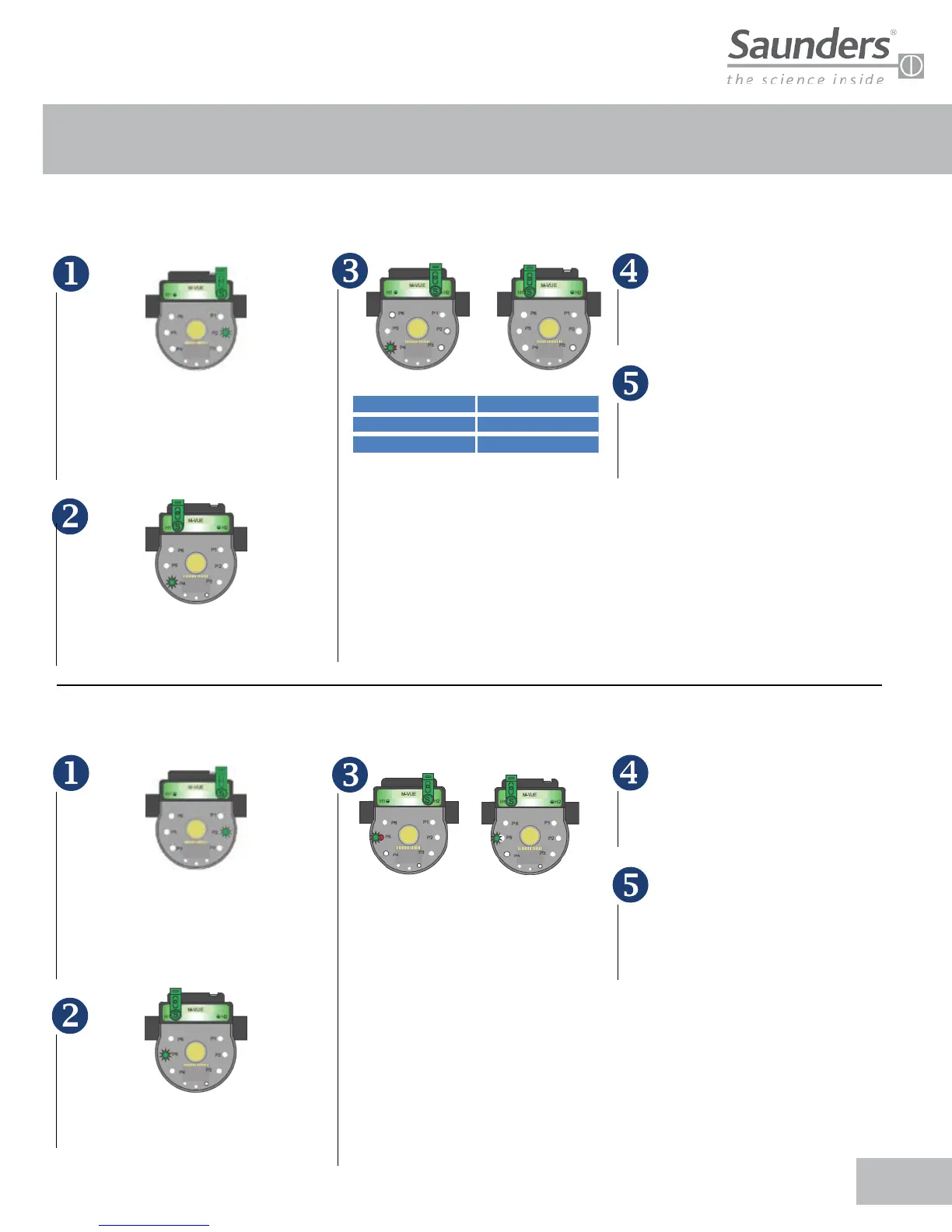
Hold the magnetic key over H2 for 3
seconds . The ring of LED’s will flash
green for 2 seconds (this indicates
Configuration Mode has been accessed)
Hold the magnetic key over H2 for 3
seconds . The ring of LED’s will flash
green for 2 seconds (this indicates
Configuration Mode has been accessed)
3 sec. to conrm hand calibration
3 sec. to conrm hand calibration
After H2 has been used to confirm
the desired option the LEDs will
flash green for 2 seconds indicating the
new configuration has been accepted.
After H2 has been used to confirm
the desired option the LEDs will
flash green for 2 seconds indicating the
new configuration has been accepted.
To exit the configuration mode
hold the magnetic key over H1 for
more than 3 seconds or wait 30 seconds
without approaching any magnetic key
to either H1 or H2 buttons
To exit the configuration mode
hold the magnetic key over H1 for
more than 3 seconds or wait 30 seconds
without approaching any magnetic key
to either H1 or H2 buttons.
All LEDs will flash for 2 seconds immediately
after P1 will flash green. Use H1 to select
• P4: Output Inversion
All LEDs will flash for 2 seconds immediately
after P1 will flash green. Use H1 to select
• P5: Output Inversion
Conrm on H2
Approach
Standard Output Inverted Output
Change to Output Inversion
Approach
Conrm on H2
Approach
Standard Output Inverted Output
Approach
Once P4 has been selected hold the
magnetic key over H2 to access the two
available options and use H1 to select
the desired option:
• P4 LED lights red and green:
standard mode
• P3 LED light green: inverted mode
Note: The inverted mode effectively
“swaps” the output bit definition.
Once P5 has been selected hold the
magnetic key over H2 to access the two
available options and use H1 to select
the desired option:
• P5 LED lights red and green: standard
mode
• P3 LED light green: inverted mode
Note: This options allows for LED
indication of Open and Closed positions:
• Standard Mode:
Open = Green ; Closed=Red
• Inverted Mode:
Open = Red ; Closed = Green
Standard Inverted
Output 1 Output 2
Output 2 Output 1
Approach
Approach


 To Next Page