30
www.cranecpe.com
Crane ChemPharma & Energy
Troubleshooting Alarms
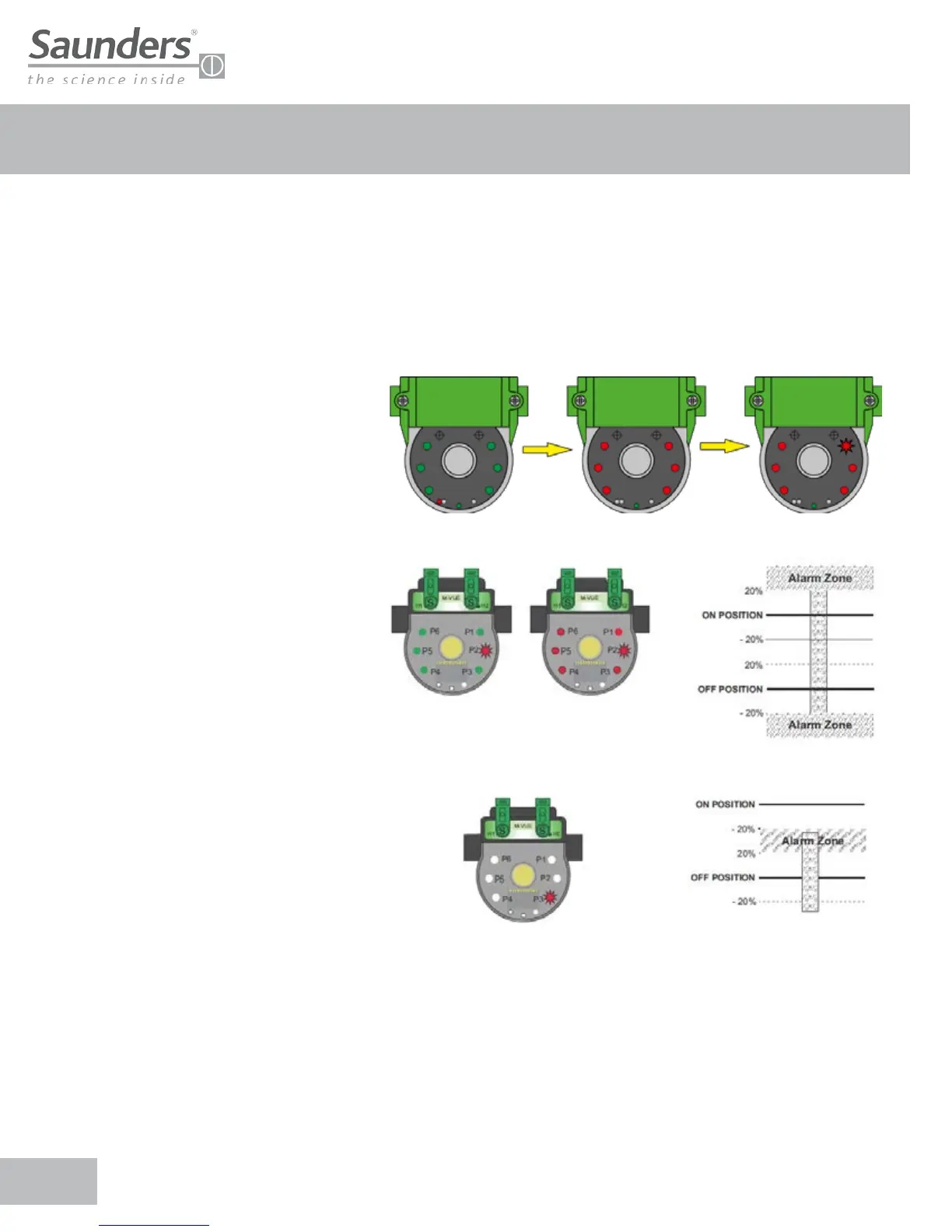
M-VUE can display three alarms:
• Alarm 1: Unexpected position change
• Alarm 2: Stroke out of range
• Alarm 3: Stop at the middle of the way
Alarm 1: This alarm indicates that an
unexpected position change has occurred. P1
flashes red to indicate Alarm 1. The alarm will
correct itself after the fault has been cleared
• Check if the aseptic valve operates correctly
• Check air connectors and required pressure
Alarm 2: Indicates that the actuator shaft has
traveled over or under the values stored during
initial calibration. P2 will flash red to indicate the
alarm (± 20% tolerance)
• Check for actuator damage
• Perform Self-Calibration again
Alarm 3: Indicates that the actuator shaft has
not reached the desired position after the initial
position has been detected. P3 will flash red to
indicate the feedback sensor status Position 1
(Open) and Position 2 (Closed) are 0.
• Check for actuator damage
• Verify correct pressure supplied to the actuator
Normal
Condition
Not Expected
Position
Alarm (P1)
Condition
Note: To disable any LED alarm hold two magnetics keys over H1 and H2 for 6 seconds. The corresponding LED alarm will stop
Flashing. The generated alarm remains in the register and can be viewed over a bus network or by holding two magnetics keys
over H1 and H2 for 6 seconds


 To Next Page