26
www.cranecpe.com
Crane ChemPharma & Energy
Using the M-VUE Menus
Overview
The Main Menu is accessed via the
magnetic buttons H1 and H2 and is used to
calibrate and program the sensor.
Solenoid Option
The Main Menu is accessed via the magnetic buttons H1 and H2 and is used to calibrate
and program the sensor.
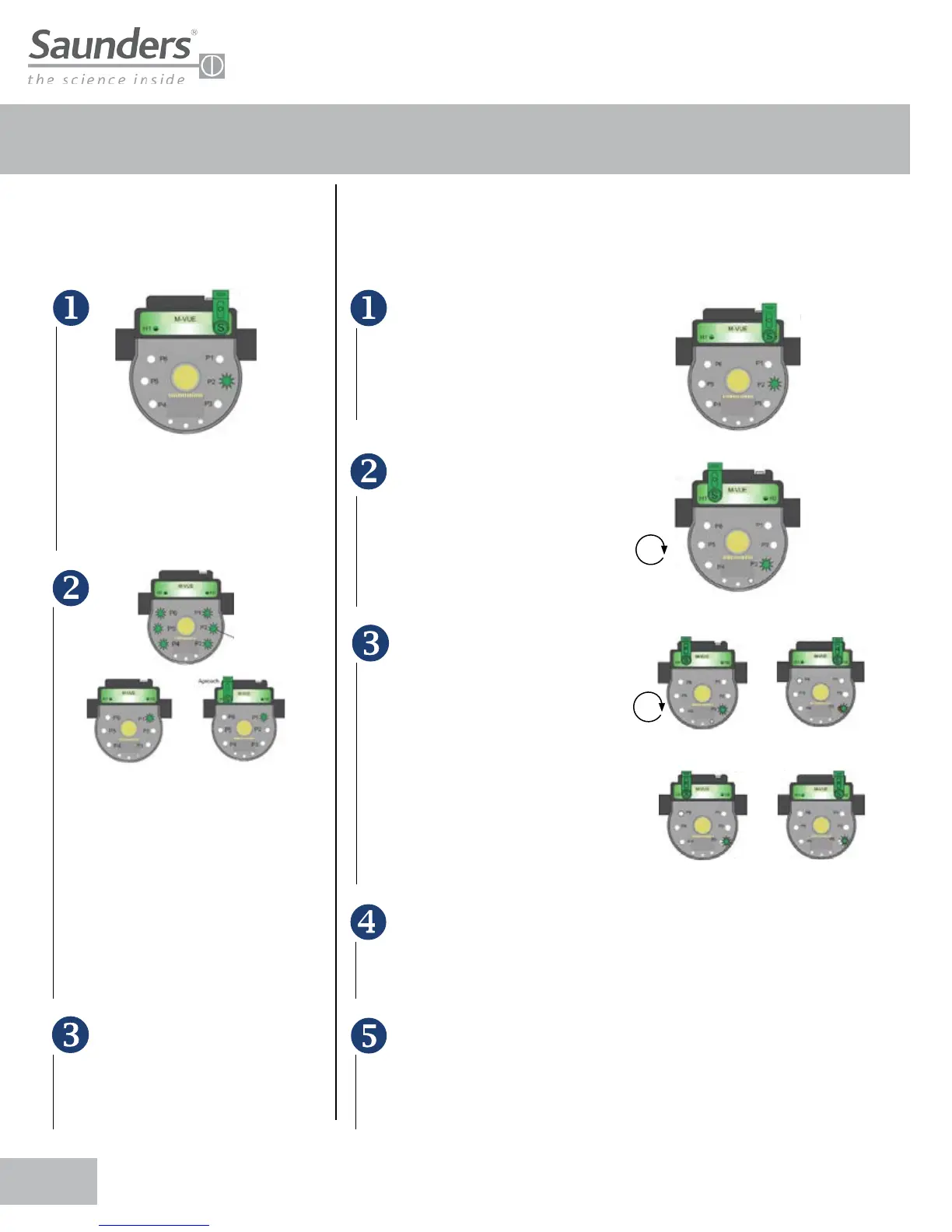
Hold the magnetic key over H2 for 3
seconds . The ring of LED’s will flash
green for 2 seconds (this indicates
Configuration Mode has been accessed)
All LEDs will flash for 2 seconds
immediately after P1 will flash green
indicating Self Calibration Mode is active.
Use H1 to select form the 6 available
configuration modes:
• P1: Self Calibration
• P2: Hand Calibration
• P3: Solenoid Option
• P4: Output Inversion
• P5: LED Inversion
• P6: Factory Reset
To exit the configuration mode, hold
the magnetic key over H1 for more
than 3 seconds or wait 30 seconds without
approaching any magnetic key to either H1
or H2 buttons.
Hold the magnetic key over H2
for 3 seconds. The ring of LED’s
will flash green for 2 seconds.
(This indicates Configuration
Mode has been accessed.)
All LEDs will flash for 2 seconds
immediately after P1 will flash green.
Use H1 to select
• P3: Solenoid Option
3 sec. to conrm hand calibration
3 sec. to conrm hand calibration
All LEDs flashing
for 2 seconds
Once P3 has been selected hold
the magnetic key over H2 to access
the two available options and use
H1 to select the desired option:
• P3 LED lights red and green:
integrated solenoid option.
• P3 LED light green: external or
remote solenoid option
After H2 has been used to confirm
the desired option the LEDs will flash
green for 2 seconds indicating the new
configuration has been accepted.
To exit the configuration mode hold
the magnetic key over H1 for more
than 3 seconds or wait 30 seconds
without approaching any magnetic
key to either H1 or H2 buttons.
Approach
Conrm on H2
Conrm on H2Change to External Solenoid
Integrated solenoid option
External solenoid option
ApproachApproach
ApproachApproach
External solenoid option


 To Next Page