F2
0,5
INSTRUCTIONS FOR USE
ÿ
In this case restore the pressure by
opening the tap (t) positioned
under the boiler until the
value of 0.8 bar is read on the
display.
Choosing the operating MODE changes the
operating mode
NB : Briefly pressing one of the + or - keys (4) or (5) will cause the previously selected temperature value
to appear on the display.
6 - Operating indicator : - Flashing red :
fault signal.
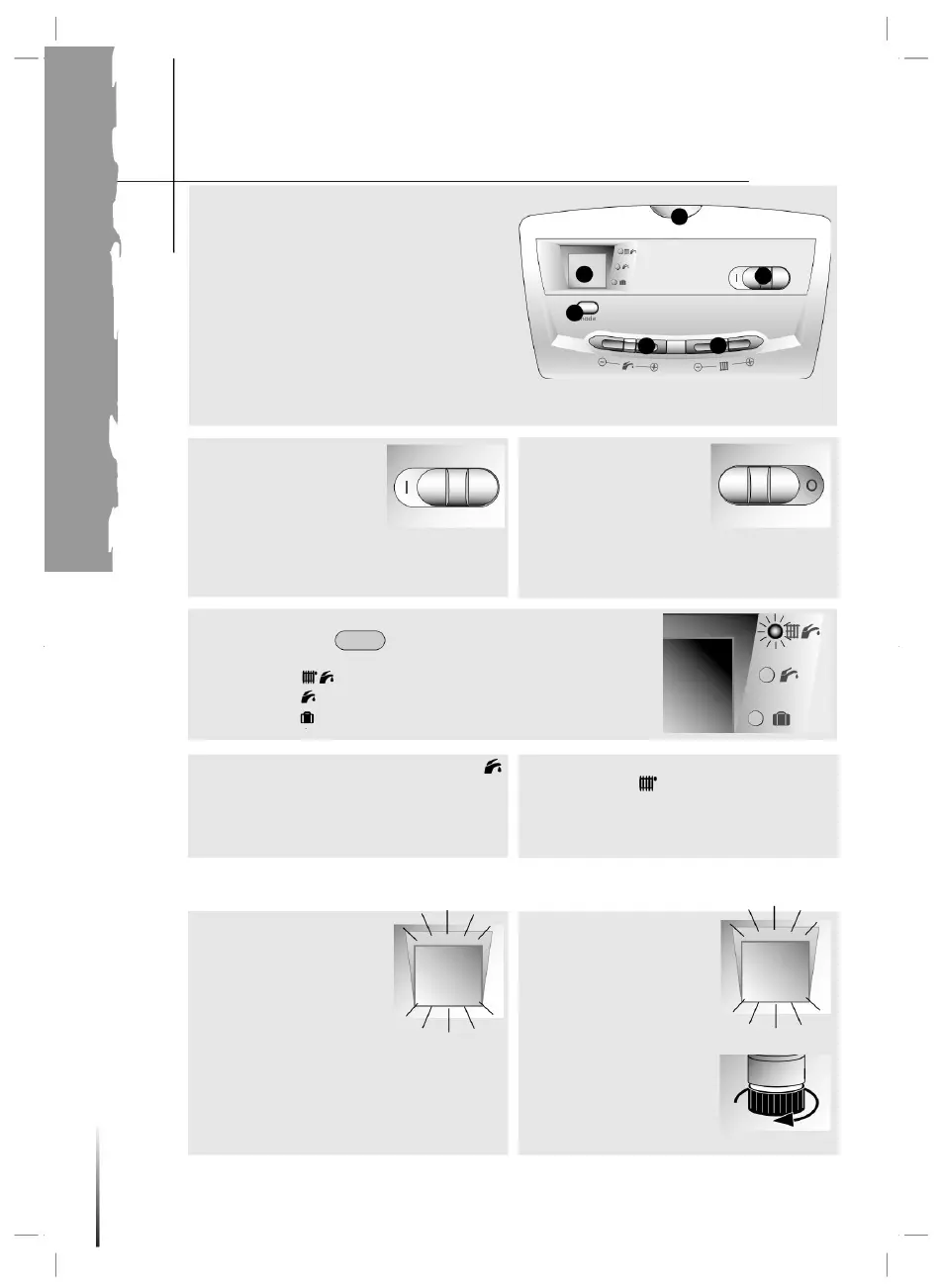
Ignition of the boiler
1 - ON/OFF 2
- Display : •
pressure (bar) of the heating circuit • temperature (°C)
of the water when the boiler is in heating request. • fault
code 3 - Choice of operating mode.
4 and 5 - Hot water and
heating temperature adjustment.
2
mode
>> Attempt a reset: move the switch to stop the boiler
( O will appear ), wait 5 s then turn the boiler
back on ( I will appear ).
Filling the
system If there
is no water, the red light
(6) and the pressure
indication (2) flash.
Turning off the
3
• Move the switch to the left
to make O appear: the
boiler is not powered • Close
the gas tap in case
of prolonged absence.
Boiler protection against freezing
Heating + hot water
Heating temperature adjustment • Use
the + and - buttons
(5) to set the heating flow temperature
between 38°C and 87°C.
5
Move the switch to the right to make I appear.
bar
In the event of a fault, the
red warning light (6) will flash and
an F code followed by a digit
will flash on the display (2).
- Steady yellow : indicates burner ignition
of the boiler. The turning on of the green light indicates the selected mode:
2
• By pressing the key
6
1
water heater
Make sure that: • the
boiler is electrically powered
If the defect persists, contact the technical assistance
service.
Hot water only
• the gas tap is open
4
Domestic hot water adjustment • Use the + and -
buttons (4) to set the domestic hot water
temperature between 38°C and 65°C.
Machine Translated by Google




 To Next Page