20 | en FH-BA-e-2430
8.13 Auto peak hold mode
Switch by pressing:
8.14 Minimum limit value function for activating measured value storage
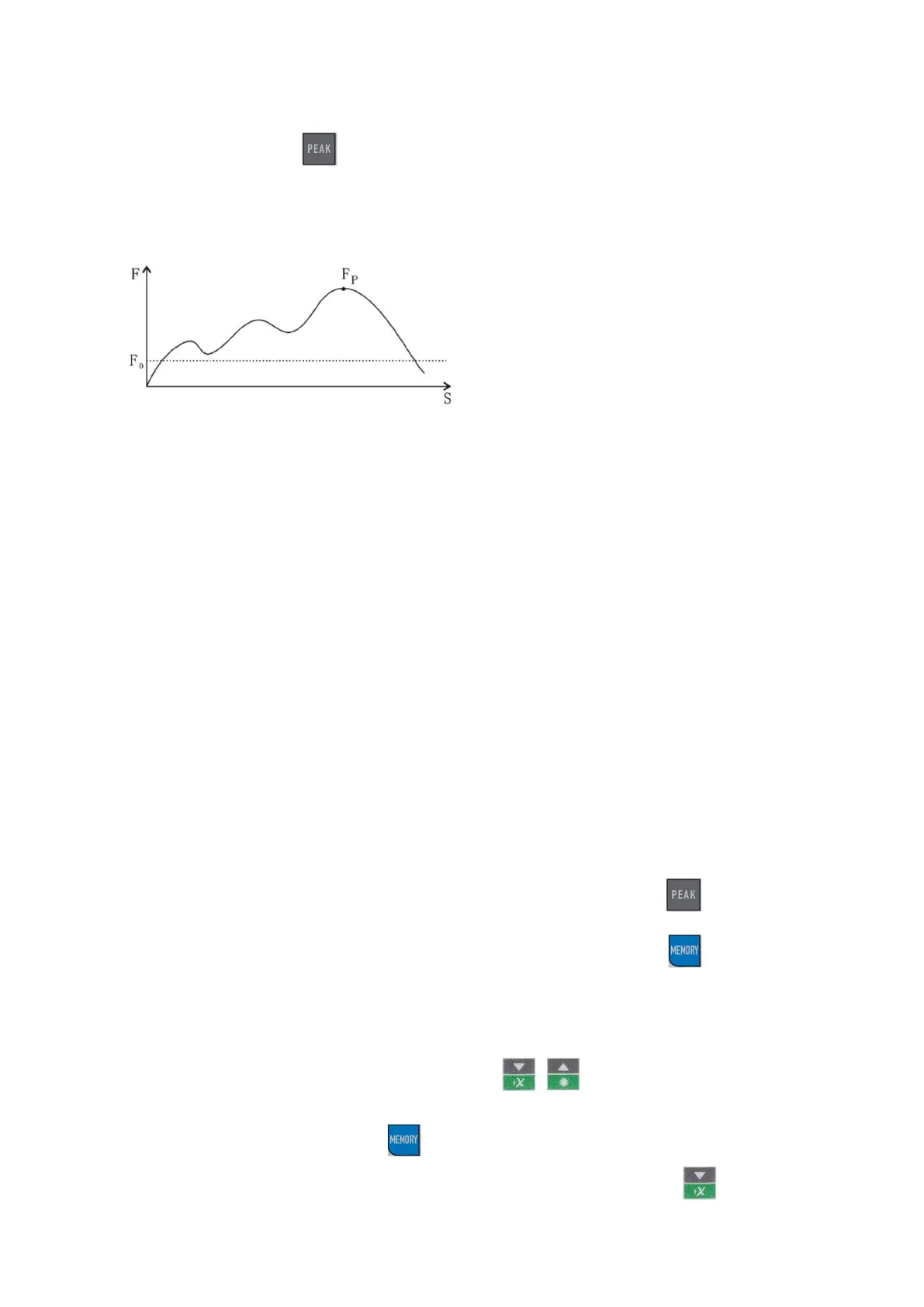
This function is used for measurements in which undesired "pre-peaks" occur that are
below the desired peak value (Fp). The adjustable limit value (Fo) prevents the
measuring device from storing the "pre-peaks".
Minimum limit value function is only possible in "Peak mode"
For setting the minimum limit value function, see SET menu under "Control buttons"
Important notes:
The RESET button (on the right-hand side of the housing) can be used to reset or
delete individual settings and saved values, for example to restart the device after
incorrect operation.
The description of how to attach all force gauges to SAUTER test stands can
be found in the operating instructions for the respective test stands
8.15 Storage of peak values and average value calculation
(from up to 10 measured values)
Storage of peak values in the measuring device
Activation of the "AUTO PEAK function" via the PEAK button
Deactivating the "Average function" via the MEMORY button
All peak values are now automatically transferred to the device memory.
The ▲ and ▼ arrow keys can be used to call up individual peak values again
(shown in the upper display segment)
The average value can be called up using the MEMORY button (then visible in
the upper display segment)
Delete the memory contents by pressing the ▼ button in
AVERAGE mode



 To Next Page