EasyManua.ls Logo

Savant CLI-W210 01 Series - User Manual

Savant CLI-W210 01 Series
8 pages
Print Icon
To Next Page IconTo Next Page
Loading...
Multistat Smart Thermostat Quick Start Guide | 009-2083-00 1 of 8 45 Perseverance Way, Hyannis MA 02601
Copyright ©2021 Savant Systems, Inc | 210920 Savant.com | 508.683.2500
Multistat Smart Thermostat Quick Start Guide
Front Panel
Getting Started
Savant recommends having the following tools available
for installation:
Box Contents
(1) Multistat Smart Thermostat (CLI-W210x-01)
(1) Installation Kit (075-0242-xx)
(2) Drywall Anchors (039-0328-xx)
(2) #6 x ¾ inch pan head screws (039-0329-xx)
(1) Flush Mount Temp Sensor (014-0122-xx)
(2) Dolphin splice connectors (028-0581-xx)
(1) Sheet of Wire Labels (080-0096-xx)
(1) Product Regulatory Statement (009-1950-xx)
(1) Quick Start Guide (009-2083-xx, this document)
Specifications
Dimensions and Weights
Height Width Depth Weight
CLI-W210
4.95 in.
(12.5 cm)
3.0 in.
(7.6 cm)
.91 in.
(2.3 cm)
.30 lb.
(0.14 kg)
Shipping
7.0 in.
(17.8 cm)
5.0 in.
(12.7 cm)
2.0 in.
(5.0 cm)
1.0 lb.
(0.5 kg)
A
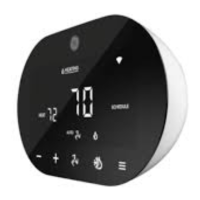
LCD Touchscreen - The display is a multi-
colored touchscreen LCD that includes various
screens for viewing and configuring the HVAC
system.
One touch and swipe operation.
Swipe right for local forecast (when
enabled).
B
Both landscape and portrait type installations
are supported. During the power-up process,
the thermostat will auto-detect its positioning
and make the proper adjustments. Mount the
backplate, as described below.
Portrait - Mount the backplate, so the terminal
strip with the O, G, Y2, Y1, etc. are located
towards the top. More information is available
in the Install Thermostat Mounting Plate
section.
Landscape - Mount the backplate, so the
reference designators on the terminal strips
can be read. If reference designators are upside
down, rotate the thermostat 180°.
Standards
Wireless
802.11 b/g/n (2.4 GHz)
IMPORTANT! 802.11r fast roaming is
not supported.
Security WPA1™, WPA2™, WPA1™ +WPA2™
Regulatory
Safety and
Emissions
FCC Part 15 Class B
Contains
FCC ID:
Z64-WL18SBMOD
Contains IC: 451I-WL18SBMOD
RoHS Compliant
Minimum Supported Release
Savant
Software
da Vinci 8.10.1 and higher
Studio 2.1 and higher
Cable Requirements
Power #18 AWG
HVAC #18 AWG - thermostat wire (solid)
Remote 10k
Sensor
#24 AWG - 500 feet (152 meters) max.
PortraitLandscape
A
B
Pencil
#2 Phillips screwdriver
Small slotted screwdriver
Drill with 5/32 inch drill bit
Wire stripper
Needle nose pliers
Measuring Tape
CAUTION! When replacing an older thermostat
that contains mercury in a sealed tube, do not
discard it into the trash. Refer to thermostat-
recycle.org or similar website for information on
how to dispose of properly.
Environmental
Temperature 32° to 104° F (0° to 40° C)
Humidity 10% to 90% RH (non-condensing)
Power
Input 24V AC (18V AC - 32V AC)
Current
Draw
150 mA RMS typical, 300 mA maximum
Max Power 7.2 watts
IMPORTANT! Savant includes a Flush Mount Temp
Sensor to allow for optimum placement and the
most accurate readings and recommends the use
on all installs
Question and Answer IconNeed help?

Do you have a question about the Savant CLI-W210 01 Series and is the answer not in the manual?

Summary

Front Panel Overview

LCD Touchscreen Functionality

Description of the multi-colored touchscreen LCD and its operations.

Portrait Mounting Instructions

Instructions for mounting the backplate in portrait orientation.

Landscape Mounting Instructions

Instructions for mounting the backplate in landscape orientation.

Getting Started with Installation

Recommended Installation Tools

List of recommended tools for installing the thermostat.

Removing the Old Thermostat

Labeling Existing Wires

Instructions for recording and labeling existing thermostat wires.

Removing Thermostat from Wall

Guidance on removing the old thermostat from the wall.

Mounting the Thermostat Plate

Separating Thermostat Components

Instructions on how to separate the thermostat's mounting plate and screen.

Securing the Mounting Plate

Steps for marking, drilling, and securing the mounting plate to the wall.

Making Electrical Connections

Wire Preparation and Insertion

Guidelines for preparing and inserting wires into terminal connections.

Securing Wire Connections

Instructions for tightening screws to secure wires and verifying connection.

Connecting Thermostat Power

Single Transformer Wiring

Wiring instructions for RC and 24C terminals with one transformer.

Jumper Shunt JP1 Explanation

Explanation of the JP1 jumper shunt and its role with multiple transformers.

Two Transformer Wiring

Wiring instructions for RH, RC, and 24C terminals with two transformers.

HVAC System Wiring

HVAC Terminal Functions

Table explaining the function of each HVAC terminal (O, G, Y2, Y1, W2, W1).

Using Remote Sensors

1-Wire Smart Sensor Setup

Information on connecting a 1-wire smart sensor for temp/humidity.

10 K Thermistor Sensor Setup

Details on the included 10K thermistor temperature sensor and ports.

Optional 10 K Sensor Types

List of optional 10K type sensors available from Savant.

Connecting to a Network

On-Screen Wi-Fi Setup

Step-by-step guide for connecting the thermostat to a Wi-Fi network.

HVAC System Configuration

Options for configuring HVAC system settings via device or web portal.

Factory Reset Procedures

Reset via Web GUI

Instructions for performing a factory reset using the web portal.

Reset via Touchscreen

Instructions for performing a factory reset using the thermostat's touchscreen.

Climate Module Integration

Available Climate Module Types

List of available climate modules and their expanded capabilities.

Powering Climate Modules

Explanation of how to power climate modules using the thermostat's 24V AC.

RS-485 Communication Setup

Instructions for connecting climate modules via RS-485 in a daisy-chain.

Climate Module Configuration Examples

Example 1: Relay Module Zones

Example showing eight CLI-REL1AUX1/CLI-PTAC1K1 modules for zone control.

Example 2: Aux Relay Modules

Example showing three CLI-AUX3/CLI-REL1AUX1 modules for damper control.

Frequently Asked Questions

Battery and Power Requirements

Clarification on battery usage and power requirements.

Software Updates and Wi-Fi Reliance

Information on OTA updates and functionality loss without Wi-Fi.

Thermostat Handling and Setup Features

Guidance on damaged units, temperature units, and scheduling.

Humidity Monitoring and Setpoints

Details on humidity monitoring and single/dual setpoint capabilities.

Climate Module Connection Limits

Explanation of the maximum number of climate modules that can be connected.

Overview

The Savant Multistat Smart Thermostat (CLI-W210x) is a versatile device designed for controlling HVAC systems. It does not require batteries, instead operating on 24V AC power, typically supplied by a transformer within the HVAC system. If the existing thermostat being replaced does not include a common (C) wire, a separate wire must be run from the HVAC system to the Savant thermostat.

Function Description

The thermostat allows for the control of heating and cooling systems, supporting both single and dual setpoint configurations. It can manage up to 8 zones, with the exact number of modules determined by the number of zones. The device receives Over The Air (OTA) software updates automatically from the Savant Cloud when connected to a local network with WAN access and configured in a Savant system. Most thermostat functions, such as temperature control, will still work even if the Wi-Fi connection is lost, though features like schedules and OTA updates, which require a network connection, will not.

Important Technical Specifications

  • Dimensions (W x H x D): 4.9 in (12.5 cm) x 3.0 in (7.6 cm) x 0.9 in (2.3 cm) for the thermostat itself, and 7.0 in (17.8 cm) x 5.0 in (12.7 cm) x 2.0 in (5.0 cm) for the shipping package.
  • Weight: 0.14 kg (thermostat) / 0.5 kg (shipping).
  • Power: 24V AC (18V AC - 32V AC).
  • Current Draw: 150 mA RMS typical, 300 mA maximum.
  • Max Power: 7.2 watts.
  • HVAC: #18 AWG - thermostat wire (solid).
  • Remote 10K Sensor: #24 AWG - 500 feet (152 meters) max.
  • Regulatory: FCC Part 15 Class B.
  • Contains FCC ID: Z64-WL185BMOD, 4S1I-WL185BMOD.
  • Humidity: 10% to 90% RH (non-condensing).
  • Temperature: 32° to 104° F (0° to 40° C).
  • Wireless: 802.11 b/g/n (2.4 GHz).
  • Minimum Supported Release: Savant da Vinci 8.10.1 and higher, Studio 2.1 and higher.

Usage Features

  • LCD Touchscreen: The display is a multi-colored touchscreen LCD that includes various screens for information and control of the HVAC system. It supports one touch and swipe operation.
  • Mounting: The thermostat can be mounted directly on a wall or on a standard single-gang electrical box using the included mounting plate. For optimal performance, it should be installed on an interior wall, away from direct sunlight, drafts, heat sources, and other appliances that could affect temperature readings.
  • Network Connection: The thermostat connects to a local Wi-Fi® network. The on-screen menu guides the user through selecting a network, entering the password, and connecting.
  • HVAC System Configuration: After connecting to the network, the thermostat can be configured via its on-screen menus ("ON DEVICE") or through a web portal ("WEB PORTAL") by entering the thermostat's IP address.
  • Remote Sensors: The thermostat supports remote 1-Wire Smart Sensors (CLI-THFM1) for temperature and humidity, as well as 10K thermistors. It can calculate an average humidity reading if both the onboard and remote smart sensors are connected.
  • Climate Modules: The system supports various climate modules, including CLI-WIRE2 (1-wire smart sensors), CLI-10K4IN (10K temperature sensors), CLI-AUX3 (additional auxiliary relays), CLI-REL1AUX1 (relay modules), and CLI-PTAC1K1 (PTAC modules). These modules expand the capabilities of the thermostat and allow for control of multiple zones.
  • Scheduling: Scheduling is set up only via the Savant Pro App Climate service.
  • Fahrenheit and Celsius: Both temperature units are supported.

Maintenance Features

  • Factory Reset: A factory reset can be performed via the Web GUI or the touchscreen. This action wipes the configuration and removes the assigned IP address, requiring the thermostat to be provisioned to the network again.
  • Troubleshooting: The manual provides guidelines for making secure electrical connections, including stripping wires to 1/4 inch and tightening screws.
  • Damaged Thermostat: If the thermostat is received damaged, contact the contractor or retailer from whom it was purchased. If purchased from the Savant Store, contact Savant through the Savant Customer Community.

Important Considerations

  • Mercury: The thermostat does not contain mercury. When replacing an older thermostat that contains mercury in a sealed tube, do not throw it into the trash. Refer to thermostat recyclers for more information on how to dispose of properly.
  • Flush Mount: For Savant flush mount temperature and humidity sensors, ensure minimum clearance and the most accurate readings and recommendations.
  • Wiring: When making connections, ensure wires are stripped to 1/4 inch and securely fastened to prevent exposed bare wire. For HVAC systems with two transformers, the JP1 jumper shunt on the thermostat's PCB board must be removed.
  • RS-485 Wiring: RS-485 wiring must be connected using a daisy-chained fashion. A 120-ohm terminating resistor must be installed between Tx+ and Tx- on the last climate module in the chain.

Savant CLI-W210 01 Series Specifications

General IconGeneral
BrandSavant
ModelCLI-W210 01 Series
CategoryThermostat
LanguageEnglish

Related product manuals