6
Infinity & Infinity HD (Micro-6) Owner’s Manual Part No. 000842, 30-m06-2017
2. FEATURES
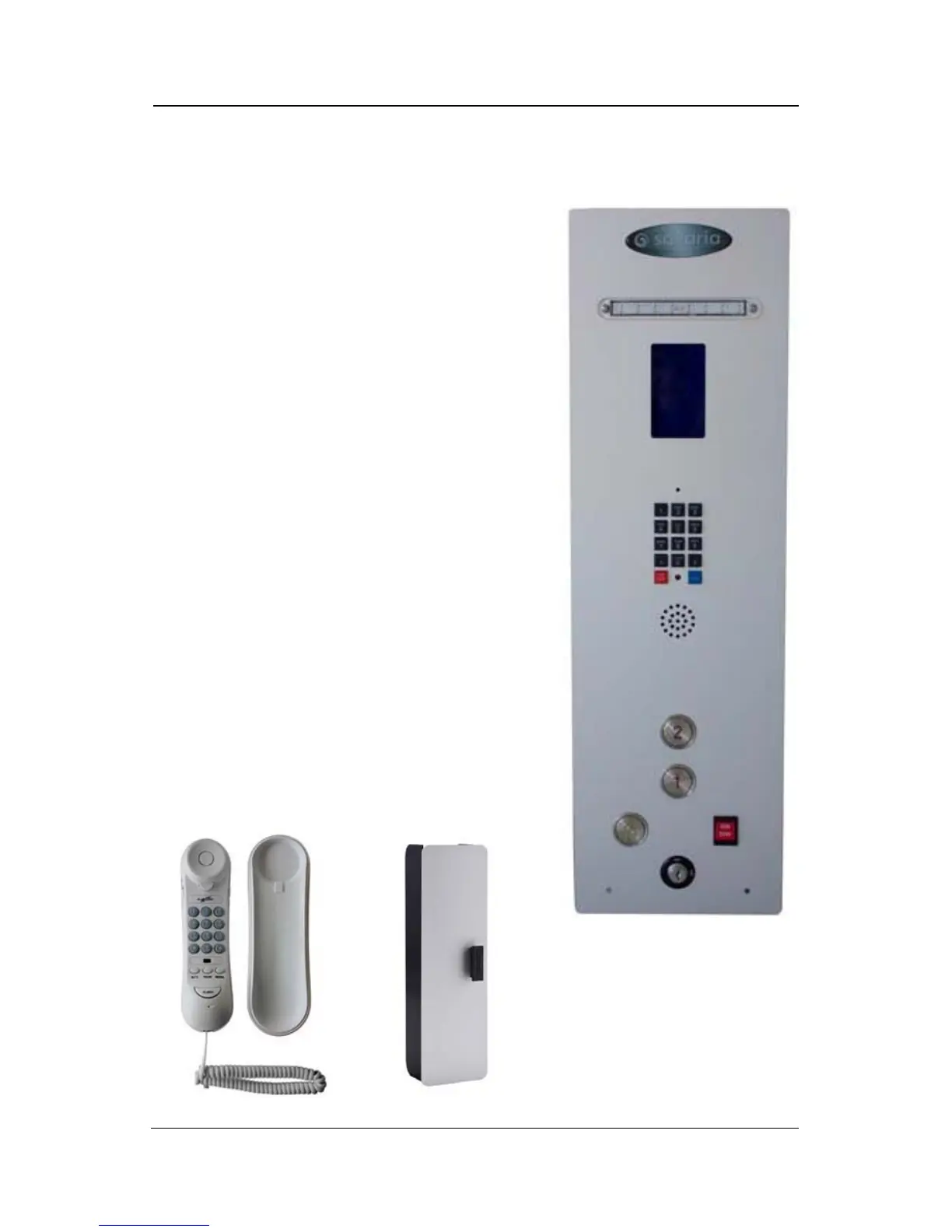
1 Cab Key Switch (Figure 1-A)
The key switch turns the cab controls ON and
OFF. It is provided to limit the use of the
elevator to authorized persons only.
2 Cab Operating Panel Buttons (Figure 1-B)
Automatic control panel buttons facilitate the
UP/DOWN movement of the cab between
landings. Once the selected landing button is
pressed, the cab will automatically move to the
landing. The cab will stop when the selected
landing is reached.
3 Alarm Button (Figure 1-C)
This button can be pressed at any time to sound
the alarm in case of an emergency.
4 Run/Stop Button (Figure 1-D)
This button can be used at any time to stop the
cab and activate the alarm buzzer.
5 Keypad Phone (Figure 1-E)
For units that have a keypad phone, it will be on
the COP. For units that have a standard phone, it
will located in the phone box (see below).
Figure 1: Sample COP
A
B
C
D
E
Figure 2: Standard Phone and Phone Box



 To Next Page