19
Repeat playback
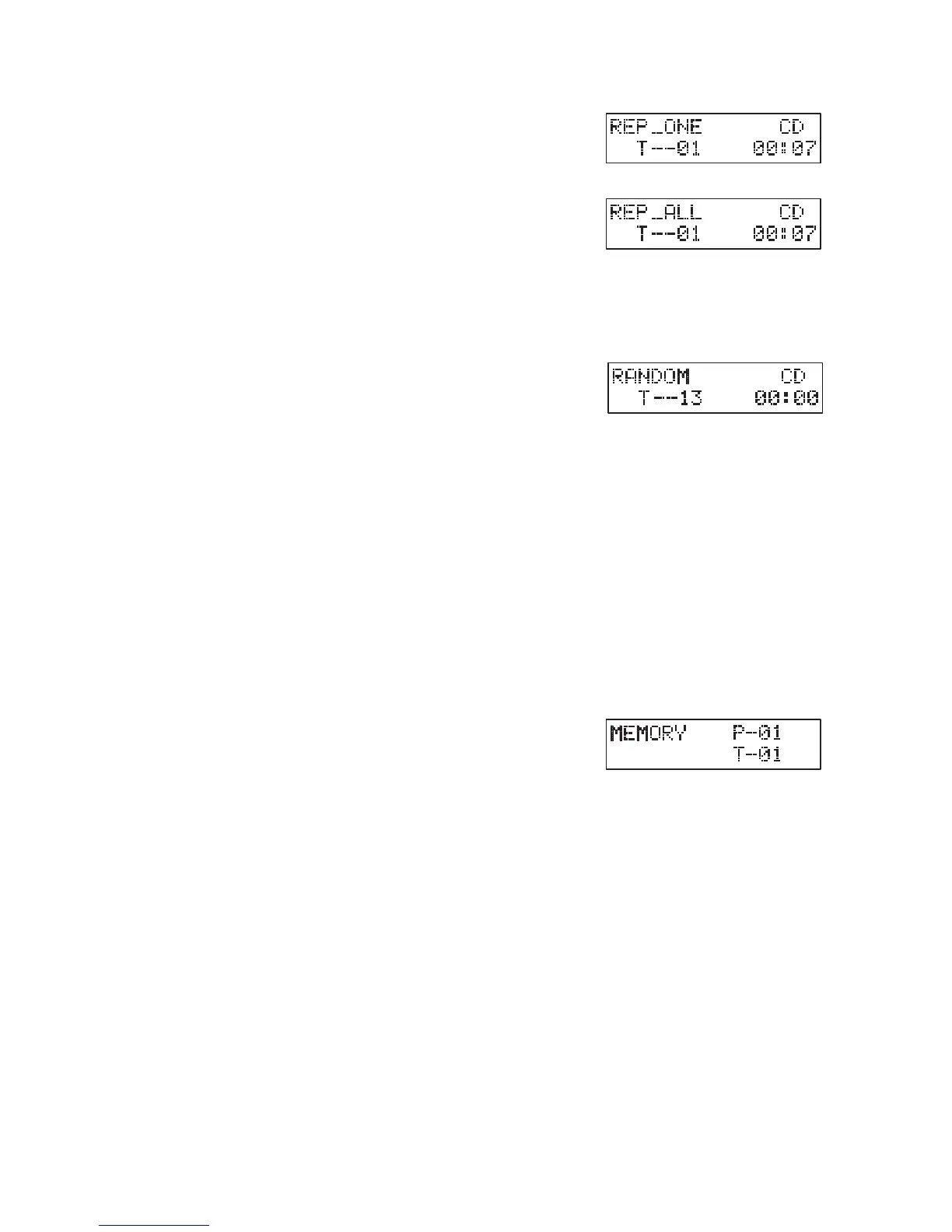
1. During stop or playback mode, press REPEAT
once on the remote control, “REP_ONE” will
show on the display. The CD will play the
current track repeatedly.
2. Press REPEAT twice, “REP_ALL“ will show
on the display. The CD will play all tracks
repeatedly.
3. Press REPEAT once more again, the REPEAT function will turn off
Random playback
All tracks on the disc can be played in a random
order.
1. During playback mode, press RANDOM on the
remote control. The “RANDOM” indicator will show on the display.
All tracks will be played randomly.
2. Press I◄◄ I ►► to playback the next random track.
3. After all the tracks have played once, the playback will stop
automatically.
4. To cancel random playback, press RANDOM during RANDOM
playback. Normal playback will resume.
Programme setting
User can program up to 32 tracks in CD mode or 64 tracks in MP3 in any
desired order. Programme mode is activated while in STOP mode.
1. Press MEMORY to enter programme mode.
2. Press I◄◄ I ►► to select the track that you
want to preset.
3. Press MEMORYtocornrmthetrack.
4. Repeat steps 2-3 to programme more tracks. Once it is completed,
press SCAN/►/II to start playback of the programmed tracks.
Programme cancel
Press ■ twice, or open the disk tray and close it again to erase the memory.
Intro playback
During playback mode
• During playback mode,press INTRO on the remote control. The
“INTRO”indicatorwillshowonthedisplay.Theunitwillplaytherst10
seconds of each track.
• Press INTRO on the remote control again to resume normal playback.
repeat playback
1. During stop or playback mode,press REPEAT once on the
remote control, “REP_ONE”will show on the display. The
CD will play the current track repeatedly.
2. Press REPEAT twice, “REP_ALL“ will show on the display.
The CD will play all tracks repeatedly.
3. Press REPEAT once more again, the REPEAT function will
random playback
All tracks on the disc can be played in a random order.
1. During stop or playback mode, press RANDOM on the
remote control. The “RANDOM” indicator will show on the
display. All tracks will be played randomly.
2. Press
to playback the next random track.
3. After all the tracks have played once, the playback will stop
automatically.
4. To cancel random playback, press RANDOM during
RANDOM playback. Normal playback will resume.
programme setting
User can program up to 32 tracks in CD mode or 64 tracks in MP3 in any desired order.
Programme mode is activated while in STOP mode.
1. Press MEMORY to enter programme mode.
2. Press
to select the track that you want to preset.
3. Press MEMORY
4. Repeat steps 2-3 to programme more tracks. Once it
is completed, press SCAN/
to start playback of the
programmed tracks.
programme cancel
Press twice, or open the disk tray and close it again to erase the memory.
intro playback
During playback mode
t During playback mode,press INTRO on the remote control. The “INTRO” indicator will show
on the display. The unit will play the rst 10 seconds of each track.
t Press INTRO on the remote control again to resume normal playback.
24
repeat playback
1. During stop or playback mode,press REPEAT once on the
remote control, “REP_ONE”will show on the display. The
CD will play the current track repeatedly.
2. Press REPEAT twice, “REP_ALL“ will show on the display.
The CD will play all tracks repeatedly.
3. Press REPEAT once more again, the REPEAT function will
random playback
All tracks on the disc can be played in a random order.
1. During stop or playback mode, press RANDOM on the
remote control. The “RANDOM” indicator will show on the
display. All tracks will be played randomly.
2. Press
to playback the next random track.
3. After all the tracks have played once, the playback will stop
automatically.
4. To cancel random playback, press RANDOM during
RANDOM playback. Normal playback will resume.
programme setting
User can program up to 32 tracks in CD mode or 64 tracks in MP3 in any desired order.
Programme mode is activated while in STOP mode.
1. Press MEMORY to enter programme mode.
2. Press
to select the track that you want to preset.
3. Press MEMORY
4. Repeat steps 2-3 to programme more tracks. Once it
is completed, press SCAN/
to start playback of the
programmed tracks.
programme cancel
Press twice, or open the disk tray and close it again to erase the memory.
intro playback
During playback mode
t During playback mode,press INTRO on the remote control. The “INTRO” indicator will show
on the display. The unit will play the rst 10 seconds of each track.
t Press INTRO on the remote control again to resume normal playback.
24
repeat playback
1. During stop or playback mode,press REPEAT once on the
remote control, “REP_ONE”will show on the display. The
CD will play the current track repeatedly.
2. Press REPEAT twice, “REP_ALL“ will show on the display.
The CD will play all tracks repeatedly.
3. Press REPEAT once more again, the REPEAT function will
random playback
All tracks on the disc can be played in a random order.
1. During stop or playback mode, press RANDOM on the
remote control. The “RANDOM” indicator will show on the
display. All tracks will be played randomly.
2. Press
to playback the next random track.
3. After all the tracks have played once, the playback will stop
automatically.
4. To cancel random playback, press RANDOM during
RANDOM playback. Normal playback will resume.
programme setting
User can program up to 32 tracks in CD mode or 64 tracks in MP3 in any desired order.
Programme mode is activated while in STOP mode.
1. Press MEMORY to enter programme mode.
2. Press
to select the track that you want to preset.
3. Press MEMORY
4. Repeat steps 2-3 to programme more tracks. Once it
is completed, press SCAN/
to start playback of the
programmed tracks.
programme cancel
Press twice, or open the disk tray and close it again to erase the memory.
intro playback
During playback mode
t During playback mode,press INTRO on the remote control. The “INTRO” indicator will show
on the display. The unit will play the rst 10 seconds of each track.
t Press INTRO on the remote control again to resume normal playback.
24


 To Next Page
 Loading...