Need help?
Do you have a question about the Scansonic R3 and is the answer not in the manual?
Guidelines for safe placement, handling, and cleaning of the radio unit.
Cases requiring the radio to be disconnected from power.
Statement regarding technical data accuracy and reservation of changes.
Steps to connect the radio to a power source.
Instructions for switching on and scanning for DAB stations.
Guide to navigating and selecting DAB radio stations.
Details on accessing information like signal strength and radio text.
Instructions for tuning and operating the radio in FM mode.
Explanation of different display information available in FM mode.
How to connect external audio sources via AUX input.
Using the mute and snooze features for the radio and alarm.
Procedure for setting the radio alarm.
Instructions for setting the automatic shut-off timer.
Advanced functions including manual tuning and system reset.
 General
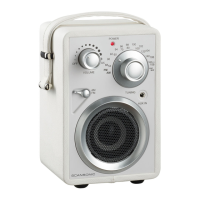
| Radio type | Portable |
|---|---|
| Tuner type | Analog |
| FM band range | 87.5 - 108 MHz |
| PLL synthesizer | - |
| Supported radio bands | DAB+, FM |
| Bass reflex | Yes |
| RMS rated power | - W |
| Number of built-in speakers | 1 |
| Subwoofer driver diameter (imperial) | 3.5 \ |
| Product color | Black, Red |
| Input voltage | 110-220 V |
| Apple docking compatibility | Not supported |
 Weight and Dimensions
| Depth | 140 mm |
|---|---|
| Width | 190 mm |
| Height | 110 mm |


 To Next Page