- 20 -
www.SCEPTRE.com
SCEPTRE A32 Series User Manual
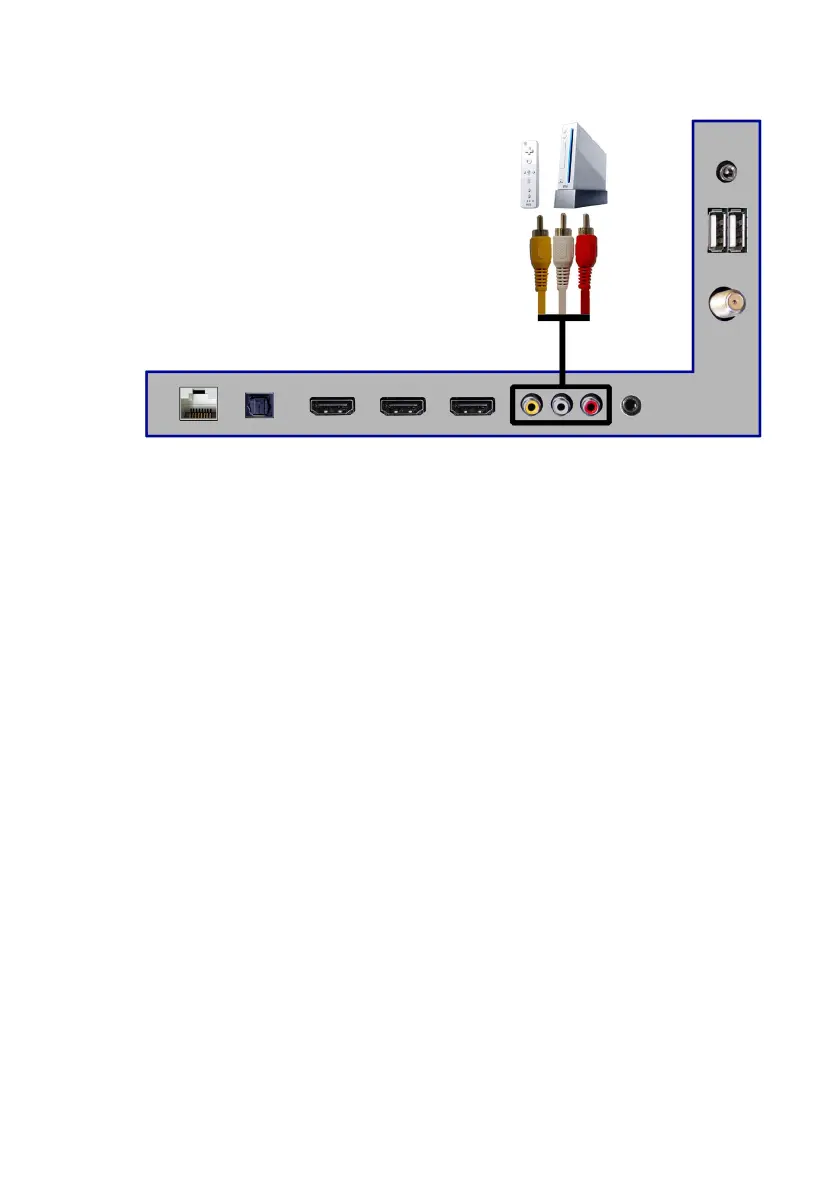
Connecting Wii™ with Composite …
1. Make sure the power of Android TV and your Wii™ is turned off.
2. Obtain a Yellow Video Cable. Connect the Yellow Video connector to both
your Wii™ and AV’s Green Video connector port on the back side of your
Android TV.
3. Obtain a RCA Audio Cable. Connect the white color connector to both your
Wii™ and AV’s white connector port on the back side of your Android TV.
4. Connect the red color connector to both your Wii™ and AV’s red connector
port on the back side of your Android TV.
5. Turn on the Android TV and your Wii™.
6. Use the remote control’s source button or the source button on the Display to
switch to AV.
Please Note:
• Make sure to read your Wii™ installation guide for further
information.
• This source shares audio jacks with Mini-YPbPr.


 To Next Page