030M001100 5VDC/0.5A
CONNECTIONS
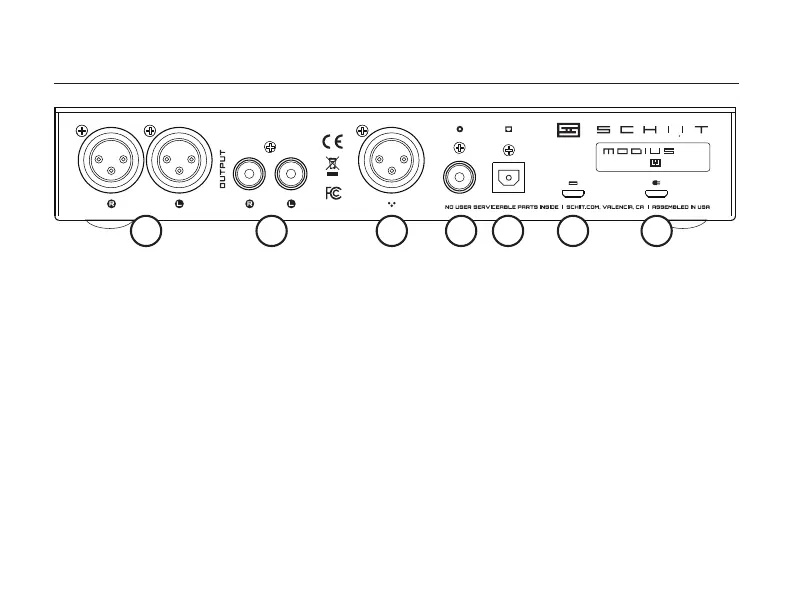
1 Balanced Analog Outputs. Connect to your
balanced-input amp or preamp using XLR cables.
2 RCA Analog Outputs. Connect to your amp or
preamp with RCA cables.
3 AES Digital Input. Connect to an AES digital
source with an XLR digital balanced cable.
4 Coaxial Digital Input. Connect a coaxial digital
source, using an RCA cable, 75 ohm preferred.
5 Optical Digital Input. Connect an optical source
to the optical input jack, using a Toslink cable.
6 USB Data and Power Input. Connect a USB
source using a USB micro cable (supplied).
1 2 3 4 5
7 Power Input. Connect a 5V power source to this
if you need external power. See “Operation.”
OPERATION
If you’re using Modius as a USB only DAC, you
don’t need to connect the Power Input. Just
connect it to your computer with the supplied
USB Micro cable and you’re set.
If you’re using the other digital inputs, and
you’re NOT using USB, you need Power Input.
Connect the supplied USB wall-wart with the
supplied USB Micro cable to provide power for
the other inputs. Modius won’t work without
power, and power comes from USB.
6 7


 To Next Page