View lock audit information
Audit information for each lock can be viewed from anywhere with the
ENGAGE mobile app.
Audit information is stored and viewed from the ENGAGE cloud
database. If the lock has been congured to connect to the Wi-Fi
network, audit information will be uploaded to the ENGAGE cloud
database daily. If the lock has not been congured to connect to a Wi-Fi
network, you must rst connect to the lock with the ENGAGE mobile app
and select “Update Door File” or “Get Audits.”
1. iOS: Select “Locks” from the tab bar at the bottom of the screen.
Android: Select “Manage Locks” from the menu.
2. Select the desired lock.
3. Under “Lock Audits,” select “Display Activity.”
L To see basic information related to access history, use the Activity
view. To view the results of the built in diagnostic test or for
troubleshooting related to Wi-Fi connectivity or other issues, use the
Diagnostics view.
Invite others to assist with administrative duties for
your site
1. iOS: Select “My Team” from the tab bar.
Android: Select “My Team” from the menu.
2. Select the “+” icon in the upper right corner.
3. Enter the email address, rst name, last name and role of the
person you wish to invite.
• Administrator: The most trusted administrative access role. The
Administrator can perform all duties within the ENGAGE web and
mobile applications.
• Manager: Same administrative privileges as an Administrator but
cannot invite or remove other Managers or Administrators.
• Operator: The most limited access. An operator can only connect
to locks to send updates or perform diagnostics.
4. Select “Save.”
Factory Default Reset (FDR)
A Factory Default Reset (FDR) will return the NDE lock settings to the
original settings as shipped from the factory. Removes congurations,
databases, and requires the lock to be re-captured. A FDR will not
remove the lock from your ENGAGE account.
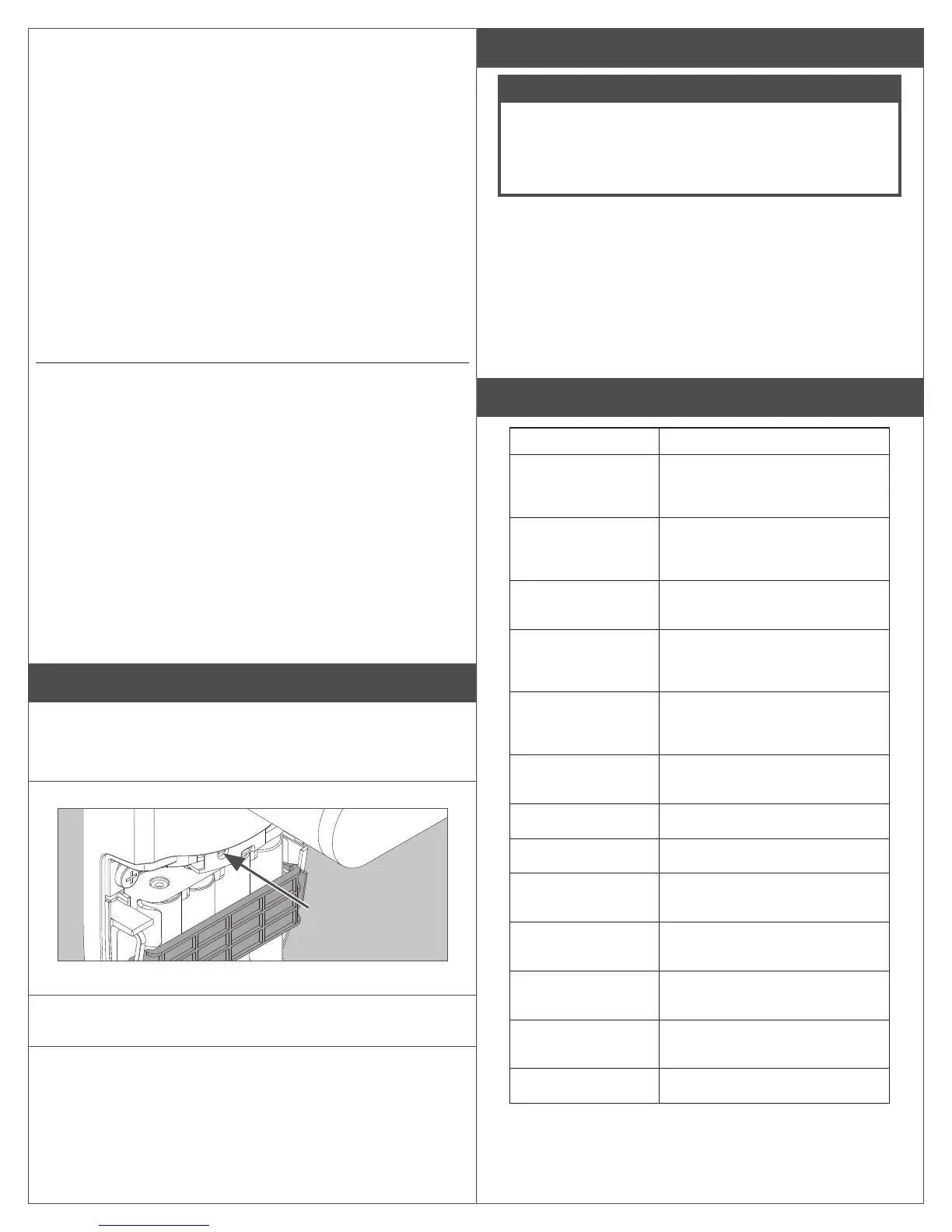
A Press and hold the FDR button for ve seconds.
The NDE will blink green two times and beep two times.
B Turn the inside lever three times within 20 seconds.
LED will blink red and lock will beep with each turn.
C Reinstall battery cover, then use the app to capture
your lock.
Turn the inside lever. The NDE will communicate on BLE looking for your
mobile device for two minutes after each lever turn in FDR mode.
If you have used this NDE in Construction Access Mode, you must
complete a FDR before it will communicate on BLE.
Safe Mode
CAUTION
Enter Safe Mode only as a last resort! Entering Safe Mode
causes the lock to load a special version of rmware
intended to be immediately updated. Once in safe mode,
commission the lock with the ENGAGE mobile application
and perform a rmware update.
To put the lock in Safe Mode:
1. Remove power from the lock.
2. Turn the inside lever 2 times.
3. Apply power to the lock.
4. When the inside LED begins to blink, turn and hold the inside lever.
5. Press the FDR button 3 times to begin Safe Mode process.
The lock will not perform the Safe Mode process if the above
sequence is not completed within 10 seconds.
Lock Indicator Guide
Indicators Meaning
Fast ash green x5 Construction Access Mode:
Successful creation of master or
user construction credential.
Steady green until
timeout (20 seconds)
Construction Access Mode: Waiting
for credential after presentation of
master construction credential.
Long ash red x2 Manual/Construction Mode: Timed
out to construction mode.
Flash red x9 followed
by the respective
credentials indication
Low battery.
Flash green x1 +
beep, then ash red
x1 upon relock
Access granted.
Flash green x2 +
beep
Already unlocked.
Flash red x12 + beep In secure privacy/lockdown mode.
Flash red x1 + beep Access denied
Flash alternate green-
red x5 + beep
Freeze/Lockdown mode.
Flash red x4 + beep Access denied. Outside credential
schedule.
Flash red x1 per
second
BLE communicating.
Fast ash green x3 +
fast beep x3
Power On self test - Pass.
Fast ash red x3 Power Off self test - Fail.


 To Next Page