EasyManua.ls Logo

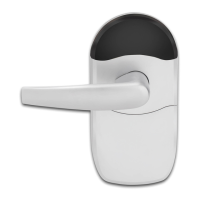
Schlage NDE80 - User Manual

Schlage NDE80
29 pages
Print Icon
To Next Page IconTo Next Page
Loading...
This is a printable pdf document.
For Smartphone-friendly
interactive version,
tap or click here.

Questions and Answers

  • F
    Felicia RodriguezSep 9, 2025
    What to do if my Schlage Microphone system denies valid cards?
    • M
      Martha CookSep 9, 2025
      If your Schlage Microphone system denies all valid cards after enrolling credentials and access files, it may be because the DPS (door position sensor) is not calibrated or there are activation or expiration date errors. Calibrate the DPS using your mobile application, as the DPS must be calibrated before access is granted. Also, check the User Credential information in the app to ensure you have enrolled the “User Configuration” with the proper access Activation and Expiration dates. The NDE clock is set automatically with the first communication to the Engage mobile application.
  • J
    Jennifer AguilarAug 23, 2025
    How to perform a Factory Default Reset (FDR) on Schlage NDE80?
    • K
      Kristen AlvarezAug 23, 2025
      If you can’t perform a Factory Default Reset (FDR) on your Schlage lock, the motor/RTX cable might be disconnected, or the pins could be bent or cut. To fix this, hold down the FDR button until you see two green blinks and hear two beeps; then turn the inside lever three times. Also, check that all connections are correct and that no wires are cut or pins are bent.
  • K
    kleinemilyAug 25, 2025
    What to do if Schlage NDE80 Locks batteries are hot?
    • T
      Thomas ThomasAug 25, 2025
      If the batteries in your Schlage lock are hot, it is likely that a battery was reversed. Replace all batteries, ensuring the polarity matches the markings on the battery pack. Confirm proper insertion and measure the battery voltage as 6 VDC or more when new.
  • J
    Joshua CannonAug 27, 2025
    Why Schlage Locks cannot connect to the device with BLE?
    • S
      Samantha PhillipsAug 27, 2025
      If you are unable to connect to your Schlage lock via BLE and do not see the expected lock name, there might be a couple of reasons: * The battery cover must be installed to avoid Tamper Mode before BLE will work. * The tamper switch could be broken. To resolve this: * Install the battery cover. * Turn the outside lever, and check for the name again by hitting the “+” sign in the application.
  • A
    Alexis TaylorAug 27, 2025
    What to do if Schlage NDE80 fails power up self test?
    • Y
      yreedAug 28, 2025
      If your Schlage lock fails the power-up self-test, indicated by three red LED blinks and beeps instead of three green ones, it could be due to the motor not being connected or low battery voltage. Check all three plug connections and inspect the door wires for cuts or pinches. Measure the battery voltage; it must be over 6 VDC.
  • K
    Kaylee GonzalezAug 29, 2025
    Why Schlage Locks has no beeps or blinks when battery pack is connected?
    • C
      Cesar DixonAug 29, 2025
      If there are no beeps or blinks when you connect the battery pack to your Schlage lock, it could be due to an improper plug connection, pinched wires or bent pins, or a reversed or dead battery. Check all wiring and the three plugs. Ensure the battery voltage is 6 VDC or better with new batteries.
  • C
    Cheryl MercadoSep 18, 2025
    Why is Schlage Microphone system NDE crooked in the door?
    • H
      Haley HerreraSep 18, 2025
      To correct a Schlage Microphone system NDE that is crooked in the door preparation, center and square the lock in the door preparation.
  • B
    Bonnie HarrisSep 18, 2025
    What to do if latch is not retracting on Schlage Microphone system?
    • R
      Rebecca AlvaradoSep 18, 2025
      If the latch is not retracting when access is granted on your Schlage Microphone system, the latch tail assembly may be incorrect. Check installation step 2.
  • A
    ann94Sep 7, 2025
    What to do if Schlage Microphone system batteries are hot?
    • J
      Jacqueline RileySep 8, 2025
      If the batteries in your Schlage Microphone system are hot, it could be because a battery is reversed. Replace all batteries, ensuring correct polarity as indicated by the markings in the battery pack. Verify the battery voltage is 6 VDC or more when new to confirm proper insertion.
  • J
    jesse64Sep 4, 2025
    Why is my Schlage Microphone system Wi-Fi connection intermittent?
    • S
      Shannon MathewsSep 4, 2025
      An intermittent Wi-Fi connection on your Schlage Microphone system may be due to your phone’s Wi-Fi being turned off or being too far from a Wi-Fi access point, or walls blocking the Wi-Fi signal. Use your smartphone Wi-Fi settings to confirm the desired SSID is present and listed under “Choose a Network” on your phone. Use the same SSID, password, and user name to connect your smart phone to the Wi-Fi to confirm the Wi-Fi is functioning at this door location. Make sure the SSID assigned to the lock is at the nearest access point with a strong signal.

Summary

Installation Preparation

Install Latch

Detailed instructions for installing the lock latch mechanism.

Tools and Notes

Lists required tools and important considerations for installation.

Door Thickness Adjustment

Install Strike and Magnet Tray Assembly

Guide for installing the strike plate and magnet.

Install Outside Assembly

Prepare Outside Assembly

Steps to ready the exterior part of the lock for installation.

Install Inside Assembly

Install Backplate and Route Ribbon Cable

Steps for mounting the backplate and managing the ribbon cable.

Align Assembly and Install on Door

Guidance on correctly positioning and securing the lock on the door.

Install Spring Cage

Steps to install the spring cage mechanism.

Install Inside Escutcheon

Instructions for fitting the interior cover plate.

Cylinder and Lever Installation

Lever Removal

Steps to detach the lock levers.

Handle Types

Describes installation for different types of lock handles.

Install Batteries

Install Batteries into Battery Holder

Details on inserting batteries into the holder.

User Guide

Lock Testing and Power On Self Test

Steps for initial lock testing and self-diagnostic.

Standalone;Construction Access Mode

Information on operating the lock without the app.

Getting Started with ENGAGE Mobile Application

Guide to setting up and using the mobile app.

Commission a Lock

Steps to connect and configure the lock with the ENGAGE app.

Add User and Enroll Credential

Process for adding users and their access credentials.

View Lock Audit Information

Invite Others to Assist

Steps to grant administrative access to other users.

Factory Default Reset (FDR)

Procedure to reset the lock to its original settings.

Safe Mode

Instructions for entering a special firmware update mode.

Lock Indicator Guide

Explains the meaning of different LED and beep patterns.

Troubleshooting

Common Troubleshooting Issues

Solutions for frequent issues encountered during installation or operation.

UL Statements

Customer Service

Contact information for support.

FCC Statement

Schlage NDE80 Specifications

General IconGeneral
BrandSchlage
ModelNDE80
Power SourceBattery
Key OverrideYes
CompatibilityStandard doors
Audit TrailYes
KeywaySchlage C
SecurityANSI/BHMA Grade 1
Weather ResistanceYes
TypeElectronic Lock
Battery TypeAA
ConnectivityWi-Fi
FinishVarious
HandingField-reversible
Backset2-3/4"
StrikeANSI Strike
OperationKeypad or App
ProgrammingVia App
Door Thickness1-3/8" to 1-3/4"

Related product manuals