26
8
M
Matching the Interface Module with Carriages and Guideway
The interface modules are configured in factory and matched to the individual
MINISCALE PLUS carriages and guideways.
Important:
Carriage, rail and interface module are delivered as a set/ system and must be
assembled as such.
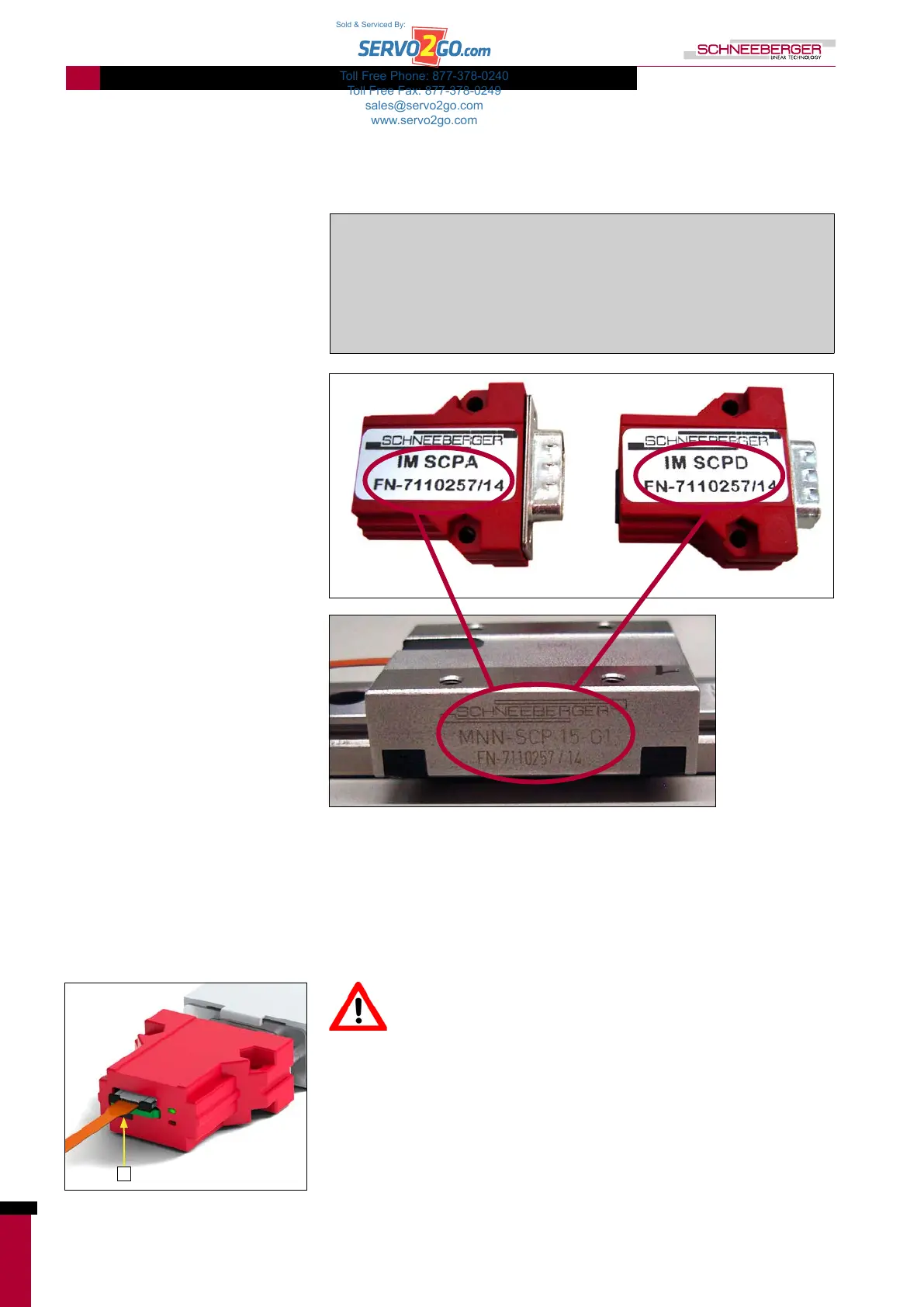
The serial number of the carriage is quoted on the label of the interface
module.
The carriage number is printed on the label of the interface module (analog on the left, digital on the right).
8.1. Adjustment Procedure for a Replacement DIGITAL Interface Module
Adjustment is only necessary for a subsequent delivery of the digital
interface module! Calibration by the customer is not possible for the
analog interface module.
Procedure
• Switch on MINISCALE PLUS
• Press and hold the calibration button (M)
• Move the carriage slowly along the entire rail length 3 to 4 times.
• Release the calibration button
• Reset MINISCALE PLUS (= switch it off and on again)
• Drive the carriage along the guideway and make sure the green LED lights up
• If the red LED lights up, the adjustment procedure must be repeated
M: Calibration button
Toll Free Phone: 877-378-0240
Toll Free Fax: 877-378-0249
sales@servo2go.com
www.servo2go.com
Sold & Serviced By:


 To Next Page