- 12 -
Création cooking
3.
Starting a Création cooking
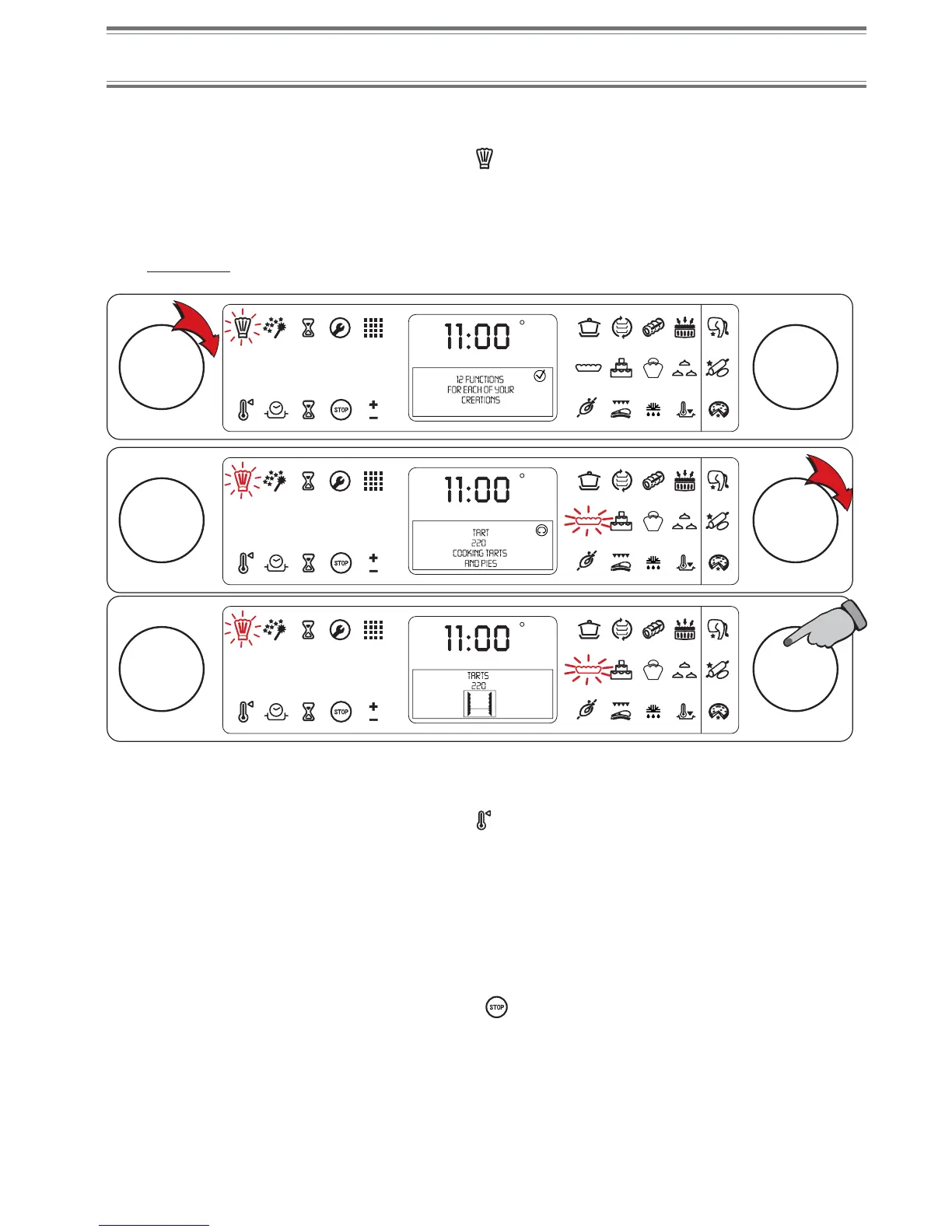
When you start with a cold oven, place your dish inside it and proceed with the following settings:
• Turn knob A towards the right to light symbol
,
• Turn knob B to light the symbol corresponding to the chosen cooking mode,
• Press knob B to confirm the function.
If you want to start with a pre-heated oven, wait until pre-heating is complete (a series of beeps will sound) and then
place your dish in the oven.
For example:
Adjusting the temperature
The temperature is pre-set for each cooking. You can adjust the temperature at any time during cooking:
• Turn knob A towards the right to light symbol
,
• Turn knob B until the display indicates the desired temperature,
• Press knob B to confirm the adjustment.
NOTE
During the pre-heating process, the display indicates PREHEATING IN PROGRESS and during cooking, COOKING
IN PROGRESS.
Turning off the oven
When cooking is complete, turn knob A towards the left to display STOP and then press knob A or B.
You may also turn knob A towards the right until icon is displayed and then press knob A or B.
NOTE
If you wish to use the "Dough proving", "Meringues", "Defrosting", "Low temperature", "Reheating" and "Pasteurisation"
functions when the oven is hot, a series of beeps sounding and the display of OVEN TOO HOT means you cannot
place your dish in the oven.
Turn your oven off and try again later.
C
F
AB
C
F
AB
C
F
AB
4.
5.


 To Next Page