- 16 -
Succès cooking
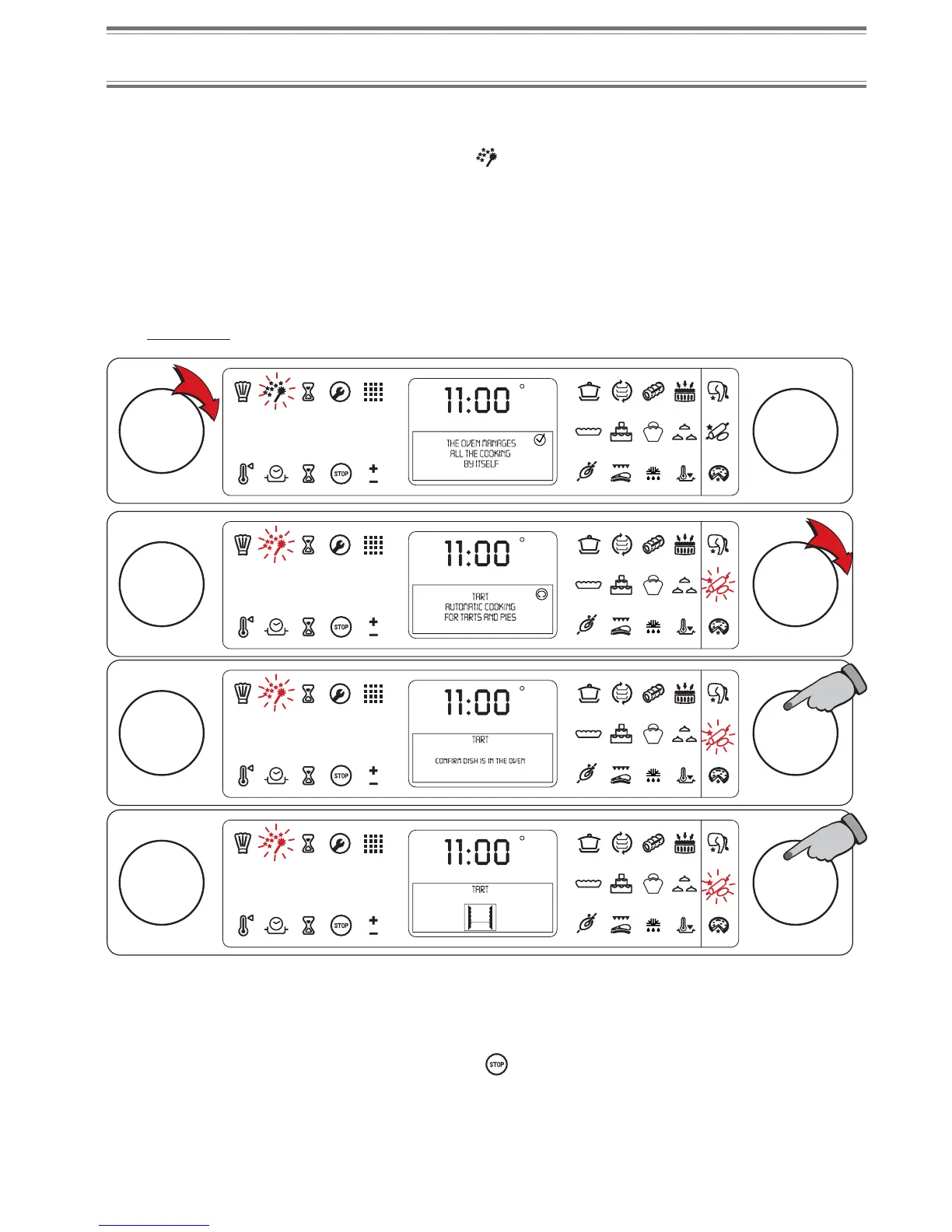
Starting a Succès cooking
The Time and Temperature parameters are pre-set (cannot be modified).
• Turn knob A towards the right to light symbol
,
• Turn knob B until the symbol corresponding to the chosen cooking mode lights up,
• Press knob B to confirm the function,
• Confirm your dish is in the oven by pressing knob B, when your oven asks you to: CONFIRM DISH IS IN THE
OVEN.
For all Succès cooking of meat and cakes and pastries, you will be asked to confirm immediately.
For "Pizza" and "Pizzeria" cooking, you will be asked to confirm after preheating is complete.
For example:
C
F
AB
C
F
AB
C
F
AB
C
F
AB
Turning off the oven
A series of beeps sounding indicates cooking is complete and the display indicates COOKING COMPLETED.
Turn your oven off. Turn knob A towards the left to display STOP and then press knob A or B.
You may also turn knob A towards the right until icon
is displayed and then press knob A or B.
NOTE
If you do not turn the oven off manually, the same will only turn off when it has cooled down sufficiently.
3.
4.


 To Next Page