Getting Started With the SEL-3355-2 Date Code 20180212
8
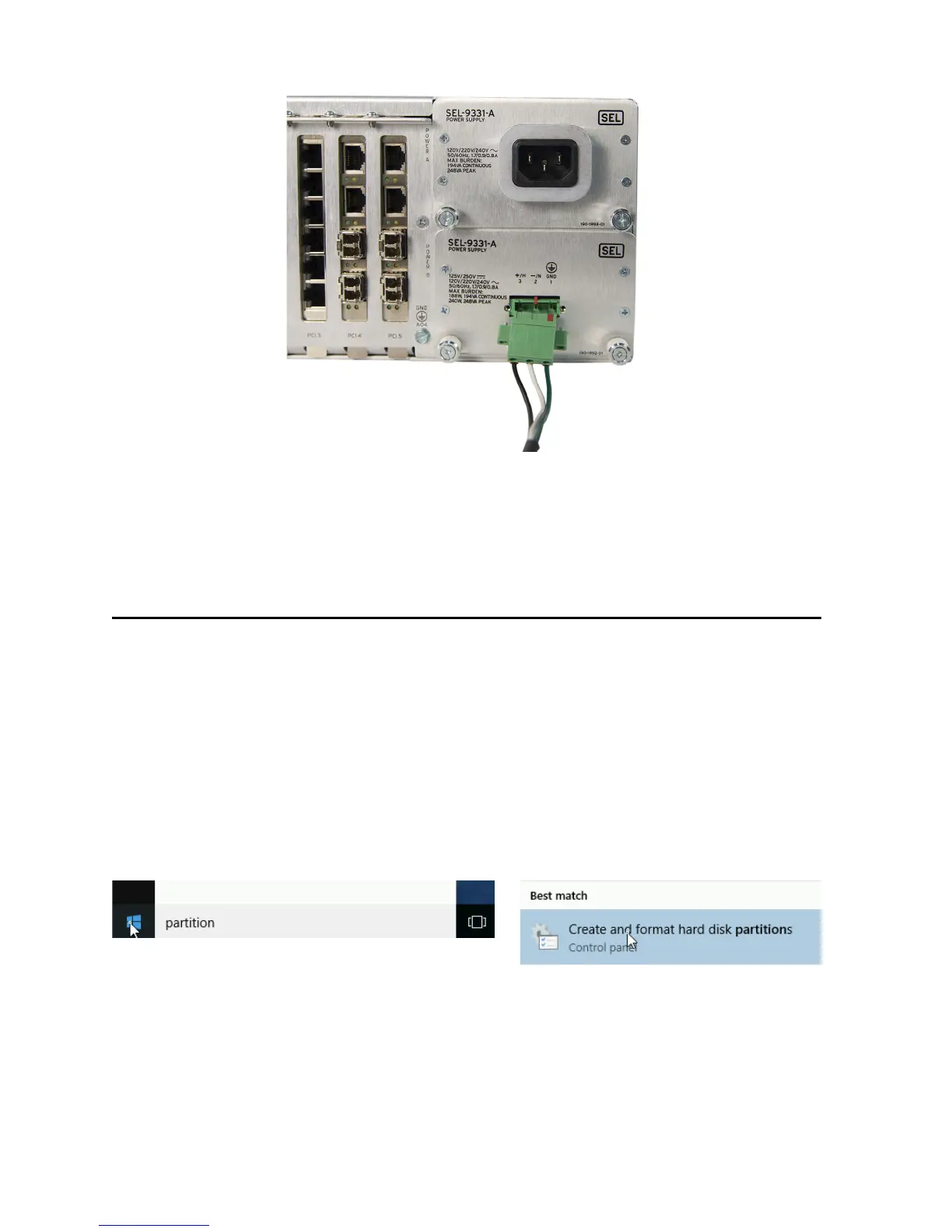
Figure 14 Attach Compression Terminal Block to Power Supply
Step 8. If you ordered dual power supplies, connect the second power supply the same way as the first.
Note: The second power supply can have different input requirements than the first (see Figure 13
for location of supply ratings).
First Boot
For SEL-3355-2 With Microsoft Windows
Upon initial startup, the SEL-3355-2 may require you to perform some initial steps to configure Microsoft
®
Windows
®
operating system, such as creating a user account and password. After completing the Windows
configuration, you should check the system to verify that all SATA drives are installed and correctly configured,
and all hardware and software packages are installed.
Hard Drive(s)
Perform the following steps to verify that the correct number of SATA drives is installed:
Step 1. Click the Start button, type partition in the box, and then select Create and format hard disk
partitions.
Step 2. The User Account Control may ask for confirmation that you understand the program being
launched can be used to make changes to the computer. Click Ye s, or provide your account
credentials, to indicate that it is acceptable to proceed.
Step 3. In the lower pane of the Disk Management window, verify that there is a disk listed (e.g., Disk 0,
Disk 1, etc.) for each SATA drive ordered with the system.


 To Next Page