33
kilometers.
Push the OK button to set the LAP distance value.
7. The Console will go to the Power-Up Mode screen with the user selected.
Changing Incline Levels
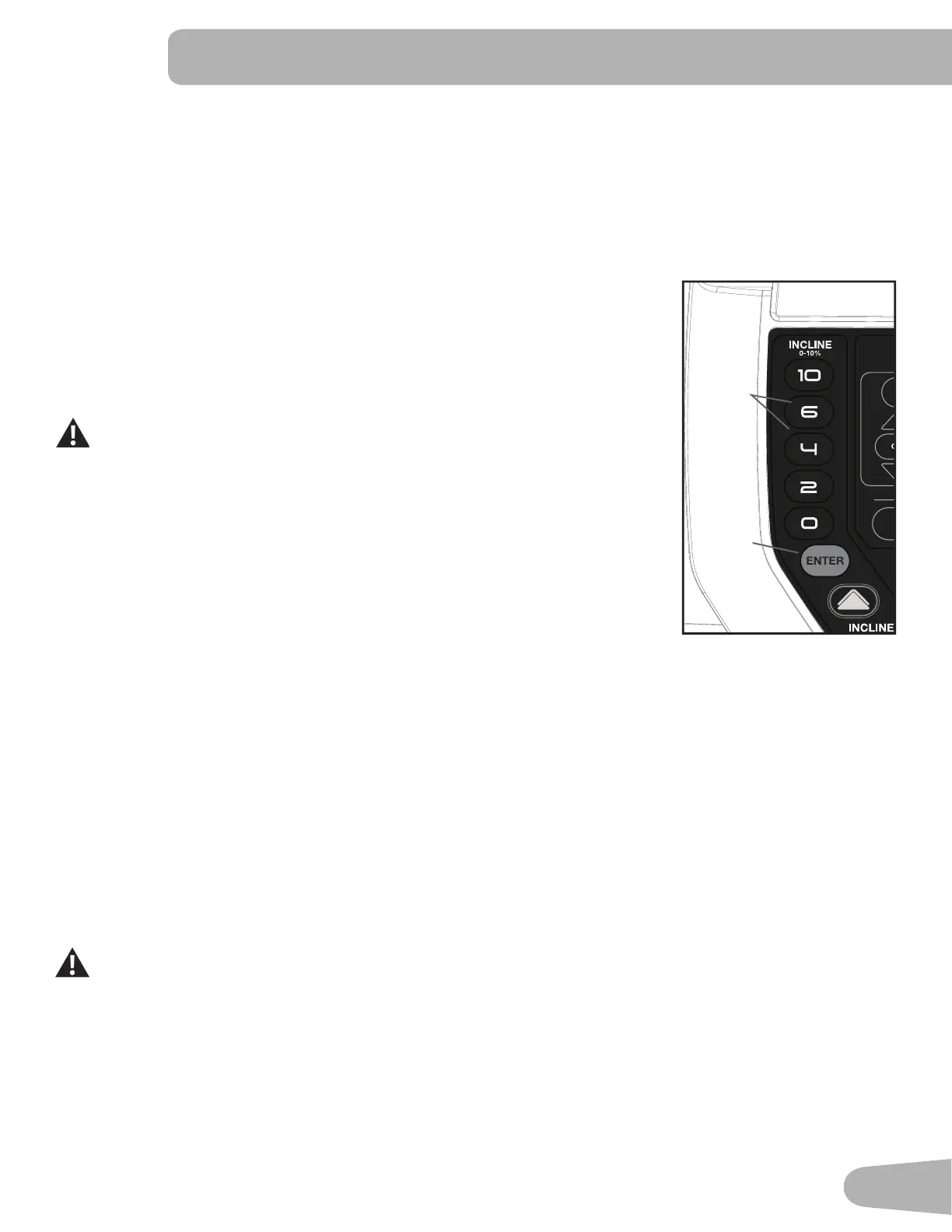
Push the Incline Level Increase() or Decrease() buttons to change the incline angle
of the Deck at any time with the Safety Key installed. To rapidly change the incline level
push the desired Pre-Set Incline Button, and then the Incline Enter Button. The Deck will
adjust to the selected incline level.
Note: After a Pre-Set Incline Button is pushed, the Incline Enter Button must be
pushed within 5 seconds.
Be sure the area below the machine is clear before lowering the Deck. Fully
lower the Deck after each workout.
Exercise on this machine requires coordination and balance. Be sure to
anticipate that changes in belt speed and incline angle of deck can occur
during workouts, and be attentive in order to avoid loss of balance and
possible injury.
Besurethattheworkoutspaceyouareutilizinghasadequateheightclearance,taking
intoconsiderationtheheightoftheuserandthemaximumheightofthefullyinclined
Deck.
Changing Speed Levels
Push the Speed Level Increase() or Decrease() buttons to change the Belt Speed at any time in a workout program.
To rapidly change the Speed level push the desired Pre-Set Speed Button, and then the Speed Enter Button. The Walking
Belt will adjust to the desired speed.
Note: After a Pre-Set Speed Button is pushed, the Speed Enter Button must be pushed within 5 seconds.
Pro le Programs
Theseprogramsfeaturedierentinclineanglesofthedeckandbeltspeedsbasedonthemaximumandminimumspeed
supplied by the user. The user can also manually adjust the incline and speed values at any time during a workout. The
ProleProgramsareorganizedintoCategorybuttons(Manual,Goals,WeightLoss,Intervals,HeartRate,andCustom).
EachProleProgramhas16segmentsallowingforavarietyofworkouts.
During a Pro le Program workout, the Console will make an audible beep when the next segment of the
workout occurs. Be prepared for changes in Incline and Speed with each segment change.
Select a type of workout by pushing the appropriate Workout Category button. The Console will display the first Profile
Program Workout within that Category. Push the Workout Category buttontoselectthedesiredProleProgramWorkout
from the Category of Workouts.
4
2
6
8
10
Max
100%
Anaerobic
80-90%
Aerobic
70-80%
Fat Burn
50-70%
Warm Up
50%
USER
PROGRAMS
MANUAL GOALS
WEIGHT
LOSS
INTERVALS
HEART
RATE
CUSTOM
HR ZONES
MANUAL GOALS WEIGHT LOSS INTERVALS HEART RATE CUSTOM
Pre-Set
Incline
Buttons
Incline
Enter
Button


 To Next Page