7
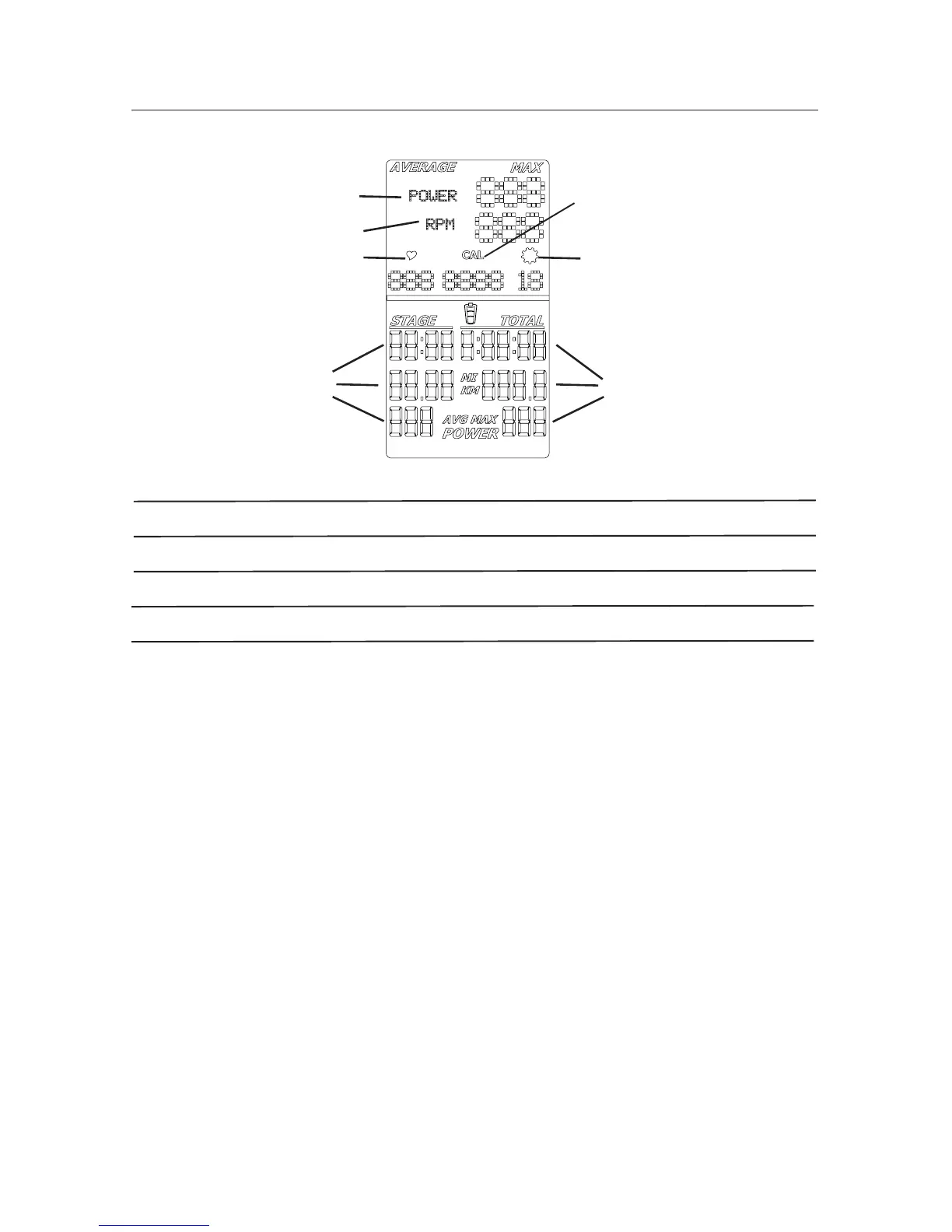
LCD Display Data
*Note: To change the measurement units to English Imperial or metric, refer to the User Setup section of this
manual.
Power
The power display field shows the Power in Watts that you are producing at the current
resistance level (1 horsepower = 746 Watts). Power data only shows if there is a power
sensor installed on the bike.
RPM
The RPM display field shows the current pedal revolutions per minute (RPM).
A1 POWER (Watts)
A2 RPM (Cadence)
A3 Heart Rate
A4 STAGE Time, Distance and Power
A3
A6
A5
Features
A5 Cal (Calories)
A6 Gear Indicator
A7 TOTAL Time, Distance and Power
Heart Rate
The Heart Rate display field shows the heart rate in beats per minute (BPM) from the heart
rate monitor (HRM). When the computer is ON, it will search for a signal from a compatible
heart rate strap for 30 seconds. During this time, the HR symbol will flash. If a strap is
detected, the HR symbol will stop flashing and remain solid while displaying the HR. If
a signal is not detected after 30 seconds, the HR symbol will disappear. The user may
reinitiate the pairing process by pressing and releasing the ON/OFF button.
A1
A2
A4
A7



 To Next Page