SCIFIT • Scientic Solutions for Fitness • SCIFIT • Scientic Solutions for Fitness • SCIFIT
6
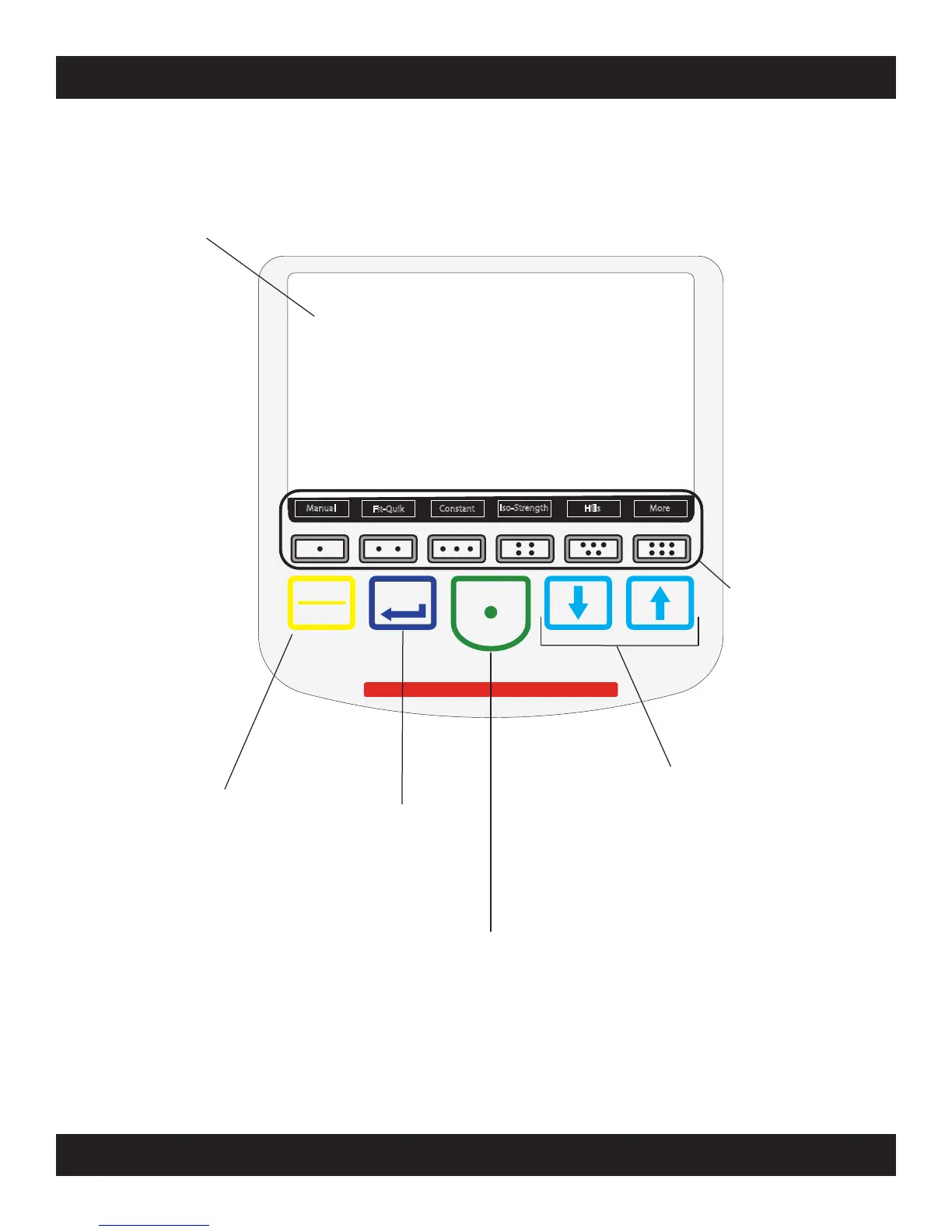
KEYPAD FUNCTIONS
SCIFIT • Scientific Solutions for Fitness • SCIFIT • Scientific Solutions for Fitness • SCIFIT
WARNING! Heart rate monitoring systems may be inaccurate.
Over exercise may result in serious injury.
If you feel faint or pain stop exercising immediately
Quick
Start
Enter
Pause
Clear
Manual
Fit-Quik
Constant
Hills
Iso-Strength
More
Work Level Status Screen:
The LCD screen gives the user a
progressive real-time view of the
current workout categories for
the program selected.
Pause/Clear:
The [Pause/Clear] key will
pause a workout at anytime,
then provide three options
(see Program Instructions)
Enter:
The [Enter] key
is used to verify
selected values for
workout parameters.
Quick Start:
This key provides a one-touch
“Quick Start” into a workout
with preset parameters.
“Quick Start” also begins a
program after all information
has been entered.
Up and Down Arrows:
These keys increase or
decrease values of the
workout parameters.
Prole
Selection Area:
Allows the user up to
10 different workout
proles to chose.



 To Next Page