SCIFIT • Scientic Solutions for Fitness • SCIFIT • Scientic Solutions for Fitness • SCIFIT
20
PROGRAM INSTRUCTIONS
LCD Dimming Feature
Both the ISO1000 and ISO7000 bike machines have a special dimming feature that can help save battery
power when pedaling below 25 RPMs. This feature can be enabled or disabled in the “Set-Up” mode screen.
Note: Once activated the screen will get very dim when the user pedals below 25 RPM, but the
machine will operate normally.
The following steps explain the process to enable or
disable the “Dimming Feature”
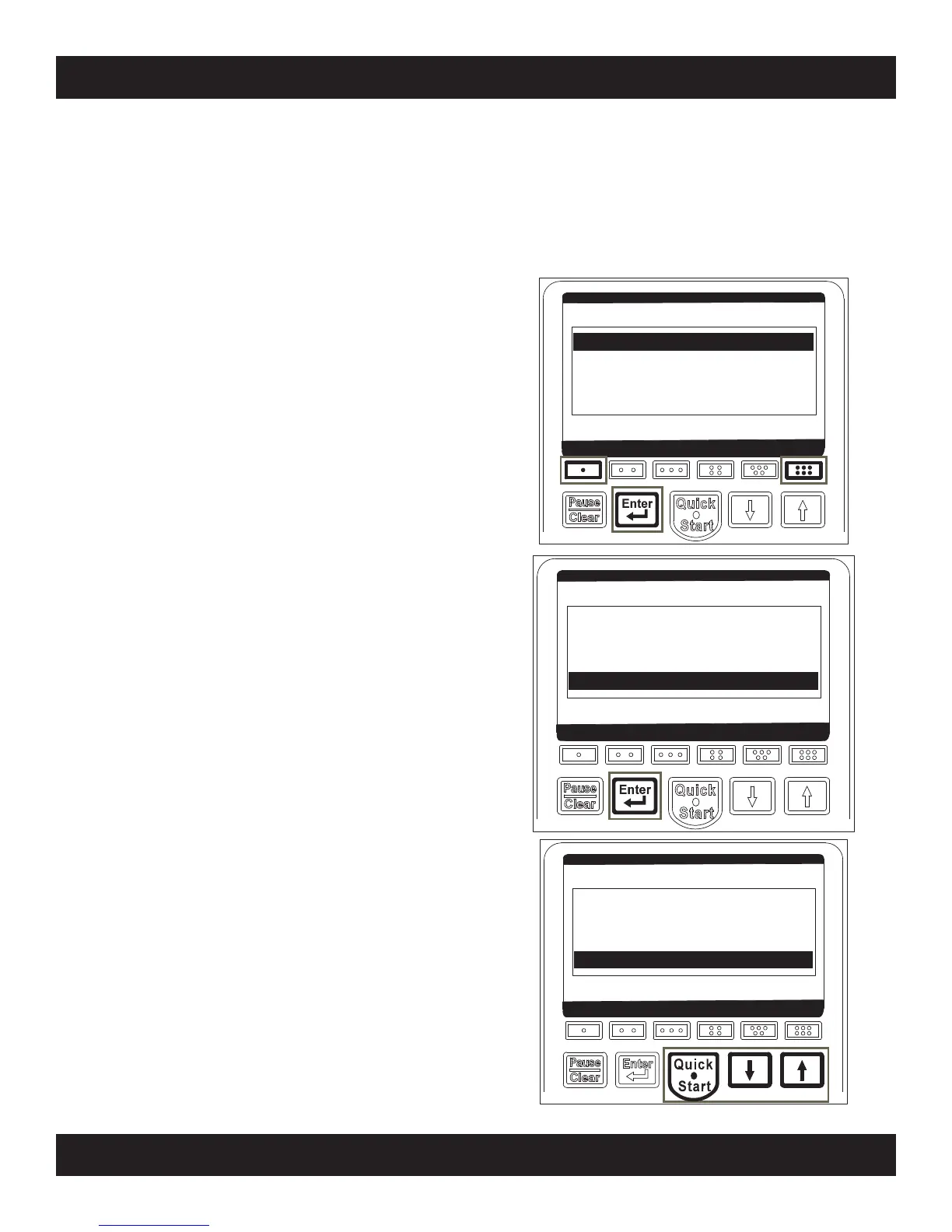
Step 1:
Press the [One Dot], [Six Dot] and [Enter] keys at
the same time until the category “Overlay” is seen.
Step 2:
Press the [Enter] key until the category
“LCD Dimming” is highlighted.
Step 3:
Press either the [Up] or [Down] arrow keys to
“Enable” or “Disable” the feature, then press the
[Quick Start] key to save.
Overlay Rotary
Model PRO1
Language English
USE ARROWS TO ADJUST
Paused Timeout (Seconds) 15
Utilization (Hours) 0.00
LCD Dimming ENABLED
USE ARROWS TO ADJUST
Paused Timeout (Seconds) 15
Utilization (Hours) 0.00
LCD Dimming ENABLED
USE ARROWS TO ADJUST



 To Next Page