Cube Size Adjustment
The cube size can be adjusted by changing the
amount of freeze cycle time. This is done by a
button press sequence.
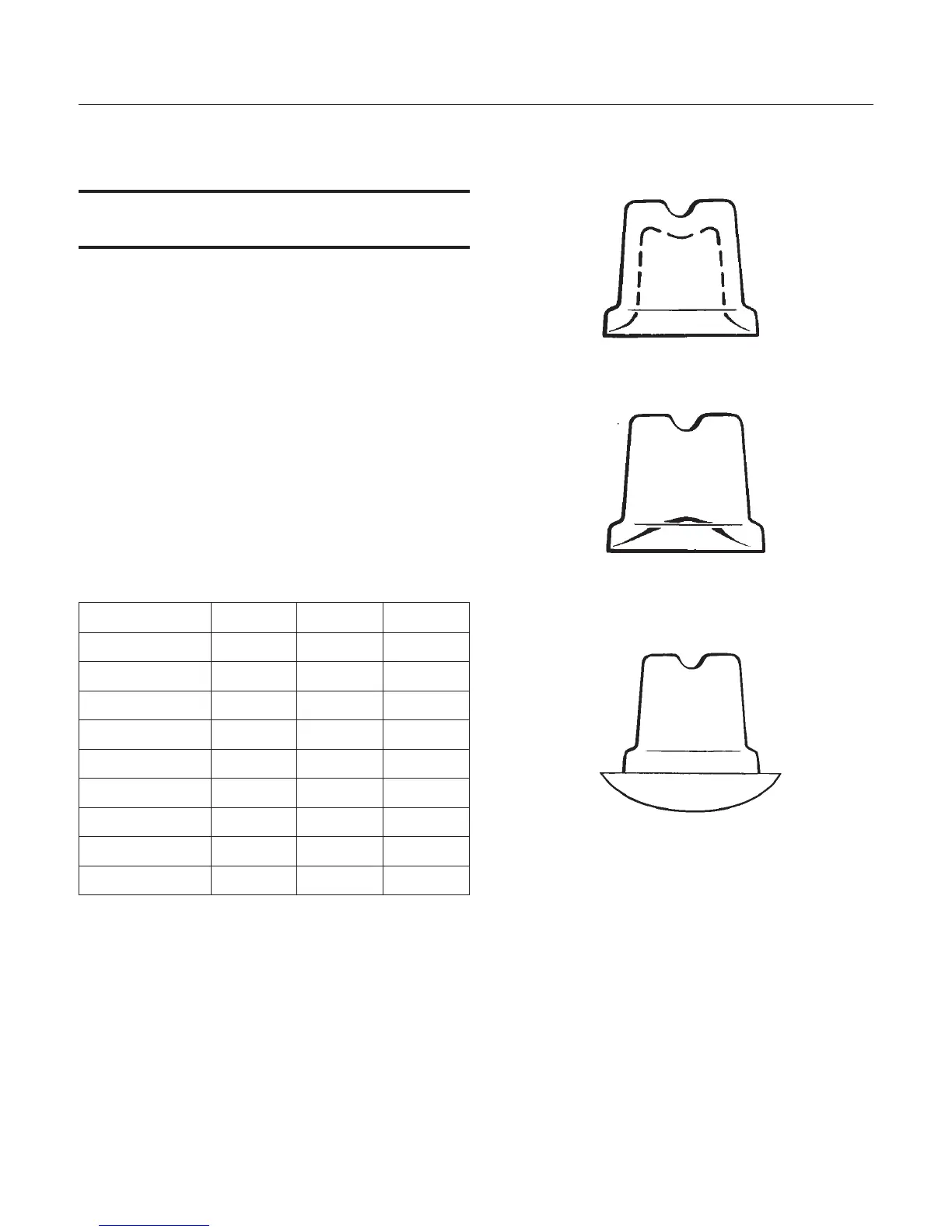
Note: There is only one correct cube size. See the
illustrations.
To adjust cube size:
1. Shut the machine off: If it's off on bin full press
and release the On/Off button once, switching the
Ice Making light off. If the machine is making ice
hold the On/Off button in until the Ice Making light
is off.
2. Press and hold the Clean button for 5 seconds
(light on), then release (light out)
3. Push and release the On/Off button.
4. View the lights. Compare to the table below.
Cube Size Change Table
On/Off Water Clean
Default off off off
Add 1 minute on off off
Add 2 minutes off on off
Add 3 minutes off off on
Add 4 minutes on on on
- 1 minute flash off off
- 2 minutes off flash off
- 3 minutes off off flash
- 4 minutes flash flash flash
5. Select the amount of change.
6. Push and release the On/Off button until the
correct light pattern is displayed.
7. Push and release the Clean button to select that
setting.
8. Push and release On/Off to return to ice making.
June 2010
Page 11
CU50
Service Manual
Too Small, Adjust Cycle Longer
Side Views of Cubes
Just Right
Too Large, Adjust Cycle Shorter



 To Next Page