Page 8 of 20
C. OPERATION
I. MAKING YOUR COFFEE
1. Switch on the appliance by pressing the Power ON/OFF button .
2. The appliance is in standby condition.
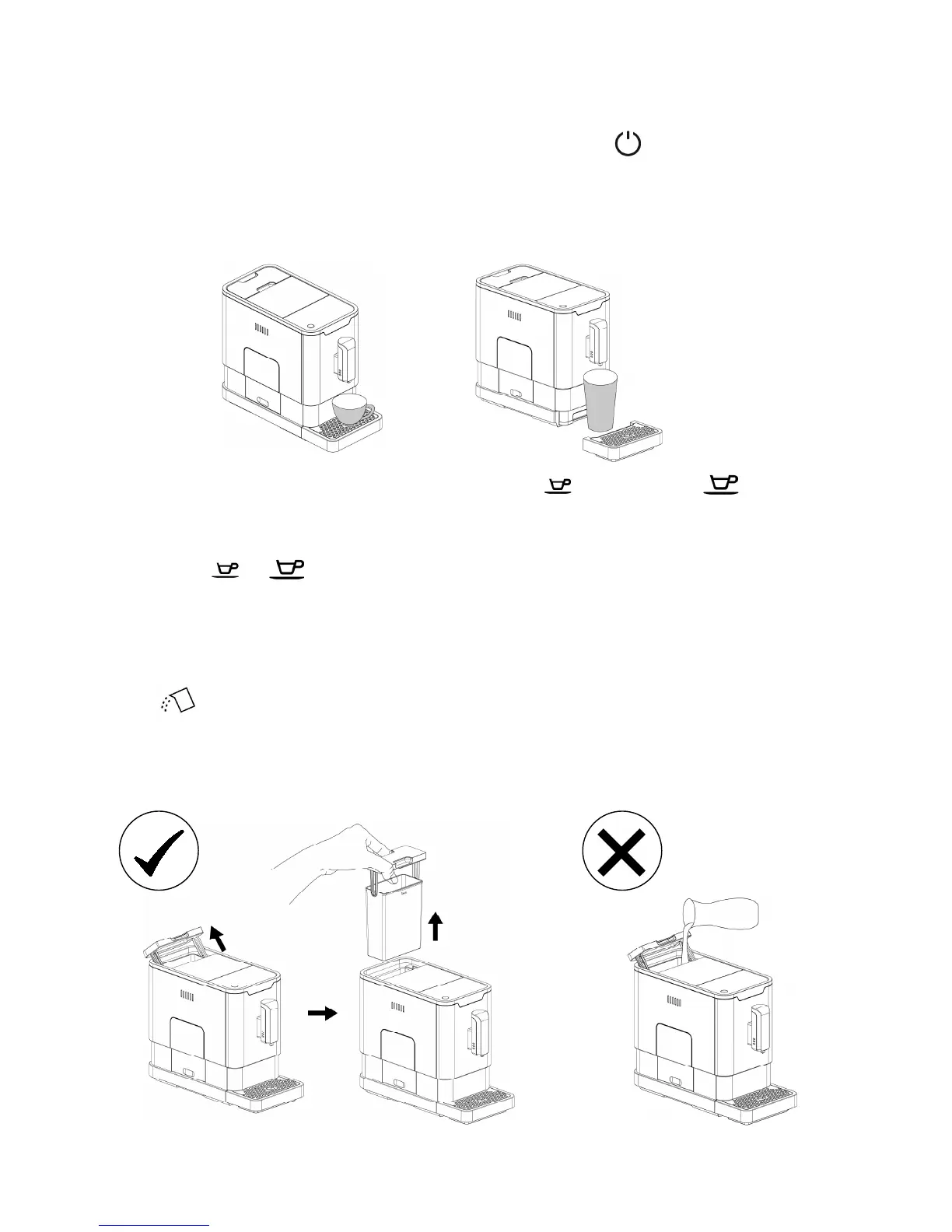
3. Place a cup under the coffee spout and adjust the height of the spout to fit the cup.
Depending on the size or height of the cup, remove the drip tray or adjust the position of
the drip tray as below:
4. According to your preference, press Espresso button
or Lungo button once.
5. The button will flash after pressed. It will then light up to indicate that the appliance is
preparing the coffee.
Note : Press or button anytime to stop brewing.
6. When the appliance resumes to standby condition, the coffee is ready to serve.
II. FILLING THE WATER TANK
When is flashing, water level in the water tank is too low and filling is necessary.
1. Use the integrated handle on the lid to lift the water tank.
Note: To prevent overflow of water from the water tank, do not fill water directly into the
container.


 To Next Page