MAN.200.EN--05--SDT200-user-manual-Eng.docx
Review measurements stored in the
SDT200
From the Measurement screen press the Enter key to access the Main Menu.
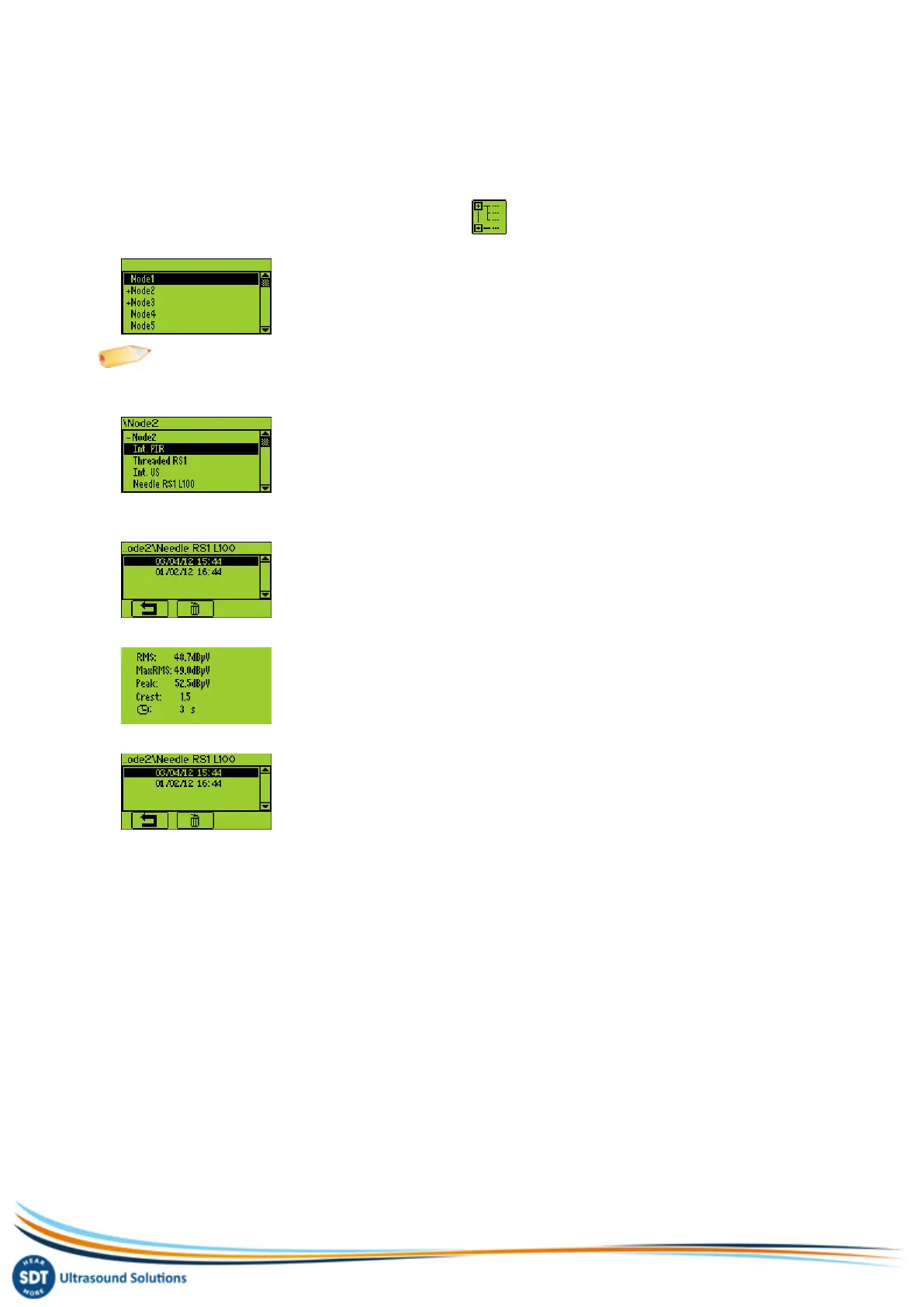
Use the arrow buttons to highlight the Node Tree icon:
Press the Enter button to display the list of memory locations:
Note: the “+” sign placed before a memory location means it contains recorded measurements.
Select the desired memory location using Up and Down arrow buttons. Expand the memory location using the
Right arrow button. The saved measurements are filtered regarding the sensor used:
Select the desired sensor using Up and down arrow buttons. Display the list of saved measurements by using the
Right arrow button. The data are filtered according to the recording time stamp:
Select a time stamp by using the Arrow Buttons, then and press the Enter button to visualize the data:
Press the F1 button to come back to the list of recording timestamps:
To delete a recording, select its timestamp using the Up and down arrow buttons and press the F2 button.
To come back to the measurement screen, press a few times the F1 button.


 To Next Page