MAN.200.EN--05--SDT200-user-manual-Eng.docx
Taking and storing an ultrasonic
measurement
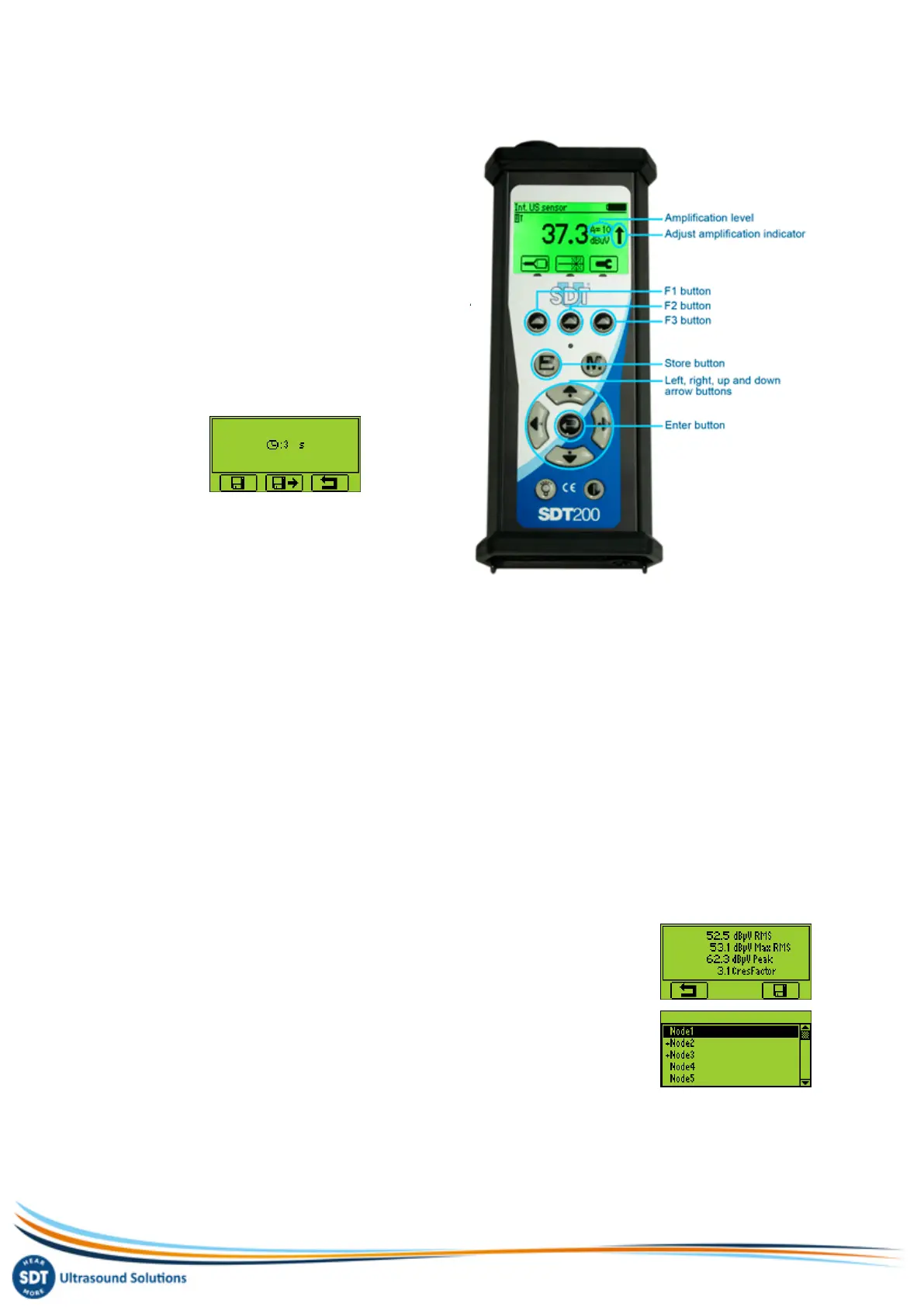
Select the desired ultrasonic sensor using the F1
button if necessary.
Set up amplification using Up and Down arrow
buttons, till the up and down amplification
adjustment indicators disappear .
Activate or deactivate the laser pointer using the F2
button.
Measurement settings
Press the F3 button to enter the measurement
settings menu.
Adjust the acquisition time using Up and Down
arrowbuttons.
If the acquisition time is set to 0 second, the RMS, Max RMS, Peak and Crest Factor are refreshed
every 250 milliseconds. This mode enables the operator to take data on the fly.
If the acquisition time is set at 1 second or more, the RMS, Peak and Crest Factor will be calculated
over the complete acquisition time. The Max RMS will be the highest sub RMS reached over the
complete acquisition time. Each sub RMS is calculated during 250 milliseconds. The maximum
acquisition time is 10 seconds.
Use the F1 button to save the settings as preferred configuration
Use the F2 button to load the settings associated to the preferred configuration
Use the F3 button to go back to the ultrasound measurement screen using the modified settings.
Note that the preferred configuration is reloaded at startup of the SDT200.
Getting data
Press the M button:
To freeze RMS and Max RMS values when the acquisition time is set to 0 second.
To start the acquisition when the acquisition time is set to 1 second or more.
At the end of the acquisition time, a screen detailing RMS, Max RMS, Peak
and Crest factor values, is displayed.:
Press the F3 button or the Store button to save the data (or the F1 button to
come back to the measurement screen without saving the data)
Then choose the desired memory location using the Up and Down arrow buttons
and confirm by pressing the Enter button.


 To Next Page