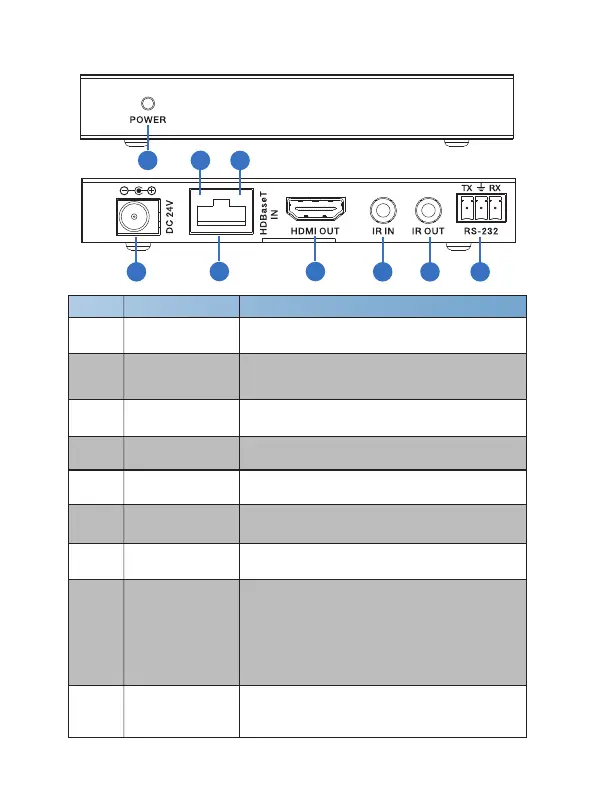
9. HDBT Receiver
3
4
1
Number Name Function description
POWER
This LED illuminates when the device is
connected with power supply.
2 DC 24V
Plug the 24V DC power supply into the unit.
(If the device connect to the matrix, the receiver doesn't
need local power supply due to POC from the matrix.)
3 HDBaseT IN
Standard HDBaseT signal input port. Connect
to Matrix HDBaseT output with a UTP cable.
4 HDMI OUT
HDMI output port. This slot is where you connect
the HDTV or monitor with HDMI cable.
5 IR IN
Channel 1 IR Receiver. Connect with Wideband
IR Rx.
6 IR OUT
Channel 2 IR Transmitter. Connect with
Wideband IR Tx.
7 RS-232
11/12
Connect to a PC or control system with phoenix
jack for transmission of RS-232 commands.
1
2
3 4
5 6 7
8 9
8
Connection Signal
Indicator Lamp
※Illuminate: The Transmitter and Receiver
are in good connection status.
※Flashing: The Transmitter and Receiver are
in poor connection status.
※Dark: The Transmitter and Receiver are not
connected.
9
Data Signal
Indicator Lamp
※Illuminate: The HDMI signal with HDCP.
※Flashing: The HDMI signal without HDCP.
※Dark: No HDMI signal.
Website: www.seada.co.uk E-mail: sales@seada.co.uk



 To Next Page