Rev. 2013.08.19 13
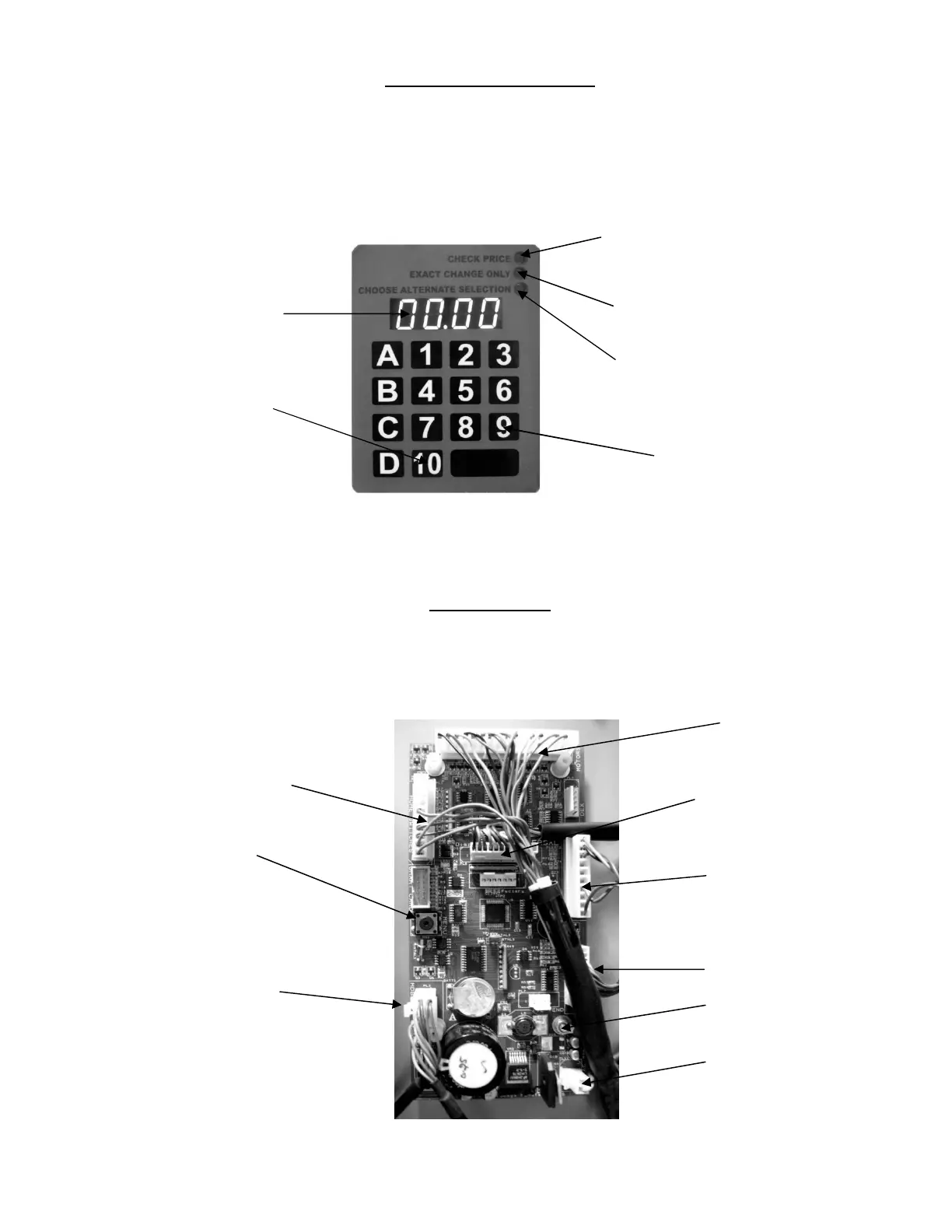
KEYPAD AND LED DISPLAY
The Keypad is touch sensitive. Light pressure will be necessary to activate each number or letter. The
Keypad is used by the customer to make their selection, and by the operator to set and test many
functions of the Office Deli. Note: The keypad and LED Display are 2 separate components, though
they appear as one streamlined piece.
Figure 13 - Keypad
The LED Display shows the customer the amount of money entered into the vendor, and the cost of
their selection. It shows the operator the Service Mode function for setting and testing the various
functions of the vendor.
PROGRAMMING
Unlock and open the Front Door to access the VMC, and enter Service Mode by pressing the
MENUS Button. (Fig. 14)
Figure 14 - MENUS Button
Previous in
Service Mode
Also displays
beverage
compartment
temperature in
standard mode
Next in
Service
Mode
LED Display
MENUS
Button
Payment Systems
Harness
Motors Home
Harness
Shelf Selection
Harness
When LED is on
check price and then
insert coins
When LED is on
Insert exact change
only for a vend
Display Harness
Refrigeration
Harness (AUX)
Keypad Harness
24 V Power
Harness
When LED is on the
customer must
choose alternate
selection
Ground Mounting



 To Next Page