
 Need help?
Do you have a question about the Seagate Backup Plus Ultra Touch and is the answer not in the manual?
Details the items included in the Seagate Backup Plus Ultra Touch package.
Lists the necessary hardware and operating system specifications for the drive.
Explains USB-C standards, bandwidth, and power management features.
Details the Micro B to USB-A cable provided with the drive.
Describes how to use the USB-C adapter for optimal transfer rates.
Step-by-step instructions for connecting the Seagate drive to a computer.
Details connecting the drive to a computer's USB-C or USB-A port.
Guides users on how to initiate the drive's setup.
Instructions for registering the Seagate Backup Plus Ultra Touch.
Steps for downloading and installing the Seagate Toolkit software.
Explains how to use Toolkit for password protection and encryption.
Guides on configuring Sync Plus for file mirroring and archiving.
Details how to optimize file copy performance using Toolkit.
Explains using Toolkit for optimization.
Covers choosing file systems, formats, and OS-specific procedures.
Instructions for safely ejecting the drive on Windows systems.
Steps to eject the drive from the Finder on macOS.
Specific steps to eject the drive from the desktop on macOS.
Covers security code errors and slow file transfers.
Addresses USB port, hub, and cable length issues.
Troubleshooting transfer errors and character limitations in filenames.
Troubleshooting missing drive icons on Windows and macOS.
Covers drive mounting, system requirements, and installation checks.
Information on China RoHS regulations and product compliance.
Information on Taiwan RoHS regulations and product compliance.
 General
| NVMe | - |
|---|---|
| Read speed | - MB/s |
| SSD capacity | 1000 GB |
| SSD form factor | 2.5\ |
| USB version | 3.2 Gen 1 (3.1 Gen 1) |
| USB connector | USB Type-C |
| Thunderbolt technology | No |
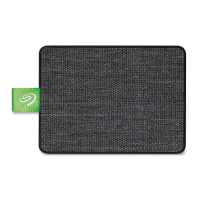
| Product color | Black |
| Housing material | Plastic |
| Protection features | Shock resistant |
| Mac operating systems supported | Mac OS X 10.12 Sierra, Mac OS X 10.13 High Sierra, Mac OS X 10.14 Mojave, Mac OS X 10.15 Catalina |
| Windows operating systems supported | Windows 10, Windows 7, Windows 8 |
| Package depth | 29.5 mm |
| Package width | 104.5 mm |
| Package height | 146 mm |
| Package weight | 131 g |
| Cables included | USB Type-C to USB Type-A |
| Master (outer) case width | 122 mm |
| Master (outer) case height | 109 mm |
| Master (outer) case length | 174 mm |
| Master (outer) case weight | 644 g |
 Weight and Dimensions
| Depth | 10 mm |
|---|---|
| Width | 55.5 mm |
| Height | 75 mm |
| Weight | 65 g |









 To Next Page