23
ENCAPSULATING
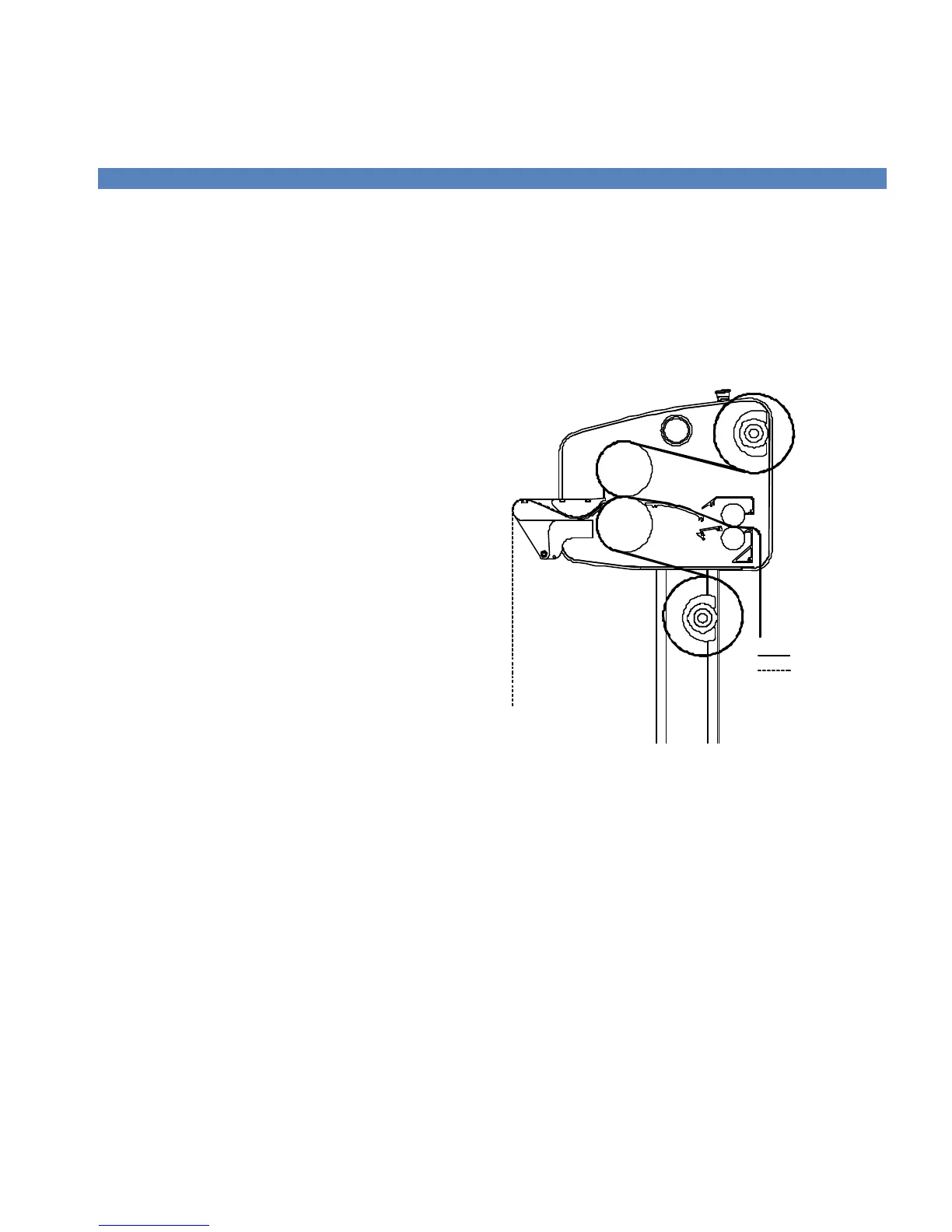
This process involves completely sealing an image
between two films. It is important to follow the
webbing instructions for films specific for your location.
MEDIA: INK JET, ELECTROSTATIC, AND
PHOTOGRAPHIC
FILMS:
-- -- -- Top Unwind: Heat-activated Laminate 3 – 5 Mil
____ Bott. Unwind: Heat-activated Laminate 3 – 5 Mil
LAMINATOR SETTINGS
CONTROL PANEL
Top Roller Temp: 205-215°F (96-102°C)
Bottom Roller Temp: 205-215°F (96-102°C)
Motor Speed Setting: 3-5 FPM (1-1.5 MPM)
WEBBING SETTINGS
Web Tension Top: Medium
Web Tension Bottom: Medium
Nip Setting: ‘0’
NOTE! Web the top laminate following the basic
procedures for webbing films w/o a release liner.
Film Path
Media Path
Figure 16. Webbing for Encapsulating



 To Next Page