Seaory S21 desktop card printer quick user guide
Excellent quality, Perfect service www.seaory.com
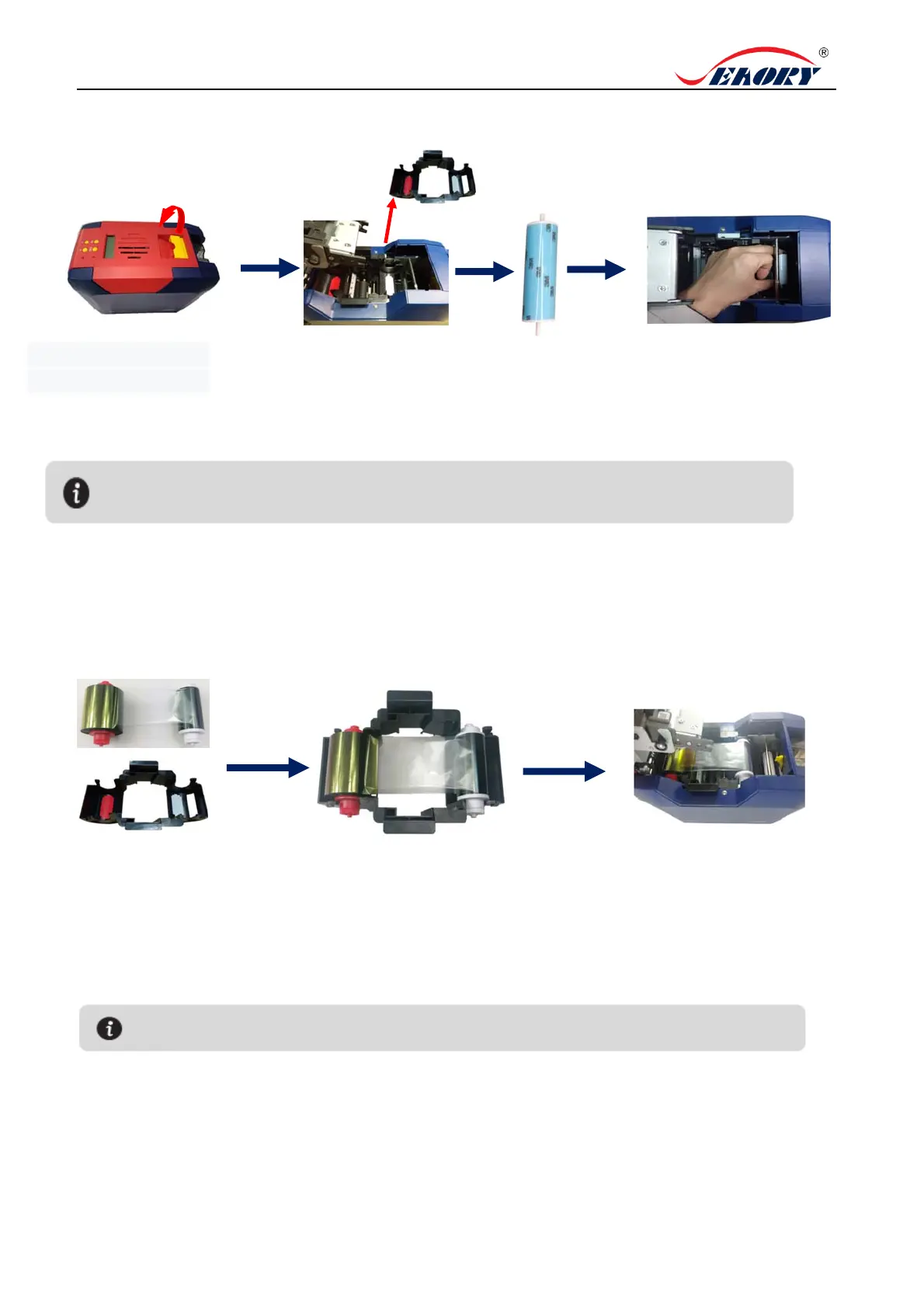
2. Cleaning Roller Installation
.
3. Ribbon Installation
4.Take the cleaning roller’s both
sides by hand. After pushing into
the mounting position, gently
press down.
2.Open upper cover, take
out the ribbon cartridge.
3. Remove 3M hyaline
layer on cleaning roller
surface.
The purpose of the cleaning wheel is to absorb the dust on the card and improve the
printing effect. Replace cleaning roller after every roll of ribbon use up.
1. Gently lift the upper
cover switch.
Ribbon cartridge
1. Open the upper cover, take
out the ribbon cartridge, install
the ribbon into the cartridge
according to the color direction.
2.Red roller supply with unused ribbon.
White roller supply with used ribbon.
3.
Take ribbon cartridge’s side, Red
roller close to the Back-end card exit
mouth, install the ribbon cartridge.
In order to ensure the normal use of the printer, please use Seaory original ribbon.



 To Next Page