Driving
●
If possible, do not wear gloves while driv-
ing. The system could interpret this as no
driving activity.
●
If driver intervention is requested on the
instrument panel display, immediately re-
sume control of the vehicle.
●
Always be prepared to adjust the speed
yourself.
Indications on the instrument panel
display
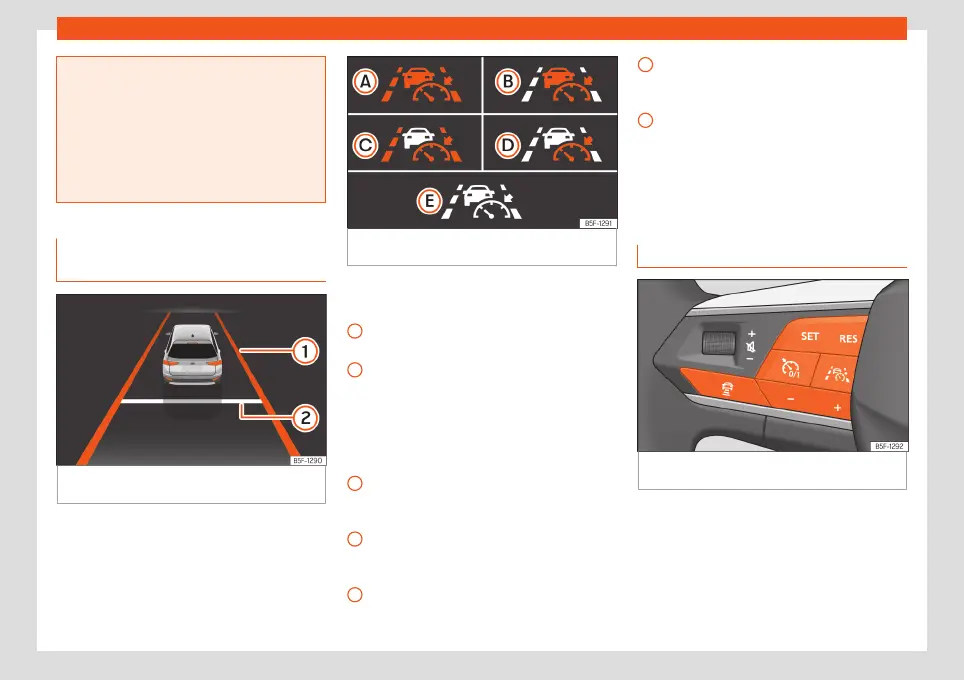
Fig. 186
On the instrument panel display: indi-
cation with active adjustment.
Fig. 187
On the instrument panel display: con-
trol lamps.
Displays on the screen
›››
Fig. 186
The adaptive lane guidance function is
active.
Distance set.
In addition, depending on the equipment,
control lamps indicate the status of the sys-
tem on the instrument panel display:
›››
Fig. 187
Travel Assist active, adaptive cruise con-
trol and adaptive lane guidance function
are active.
Travel Assist active, adaptive cruise con-
trol active and adaptive lane guidance
function passive.
Travel Assist active, adaptive cruise con-
trol passive and adaptive lane guidance
function active.
1
2
A
B
C
Travel Assist active, adaptive cruise con-
trol and adaptive lane guidance function
are passive.
Inactive Travel Assist.
Depending on the equipment, more details
may be displayed on the instrument cluster,
such as dashed lines or other vehicles on the
road.
Operating Travel Assist
Fig. 188
Left side of the multifunction steering
wheel: buttons for operating Travel Assist.
Connecting
●
Press the
button on the multifunction
steering wheel.
The control lamp
will light up green.
The following warning is also displayed on
the instrument panel screen: The Travel Assist
maintains the current speed and the preset
D
E
256



 To Next Page