Instruments and warning/control lamps
menu. Some warnings can be confirmed and
hidden with the button of the multifunction
steering wheel
›››
Fig. 75.
Select a menu or an informative display
●
Switch the ignition on.
●
If a message or vehicle symbol is displayed,
press the button
›››
Fig. 75; if necessary,
several times.
●
To change menus, use buttons
or
›››
Fig. 75.
●
To open the menu or the information dis-
played, press the button
›››
Fig. 75 or wait
a few seconds until the menu or the informa-
tive display opens automatically.
Changing menu settings
●
In the menu displayed, turn the right thumb-
wheel of the multifunction steering wheel
›››
Fig. 75 until the desired option of the menu
is highlighted. The option appears framed.
●
Press the button
›››
Fig. 75 to make the
required modifications. A mark indicates that
the system or function is activated.
Back to menu selection
Press the button
or
.
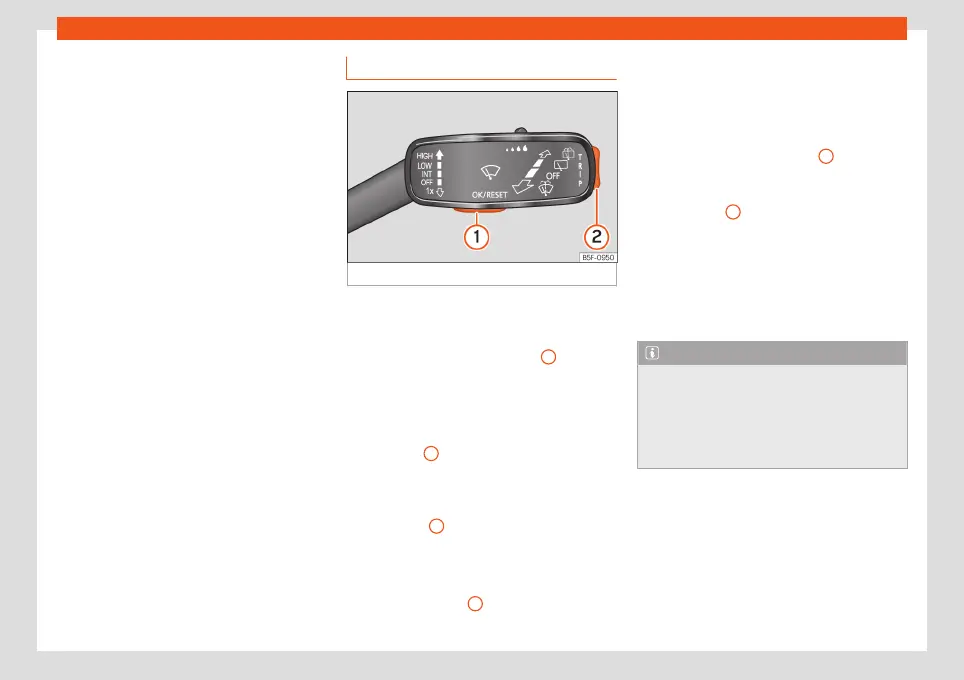
Operation with the wiper lever
Fig. 76
Wiper lever: control keys.
As long as a priority 1
›››
page 77 warning is
active, it will not be possible to access any
menu. Some warnings can be confirmed and
hidden with the button
›››
Fig. 76
1
.
Select a menu or an informative display
●
Switch the ignition on.
●
If a message or vehicle symbol is displayed,
press button
1
; if necessary, several times.
●
To display the menus
›››
page 75 or to re-
turn to the selection of menus from a menu or
from an informative display, hold down the
rocker button
2
.
●
To change from one menu to another, press
the upper or lower part of the rocker switch.
●
To open the menu or the informative display
shown, press button
1
or wait a few seconds
until the menu or the informative display
opens automatically.
Changing menu settings
●
In the menu displayed, press the upper or
lower part of the rocker switch
2
until the re-
quired menu option is checked. The option
appears framed.
●
Press button
1
to make the required modi-
fications. A mark indicates that the system or
function is activated.
Back to menu selection
Select Back on the corresponding menu to
exit.
Note
If when switching on the ignition warnings
are shown about existing faults, it might not
be possible to change the settings or show
the information as described. In this case,
go to a specialised workshop and request a
repair.
87



 To Next Page