Operation
presence of metallic objects (e.g. rails on the
r
o
a
d or sheets used in road works).
The area in front of and around the radar sen-
sor should not be covered with adhesives,
additional or similar headlights, as this may
negatively affect ACC operation.
If the front of the vehicle is not properly re-
paired or structural modifications are made
to it, for example, if the suspension is low-
ered, ACC operation may be affected. In this
scenario, SEAT recommends visiting a SEAT
dealership.
CAUTION
If you have the sensation that the radar sen-
sor is d
amaged or has lost its settings, dis-
connect the ACC. This will avoid possible
damage. If this occurs have it adjusted.
●
The sensor may become damaged or lose
its settings when knocked, for example, dur-
ing a parking manoeuvre. This may compro-
mise the system's efficacy or disconnect it.
●
Repairs to the radar sensor require special-
ist knowledge and special tools. SEAT recom-
mends visiting a SEAT dealership for this pur-
pose.
●
Clean away the snow with a brush and the
ice preferably with a solvent-free de-icer
spray.
Operating the Adaptive Cruise Control
A
C
C
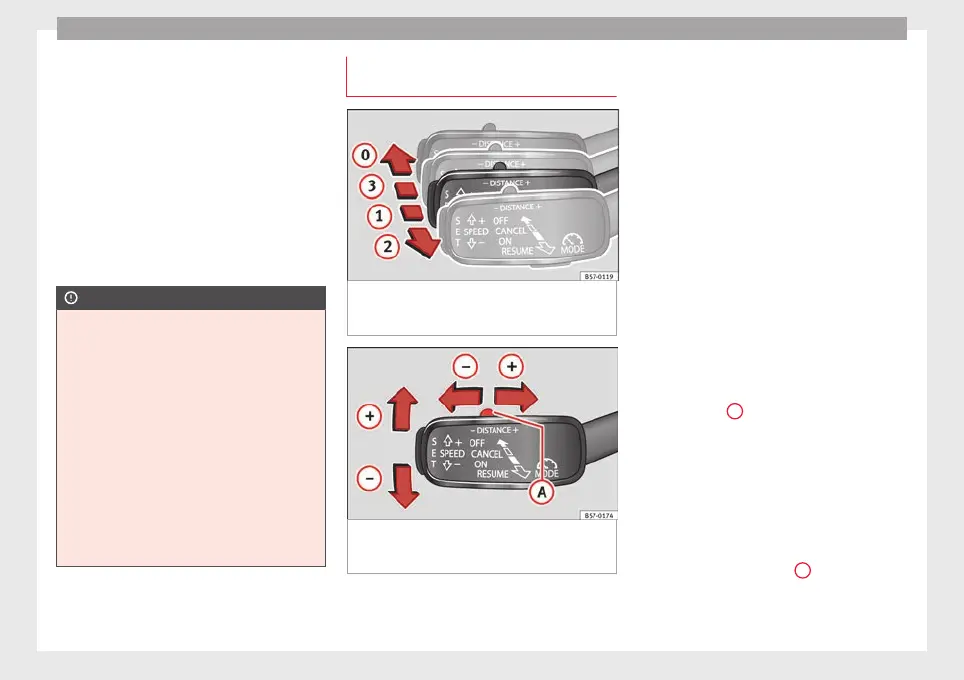
Fig. 197 On the left of the steering column:
thir
d l
ev
er for operating the Adaptive Cruise
Control.
Fig. 198 On the left of the steering column:
thir
d l
ev
er for operating the Adaptive Cruise
Control.
When the Adaptive Cruise Control (ACC) is
c
onnect
ed, the gr
een control lamp will
light up on the instrument panel, and the
programmed speed and ACC status will be
displayed ››› Fig. 195.
What ACC settings are possible?
●
Setting your speed ››› page 224.
●
Setting your distance ››› page 225.
●
Connecting and activating the ACC
››› page 225.
●
Disconnecting and deactivating the ACC
››› page 225.
●
Adjusting the default distance level at the
start of your journey ››› page 225.
●
Adjusting the driving profile ››› page 225.
●
Conditions in which the ACC does not react
››› page 225.
Setting speed
To set your speed, move the third lever loca-
ted in position
1
upwards or downwards un-
ti
l
the de
sired speed is shown on the instru-
ment panel display. The speed adjustment is
made at 10 km/h (6 mph) intervals.
Once you are driving, if you wish to set the
current speed as the vehicle’s cruise speed
and activate the ACC, press the button
››› Fig. 198. If you wish to increase or reduce
speed by intervals of 1 km/h (0.6 mph),
move the lever to position
2
›
›
›
Fig. 197 or
press the button, respectively.
The set speed can be changed when the ve-
hicle is stopped or during driving, as you like.
224



 To Next Page