Operation
The red markings on the release buttons
should no longer be visible.
WARNING
●
Always secure objects, even when the
net partition is properly assembled.
●
There should be nobody behind the as-
sembled partition when the vehicle is mov-
ing.
●
The attachments on the backs of the rear
seats must never be used to fit the net par-
tition when the rear seat backs are in their
vertical position.
CAUTION
Incorrect handling of the net partition
could cause damage.
●
Do not “release” the net partition when
lowering it, as the net and other vehicle
parts could be damaged. Roll down the net
partition by hand.
Using the net partition while the
rear seat backs are folded down
3 Valid for: LEON Sportstourer
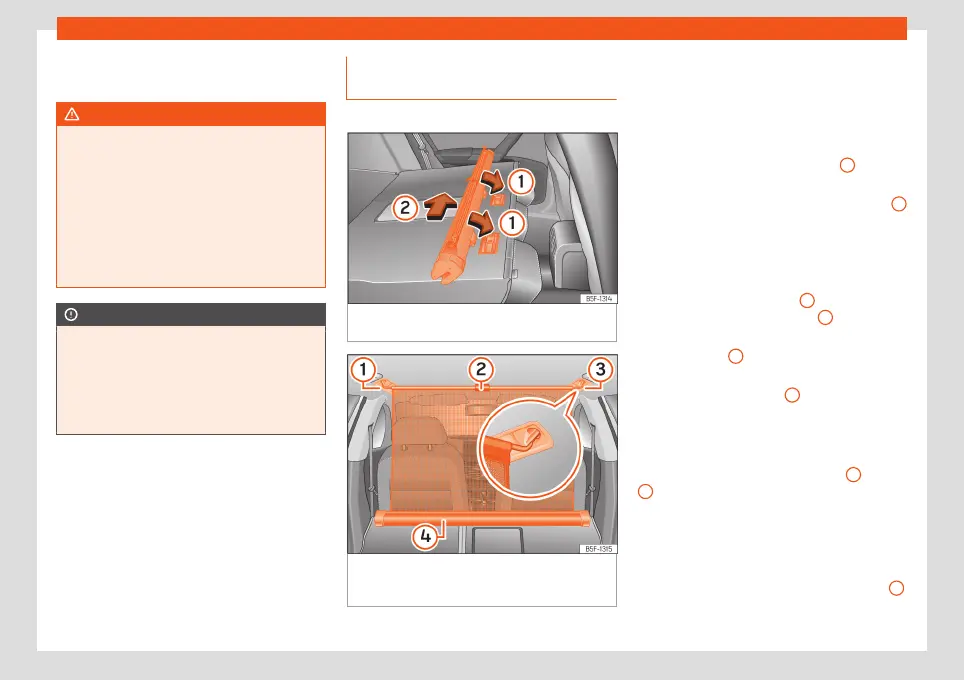
Fig. 140
Assembling the net partition in the
rear seat backrests.
Fig. 141
In the luggage compartment: net par-
tition hooked in place with the rear seat backs
folded down.
Fitting the net partition
●
Fold the rear seat backrests forward.
●
Remove the net partition from the side sup-
ports.
●
Place the net casing in the rail slots in the
direction of the arrows
›››
Fig. 140
1
.
●
Push the casing towards the left side of the
vehicle in the direction of arrow
›››
Fig. 140
2
and as far as it will go.
●
Check that the net is secure.
Pulling out and securing the net partition
●
Pull up handle
›››
Fig. 141
2
to remove the
net from the casing
›››
Fig. 141
4
.
●
Hook in the net partition on the right or left
side
›››
Fig. 141
3
(magnified image).
●
Hook in the net partition into the housing on
the other side
›››
Fig. 141
1
by pulling the
rod.
The net partition is properly assembled when
the T-shaped ends are firmly secured in the
corresponding housings
›››
Fig. 141
3
and
1
.
Retracting the net partition
●
Remove the rod from the housings in the
trims of the roof side members.
●
Roll up the net into the casing
›››
Fig. 141
4
lowering it with your hand.
146



 To Next Page