Operation
Explanation of the function buttons
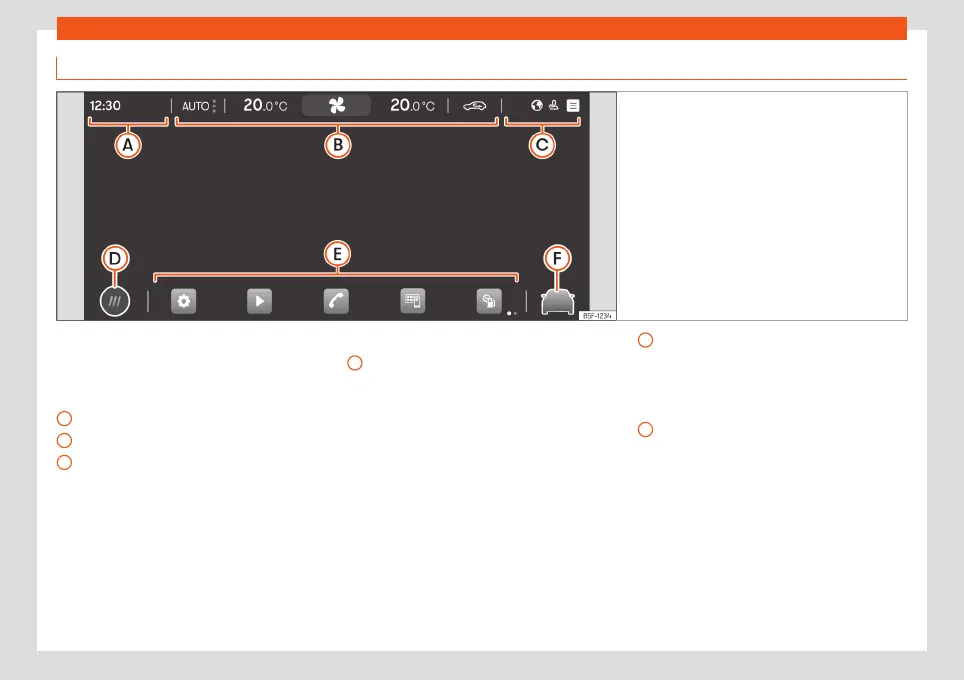
Fig. 74 Schematic representation: Overview of the
possible function buttons on the screen
Top part of the screen
The following information is always visible,
even when the infotainment system is turned
off
›››
Fig. 74:
Time or Incoming call.
Air conditioning menu
›››
page 156.
Status bar. System customisation based
on user and notifications.
A
B
C
Bottom part of the screen
Main menu display mode:
: main menu with the 6 main functions
divided into 2 screens (3 + 3, customisa-
ble by the user by pressing on the func-
tion).
: main menu in mosaic mode (all func-
tions of the Infotainment system)
D
Direct accesses to the functions of the In-
fotainment system (up to 10 functions, 5 +
5, customisable by the user). By pressing
on the icon, you can select/deselect the
functions in question.
Direct access to the assist systems and
vehicle settings
›››
page 93.
E
F
90



 To Next Page