Instruments and warning/control lamps
Initial configuration wizard
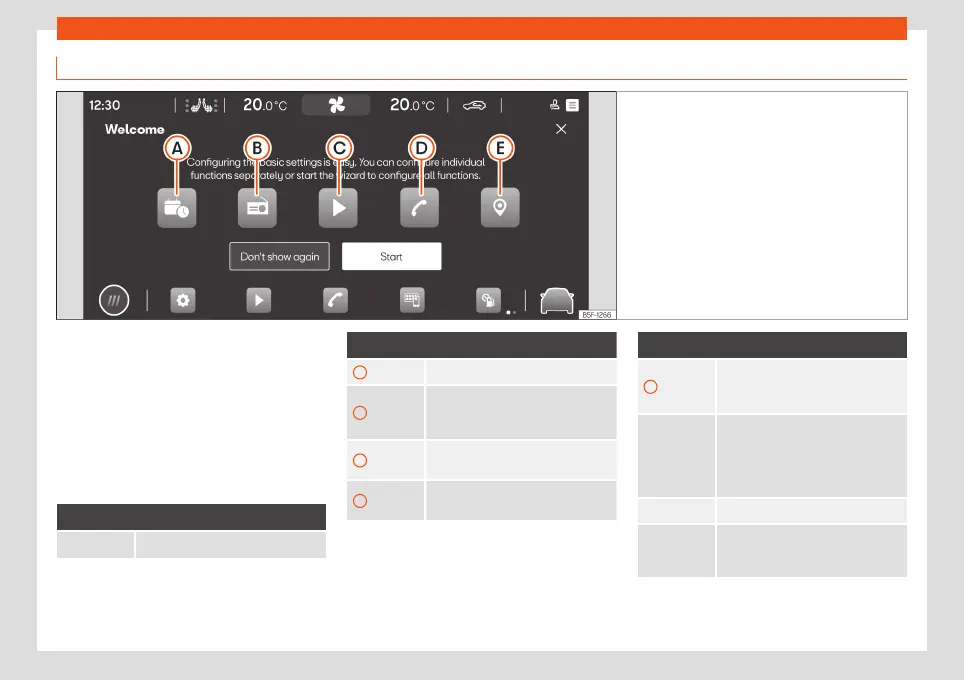
Fig. 75 Schematic representation: Initial configu-
ration wizard
The initial configuration wizard will help you
to set up your Infotainment system the first
time you switch it on.
Every time you switch on the Infotainment
system, the initial setup screen will be dis-
played
›››
Fig. 75 if any parameters have not
been set (marked with “
”) or if the Don't
show again function button has not been
pressed.
Function button: Function
Closes the Configuration Wizard.
Function button: Function
A
Press to set day and time.
B
Press to search and store to memory
the radio stations that have the best
reception at that moment.
C
Press to go to the Online Media set-
tings.
D
Press to link your mobile phone to
the Infotainment system.
Function button: Function
E
Press to select your home address
using your current position or by
manually entering an address.
Don't show
again
Disables the possibility of changing
the settings of the Infotainment sys-
tem. If you wish to perform the initial
configuration, you must access
through Help.
Start Starts up the Configuration Wizard.
End
Once one or more settings have
been applied, press to finalise the
setup in the main menu of the wizard.
91



 To Next Page