Driving
●
The driver should be r
eady to accelerate
or brake at all times.
Note
●
If the ACC does not w
ork as described in
this chapter
, do not use it until it has been
checked by a specialised workshop. SEAT
recommends visiting a SEAT dealership for
this purpose.
●
Maximum speed with the ACC activated
is limited to 210 km/h (130 mph).
●
When the ACC is switched on, strange
noises may be heard during braking,
caused by the braking system.
Symbols on the instrument panel
displ
ay and contr
ol l
amps
3 Applies to vehicl
es with analogue instrument
panel
The speed reduction by the ACC
to maintain the dist
ance from the
vehicle in front is not sufficient.
Brake! apply the foot brake! Driver intervention
prompt.
The ACC is not currently availa-
ble.
Whil
e the vehicle is stationary, switch off the engine
and start it again. Perf
orm a visual check of the radar
sensor
›››
Fig. 164. If it is still unavailable, refer to a
specialised workshop to have the system inspected.
The ACC is active.
No vehicle is detected in front. The programmed
speed remains constant.
If the symbol is white: the ACC is
active.
A v
ehicle in front has been detected. The ACC ad-
justs speed and distance from the v
ehicle in front.
If the symbol is grey: ACC is inac-
tive (Standby)
The syst
em is switched on, but is not adjusting.
The lamp lights up green
The ACC is active.
Some control and warning lamps will light up
briefly when the ignition is s
wit
ched on t
o
check certain functions. They will switch off
after a few seconds.
WARNING
Observe the safety warnings
›››
in Con-
trol and warning l
amps on page 81.
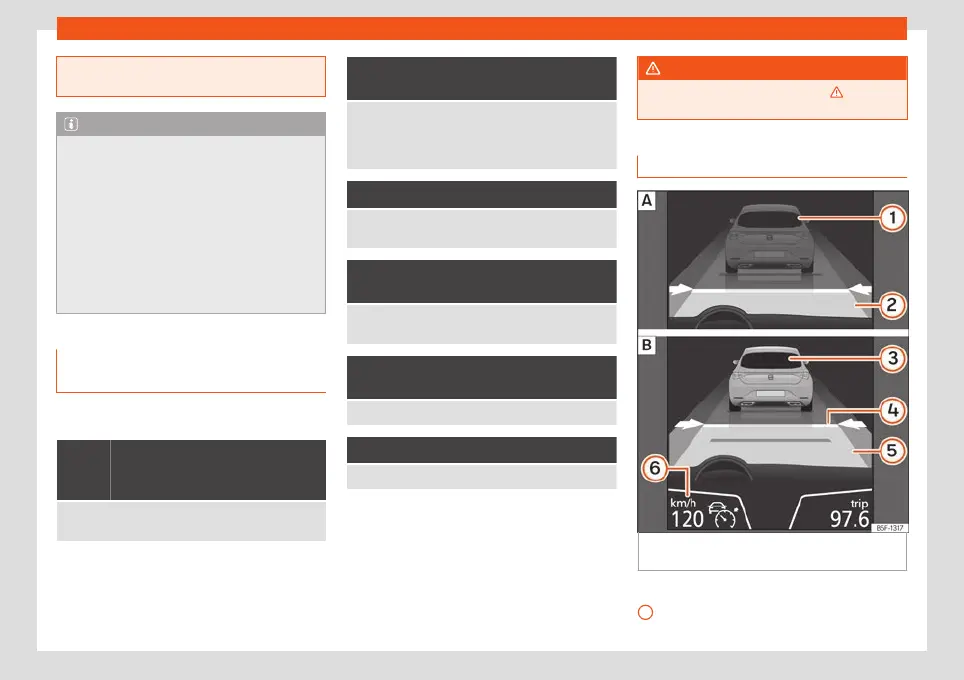
Status display
Fig. 163
On the instrument panel display:
ACC inactiv
e (St
andby).
ACC activ
e.
Indications on the display
›
›
›
Fig. 163:
Vehicle ahead detected. ACC is not ac-
tive and is not regulating your speed.
1
230



 To Next Page